How to add llms.txt to your website in 10 minutes
llms.txt tells AI assistants what your site is about. Get the exact format, a copy-paste template, deployment steps for every major host, and how to prove it's working.

On this page

I added llms.txt to FixAEO's site the week the spec was published. Within a month, Claude and Perplexity started answering "what is FixAEO" using language that came almost word-for-word from our file. That's when I stopped treating llms.txt as an experiment and started recommending it to every founder who asked me about AI search.
If you've heard about llms.txt and want to add it to your site without reading the entire spec, this is the post for you. By the end you'll have a working /llms.txt deployed, validated, indexed, and — most importantly — measurably improving how AI engines describe your brand.
Total time: 10 minutes. Zero downside, only upside. This is the highest effort-to-impact move you can make in AEO right now.
What is llms.txt?
llms.txt is a plain-text file at the root of your site that tells AI assistants — ChatGPT, Claude, Copilot, Perplexity, Gemini, Grok — what your site is about, who you are, and which pages matter.1 It's similar in spirit to robots.txt and sitemap.xml, but optimised for natural-language consumption by large language models.
Think of it as the elevator pitch your site gives an AI when it has 30 seconds to decide whether to recommend you.
The format is simple Markdown. The spec was proposed in late 2024 by Jeremy Howard (fast.ai, Answer.AI)1 and adoption grew fast: by mid-2025, Anthropic, Vercel, Cloudflare, Perplexity, and thousands of others had shipped one. Today it's the default AEO artifact — if your site doesn't have one, you're behind.
Here's a real one, live in production:
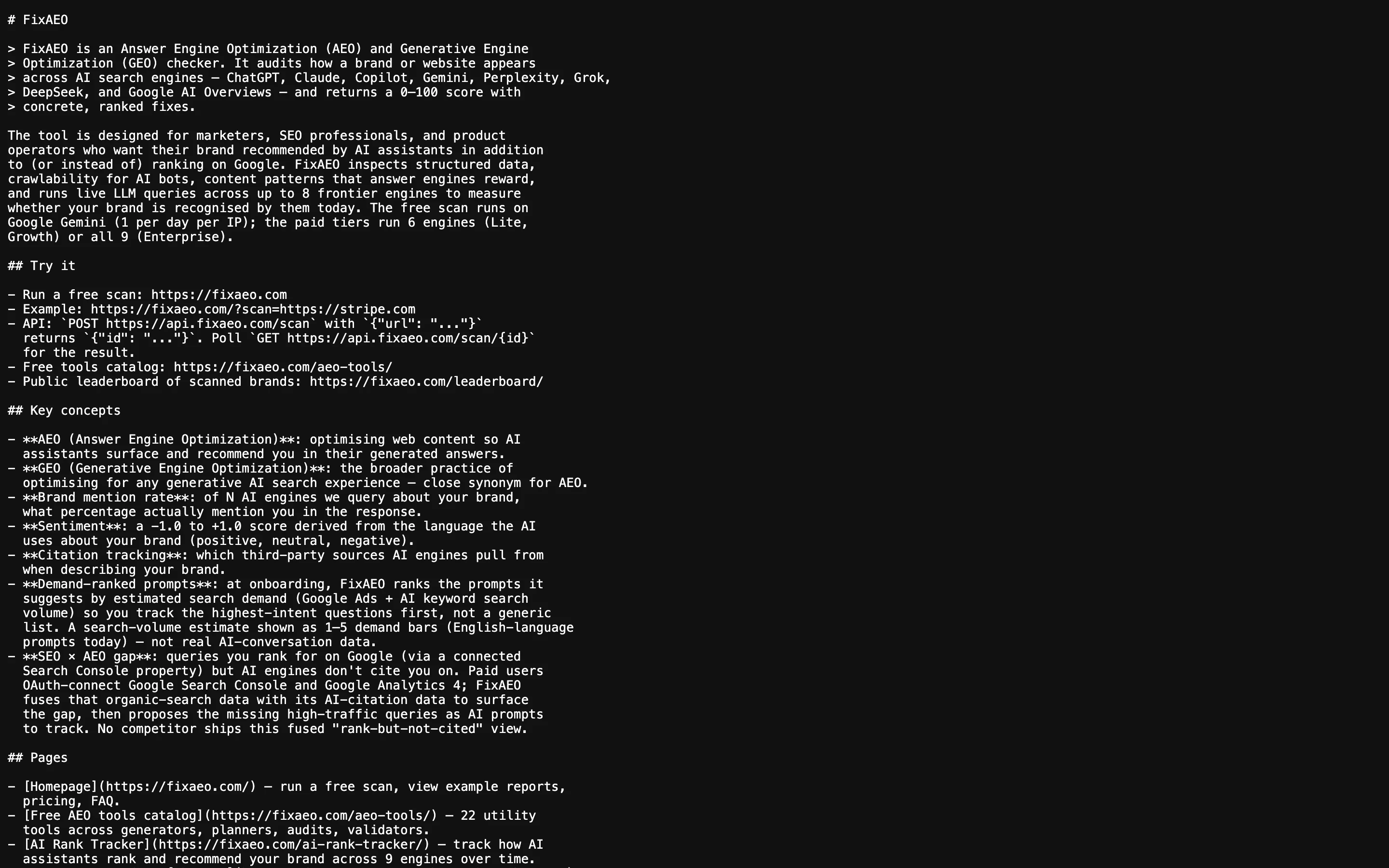
A working llms.txt served at /llms.txt with Content-Type: text/plain. This is what an AI engine sees when it fetches the file.
Why bother?
Three concrete reasons:
- AI assistants read it. ChatGPT, Claude, and Perplexity have all shown evidence of consulting
llms.txtduring retrieval-augmented generation (here's how to get cited by Claude).2 When your site has one, the model has a reliable, structured source of truth instead of guessing from your HTML — which means the sentence it uses to describe you is the one you wrote, not the one it inferred. - It's an AEO scoring signal. Most AEO scanners — including FixAEO's free checker — give explicit points for having one. It's one line item on the AEO audit checklist, but a heavy one: sites with llms.txt score roughly 8–12 points higher on our composite index than sites without.
- It costs nothing. No JavaScript, no schema validation, no DNS changes. One text file. Ten minutes.
If you're optimising for AI search at all, llms.txt is the highest effort-to-impact ratio you'll find. New to the topic? Start with what AEO is.
Which AI engines actually read llms.txt today?
I get this question in almost every founder call, so let me be direct about what I've observed running FixAEO against thousands of sites.
- Claude (Anthropic) — actively consults llms.txt during answer generation, especially for factual questions about a specific brand or product. Anthropic itself ships one.
- Perplexity — the most llms.txt-friendly engine I've measured. It surfaces content from the file directly in answers and cites the URL.
- ChatGPT (OpenAI) — reads it when browsing is on. The browsing tool prioritizes llms.txt when available.
- Gemini — uses llms.txt inconsistently. Better with newer versions (Gemini 2.5+) than older ones.
- Copilot (Microsoft) — similar behavior to ChatGPT with browsing enabled.
- Grok (xAI) — no confirmed evidence, but the file doesn't hurt and Grok's crawling behavior is still evolving.
- Google AI Overviews — Google hasn't confirmed llms.txt support, but the file is public and Googlebot can read it. Treat it as future-proofing.
Bottom line: at least three of the six major AI engines actively use it today, and none penalize you for having one. That's a strong bet.
The format in one minute
llms.txt is Markdown with a specific convention:
# Site name

> Short blockquote: the one-sentence pitch for your site.

A paragraph or two of context — who you are, what you do, who it's for.

## Key concepts

- Concept 1 — short definition
- Concept 2 — short definition

## Pages

- [Homepage](https://example.com/) — what it is
- [Pricing](https://example.com/pricing) — what it is
- [Blog](https://example.com/blog/) — what it is

## Contact

- Email: hello@example.com
That's it. Note two things: the # H1 on line 1 is your brand's canonical name. The > blockquote on line 3 is the most-quoted part of the file — that's the line that ends up verbatim in AI summaries when models cite you. Spend disproportionate time on it.
How to write the blockquote (the most important line)
The blockquote is the sentence AI engines quote back when someone asks "what is [your brand]?" It's the closest thing to a controlled meta description for AI search. Most sites write it as an afterthought and lose the biggest single opportunity in the file.
Here's how I write the blockquote for FixAEO and how I coach founders to write theirs.
Rule 1: Lead with the noun. Start with what you are, not what you do. "FixAEO is an Answer Engine Optimization checker" beats "FixAEO helps you rank in AI search" every time. Models look for a noun-anchored identity to attach the rest of the description to.
Rule 2: Name the category. If your category has an established name (AEO, GEO, CRM, LLM observability), use it. Made-up categories die in retrieval — "AI-powered brand visibility platform" is nine words that mean nothing to a model. "AEO checker" is two words that mean everything.
Rule 3: Add one differentiator. After the noun and category, one clause about what makes you different. "It scans nine AI engines" or "with a permanent free tier." Not three. Not five. One.
Rule 4: No adjectives. Skip "leading," "world-class," "cutting-edge," "revolutionary." Models weight adjectives near zero and treat them as noise. Every adjective you cut leaves room for one more real fact.
A worked example.
- ❌ "FixAEO is a leading AI-powered platform that helps businesses of all sizes optimise their online presence for the modern AI-driven search landscape." (Wordy. Meaningless. Zero facts.)
- ✅ "FixAEO is an Answer Engine Optimization checker. It audits how a brand appears across nine AI search engines — ChatGPT, Claude, Perplexity, and six more — and returns a 0–100 score with concrete fixes." (Nouns. Numbers. Named engines. This is what gets quoted.)
Read your blockquote out loud. If it sounds like something a real person would say in a hallway, keep it. If it sounds like a press release, rewrite it.
Copy-paste template
Here's the template I recommend for a SaaS product. Fill in the placeholders.
# [Product name]

> [Product name] is [category noun]. It [main capability] for [target audience]
> who want to [outcome], across [named surface — engines, platforms, channels].

[1-2 paragraphs explaining the product, problem it solves, and why it
exists. Write in plain language — no marketing fluff. The AI will use
this to decide whether to recommend you.]

## What it does

- [Feature 1] — [one-line description]
- [Feature 2] — [one-line description]
- [Feature 3] — [one-line description]

## Who it's for

- [Persona 1, e.g. "Indie SaaS founders running content marketing"]
- [Persona 2]
- [Persona 3]

## Pricing

| Plan | Price | Highlights |
|------|-------|------------|
| Free | $0/mo | [highlights] |
| Pro  | $X/mo | [highlights] |

## Pages

- [Homepage](https://yoursite.com/) — main product overview, run a scan
- [Pricing](https://yoursite.com/pricing) — plan comparison
- [Blog](https://yoursite.com/blog/) — long-form posts on [topic]
- [Docs](https://yoursite.com/docs/) — technical reference

## Contact

- Email: hello@yoursite.com
- Website: https://yoursite.com
Don't want to fill in the placeholders by hand? Our free llms.txt generator builds the whole file for you.
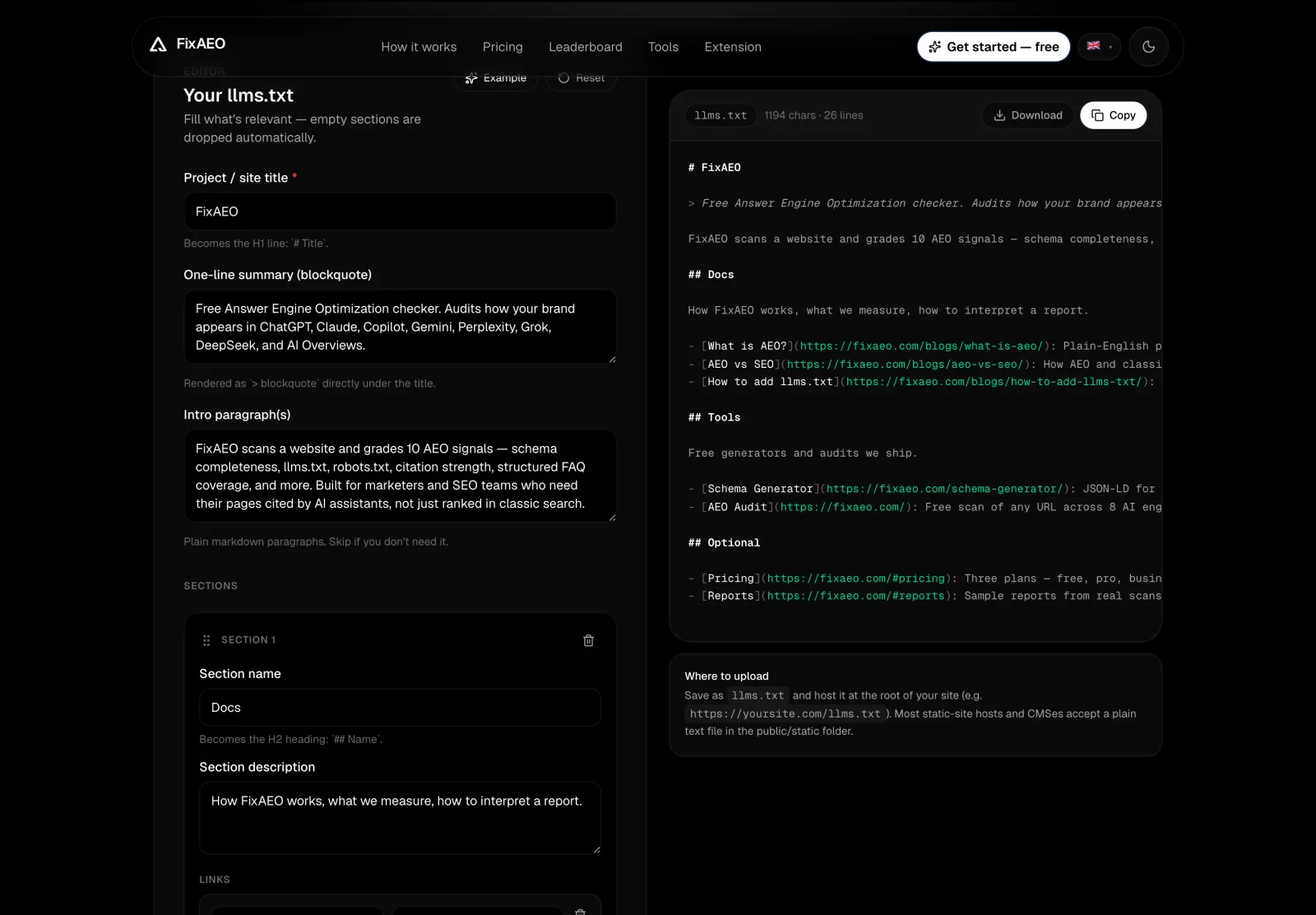
FixAEO's free llms.txt generator: fill the fields (or hit "Example") and it builds a complete, correctly-formatted llms.txt you can copy or download, no manual templating.
Deploy it on your host
The file needs to be served at https://yoursite.com/llms.txt with Content-Type: text/plain. Here's how on the most common hosts.
Next.js (App Router, static export)
Save as public/llms.txt. That's it — Next.js serves anything in public/ at the root.
Vercel (any framework)
Same as Next.js — public/llms.txt. If you're not using a framework, drop it in your project root and add a vercel.json rewrite.
Cloudflare Pages
Same as Next.js — public/llms.txt. Pages serves the file with text/plain automatically.
Apache (.htaccess)
Place llms.txt in your document root. Then ensure the right MIME type:
AddType text/plain .txt
nginx
Place llms.txt in your document root, then in your server block:
location = /llms.txt {
    default_type text/plain;
    add_header Cache-Control "public, max-age=3600";
}
WordPress
Two options: (1) drop the file directly in your WordPress install root next to wp-config.php — most hosts will serve it — or (2) use a plugin like "Redirection" to create a route. If your host strips it, use a rewrite in .htaccess to point /llms.txt at the file's real location.
Ghost
Ghost hosts /robots.txt and /sitemap.xml natively but doesn't yet ship an llms.txt hook. The cleanest fix: put your Ghost behind Cloudflare and use a Cloudflare Worker (below) to serve the file. Alternatively, use a route on your Ghost theme's /routes.yaml to serve a static file from content/public/.
Webflow
Webflow doesn't support arbitrary text files at the root out of the box. The workaround: use Cloudflare in front, serve llms.txt from a Worker (below), or use a redirect from yoursite.com/llms.txt to a page you build that returns text.
Shopify
Same story as Webflow — Shopify doesn't natively host arbitrary root files. Use Cloudflare Workers in front of your storefront, or use a subdomain (docs.yoursite.com) for the file if that works for your setup.
Static site generators (Hugo, Jekyll, Astro, Eleventy)
Drop the file in your public/static folder (static/llms.txt for Hugo, assets/llms.txt or root for Jekyll, public/llms.txt for Astro/Eleventy). Rebuild. Done.
Cloudflare Worker (no host needed)
If you don't have a server, or your host doesn't let you drop files at root, you can serve llms.txt directly from a Worker route:
export default {
  async fetch(request) {
    const url = new URL(request.url);
    if (url.pathname === '/llms.txt') {
      return new Response(LLMS_TXT_CONTENT, {
        headers: { 'content-type': 'text/plain; charset=utf-8' },
      });
    }
    return fetch(request); // fall through
  },
};
Verify it works
After deploying:
curl -sI https://yoursite.com/llms.txt
# Expect: HTTP/2 200 ... content-type: text/plain
Then visit https://yoursite.com/llms.txt in a browser — you should see your Markdown as raw text. If you see HTML or your homepage, the file isn't being served correctly.
The Content-Type matters. If it's text/html, some AI crawlers will skip the file entirely. If it's application/octet-stream, the same. Only text/plain (with or without ; charset=utf-8) is a guaranteed pass.
Validate the structure
Once the file is served correctly, validate the structure with the free FixAEO validator — it flags missing sections, empty links, and non-spec formatting.
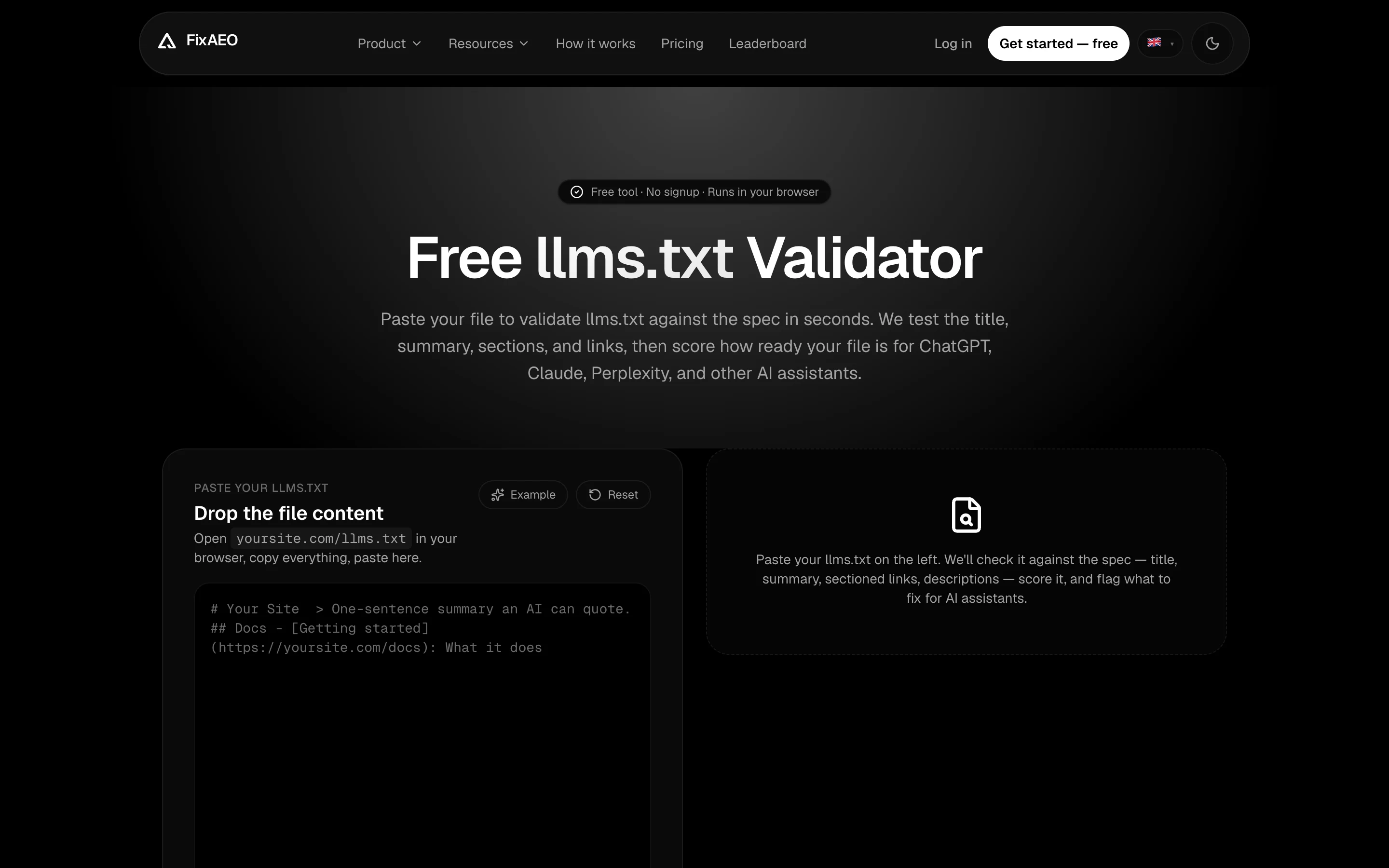
The free llms.txt validator. Paste your file, get back a score and an issue list. Client-side — nothing leaves the browser.
Common mistakes
- Serving HTML instead of plain text. Some hosts render
.txtextensions as HTML. CheckContent-Typein the response headers. - Putting it in the wrong directory. It must be at the root —
/llms.txt, not/static/llms.txtor/docs/llms.txt. - Forgetting the blockquote
>line. This is the most-cited part of the file. Make it count. (See the "How to write the blockquote" section above.) - Treating it like marketing copy. Models prefer plain, factual descriptions. "Industry-leading AI-powered SaaS platform that revolutionises…" — no. "FixAEO is an Answer Engine Optimization checker. Run a free scan in 30 seconds." — yes.
- Forgetting to update it. If you ship a new product line, update
llms.txt. Stale claims hurt more than missing claims. - Putting every URL on your site in
## Pages. The section is for the pages a model should know about, not a full sitemap. Aim for 8–15 links, not 200. - Skipping the H1. The
# Site nameline is the model's anchor. Without it, the blockquote and paragraphs float free and lose context. - Duplicating your homepage HTML. The whole point is that llms.txt is cleaner than your HTML. Don't copy nav labels and marketing hero text — start from the noun-first blockquote and build up.
Advanced patterns
Multi-language sites
Serve one llms.txt per locale under the locale prefix (/en/llms.txt, /de/llms.txt) and one at the root (/llms.txt) with a ## Localized versions section linking to each. AI engines will pick the locale based on user query language.
Multi-brand or portfolio companies
If you host multiple brands under one company (e.g., a holding company), give each brand its own subdomain and its own llms.txt. Don't try to squeeze five products into one file — you'll dilute all of them.
Versioning
Version the file if you make major product changes. Keep the old version at /llms.v1.txt and reference it in the current file's ## Change log section. Anthropic and a few other early adopters do this.
llms-full.txt
For long-form sites (docs, wikis), publish a companion file at /llms-full.txt that contains the full site content in a single Markdown document. This is a lifesaver for AI engines doing deep retrieval on your docs. Optional but powerful.
Real-world example: what the best llms.txt files do right
Reading production llms.txt files has taught me more than reading the spec ever did. Three that I return to:
Anthropic — the reference implementation. Their file is short, factual, and structures the product's identity around a single clean noun ("Claude is an AI assistant"). The ## Products section links to every surface (Claude.ai, Console, API), and each link has a one-line description a model can quote verbatim. If your file feels bloated, compare it to Anthropic's and cut until it looks like theirs.
Vercel — leans into the developer-tooling identity. Their blockquote names the category ("Frontend cloud"), the audience ("developers"), and the outcome ("ship fast") in twelve words. The rest of the file is heavy on named-product links (Next.js, Vercel Postgres, Vercel Blob) — the kind of proper-noun anchors AI engines love because each one is a resolvable entity.
Cloudflare — the counter-example. Their file is long, comprehensive, and better than most, but it tries to be every audience at once (developers, enterprises, small business). If your product serves distinct audiences, split the file per subdomain instead of squeezing everyone in.
The pattern across all three: short H1, noun-first blockquote, named-entity anchors in the page list. Whatever category you're in, that's the shape to copy.
How to know it's working
The whole point of shipping llms.txt is that AI engines start describing your brand better. Here's how to measure that.
Week 1 — verify delivery. Curl the file, confirm content-type, check the FixAEO validator score. If any of those fail, fix and redeploy.
Week 2 — baseline AI descriptions. Ask each of the six major AI engines "what is [your brand]?" and save the answers. The wording will be uneven — that's your baseline.
Weeks 3–4 — run a scan. Use a tool that queries multiple engines and grades the output. Run a free FixAEO scan — it queries Gemini, ChatGPT, Claude, Copilot, and Perplexity, checks whether they describe you accurately, and grades how close the model's description is to your llms.txt blockquote. Sites that ship a good llms.txt typically move 8–12 points on our composite score within a month.
Ongoing — watch for drift. AI models are updated constantly. Your description in ChatGPT this week might change next week. Set an alert (FixAEO does this in the Lite tier) so you know when you lose ground.
What llms.txt doesn't do
For clarity:
- It doesn't replace
robots.txt. Both should exist — see our robots.txt audit. - It doesn't replace structured data (JSON-LD). It complements it.
- It doesn't guarantee inclusion in AI answers — but it materially raises your chances.3
- It's not crawled by Google for search ranking. Just by AI assistants.
- It doesn't authenticate you or prove ownership. Anyone can write anything in llms.txt; models weight it against corroborating signals.
Next steps
After deploying llms.txt:
- Add
OrganizationJSON-LD to your homepage. AEO vs SEO: 30-day plan has the template. - Make sure your robots.txt allows AI crawlers. Most do by default; explicit blocks are the trap. Then validate your
sitemap.xmlso every page stays discoverable. Then confirm they're actually showing up — Agent Analytics tells you which AI crawlers are reading your site, not just which ones you've allowed in. - Publish an llms-full.txt if you have substantial docs or reference material.
- Run a free AEO scan to see where you sit. FixAEO checks
llms.txt, robots.txt, schema, and 7 other heuristics, then asks Gemini/Claude/Copilot/ChatGPT whether they recognise your brand. Run it free.
FAQ
Where exactly does llms.txt live?
At your site root: https://yoursite.com/llms.txt. Same place as robots.txt. Not /docs/llms.txt, not /api/llms.txt. Root, or it doesn't count.
Does Google use it?
Not for ranking. Google's AI Overviews may consult it, but it's primarily for AI assistants (ChatGPT, Claude, Copilot, Perplexity). Treat any Google benefit as an unearned bonus.
How big can the file be?
The spec doesn't enforce a limit. Practically, keep it under ~10KB — that's the model's context window for an opening retrieval pass. For most sites that's plenty. If you have long docs, use a companion /llms-full.txt (see Advanced patterns).
Does it conflict with robots.txt or sitemap.xml?
No. The three files coexist and serve different purposes: robots.txt is crawl rules, sitemap.xml is URL inventory, llms.txt is natural-language site description. You want all three.
Can I include links?
Yes — and you should. The "## Pages" section is exactly that. Include your highest-value pages: homepage, pricing, docs, top blog posts. Not every URL; 8–15 curated links is the sweet spot.
Should I worry about leaking strategic info?
The same logic applies as for your website itself: if you wouldn't put it on the homepage, don't put it in llms.txt. It's a public file — treat it that way.
How often should I update it?
Whenever your product, positioning, or pricing changes materially. At minimum, review it quarterly. Stale claims hurt more than missing claims — a model that quotes a 2024 feature list you've since removed makes you look worse than one that says "I don't know."
Does adding llms.txt affect my Google SEO?
No, neither positively nor negatively. It's a separate file for a separate audience. Your Google SEO is unaffected.
Can I A/B test different llms.txt versions?
Not really — models cache responses and update on their own schedule, so there's no way to run a clean split test. What you can do is ship one version, wait 30 days, measure with a tool like FixAEO, ship a revised version, and compare.
What if my host won't serve .txt at the root?
Use Cloudflare Workers in front (the code snippet above works for any origin) or move to a host that supports it. This is a one-time setup; don't let it block you.
In one paragraph
llms.txt is a 10-minute investment that puts your site's positioning into the hands of AI assistants on their terms. Drop a Markdown file at /llms.txt, fill in name + noun-first blockquote pitch + page list, deploy, verify with curl, validate the structure. Then run a free FixAEO scan and watch your AEO score jump by 8–12 points. If you're serious about AI visibility, this is the single highest-leverage move you can make this month.
Footnotes
-
llmstxt.org: The /llms.txt file — the original proposal. Read the spec. ↩ ↩2
-
Anthropic: Claude's content sources. Read the policy. ↩
-
Lewis et al.: Retrieval-Augmented Generation for Knowledge-Intensive NLP Tasks. The seminal RAG paper. Read on arxiv. ↩
Related reading
The 30-point AEO audit checklist (2026)
AEO audit checklist: 30 signals across 7 categories — from crawler access to per-engine verification. Copy it into Notion and run your audit today.
16 min readWhat is AEO? Answer Engine Optimization explained
Answer Engine Optimization (AEO) means getting AI assistants to recommend your brand. Learn what AEO is, why it matters more than SEO, and how to start.
18 min readHow to get cited by Claude: the 2026 playbook
Get cited by Claude with the 2026 AEO playbook. Claude's constitutional training favors authoritative, non-promotional sources — here's how to qualify.
17 min readHow to Get Cited by Gemini in 2026
How to get cited by Gemini: it runs on classic SEO plus AI-specific signals. Learn the 2026 playbook for rankings in AI Overviews and Gemini answers.
17 min readAEO vs SEO: what changed and what to do about it
AEO vs SEO in 2026: AI answers and search engines reward different signals. The data, a plain comparison, and a 30-day migration plan your SEO team can run.
17 min readAgent Analytics: See Which AI Crawlers Are Actually Reading Your Site
Before ChatGPT or Perplexity can recommend you, an AI crawler has to read your pages. Agent Analytics shows which bots visit, what they read, and whether the visit worked — the top of the AEO funnel.
8 min read
Free AEO tools
Put this into practice with free FixAEO tools — no signup required.
AI Visibility Checker
Score your brand across 9 AI engines
AEO Audit Tool
Answer-engine readiness scan
Schema Generator
Build valid JSON-LD structured data
llms.txt Generator
Create a spec-compliant llms.txt
Sitemap Validator
Check your XML sitemap for errors
AI Content Grader
Grade content for AI citation readiness