Can Microsoft Copilot Search the Web? How Bing Grounding Works
Yes, Microsoft Copilot searches the web through Bing and cites sources. Learn how Search mode, grounding, Researcher, privacy, and indexing work.

On this page
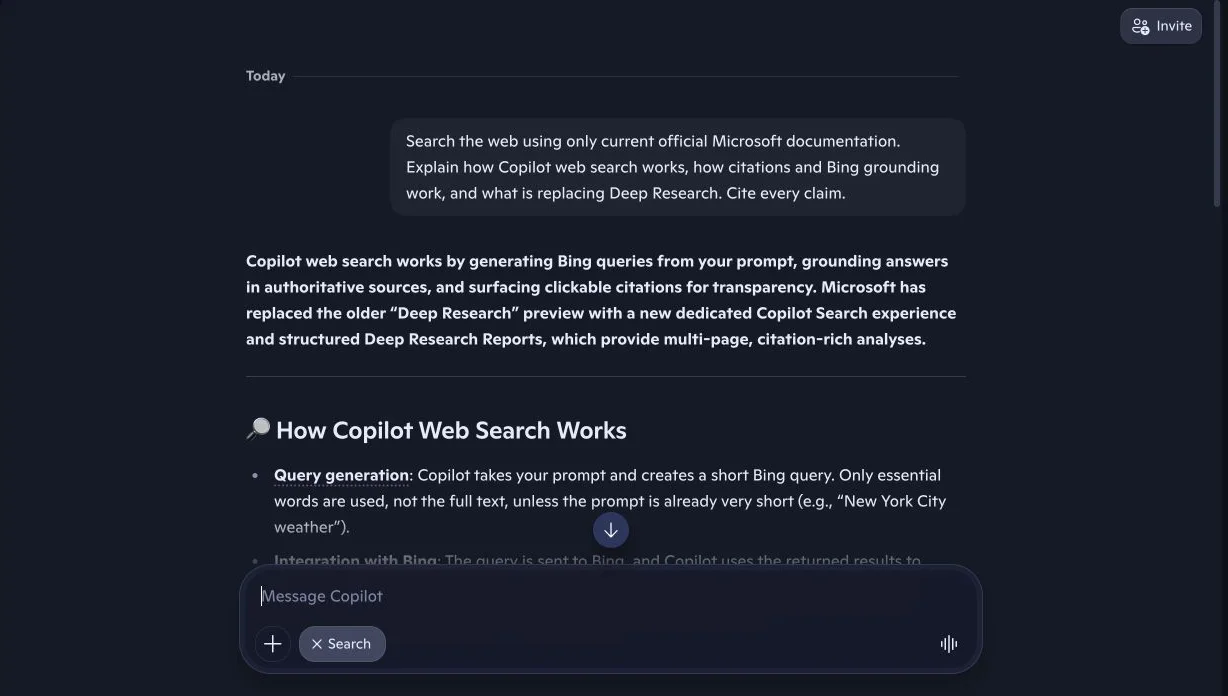
Short answer: yes, Microsoft Copilot can search the web. Consumer Copilot offers a dedicated Search response mode, and Microsoft 365 Copilot can use Bing when current public information would improve an answer. Copilot rewrites the prompt into a short search query, retrieves Bing results, synthesizes a response, and shows clickable citations.
| Microsoft surface | Can it search the public web? | How it works |
|---|---|---|
| Consumer Copilot | Yes | Choose Search for enhanced references, or let Smart mode select an approach |
| Copilot Search in Bing | Yes | Combines a generated answer with traditional web results and prominent links |
| Microsoft 365 Copilot Chat | Yes, when enabled | Generates a short query and sends it to Bing for grounding |
| Researcher in Microsoft 365 Copilot | Yes | Combines multistep web research with work data the user can access |
| Copilot Studio agents | Optional | Use open web search, specific public sites, or Bing Custom Search |
| Consumer Deep Research | Being retired | Microsoft says retirement begins August 18, 2026 |
Reviewed August 11, 2026 against current Microsoft Support, Microsoft Learn, Bing Search, and Bing Webmaster documentation. Product screenshots are fresh tests performed by FixAEO on the same date.
The product name creates confusion because “Copilot” covers consumer chat, Microsoft 365, Edge, Bing, Windows, Studio agents, and application-specific experiences. They share Bing grounding, but they do not expose identical controls, citations, privacy terms, or research modes.
What does it mean when Copilot searches the web?
Copilot web search is a grounding process. The system takes a question, identifies the terms that need current public information, forms a short query, sends it to Bing, receives relevant search results, and uses those results while writing the answer.
Microsoft's current web-search documentation for Microsoft 365 Copilot describes the sequence in unusually clear terms:
- Copilot parses the prompt and identifies terms where web information would improve the response.
- It creates a short generated query that differs from the original prompt.
- The query is sent to the Bing search service.
- Bing returns web results.
- Copilot uses that information with other active context to compose the answer.
- The user receives the response with linked citations where supported.
The model's built-in knowledge still matters. It decides what is ambiguous, which terms to search, how to interpret the results, and how to connect evidence. Bing supplies current material; the model performs the synthesis.
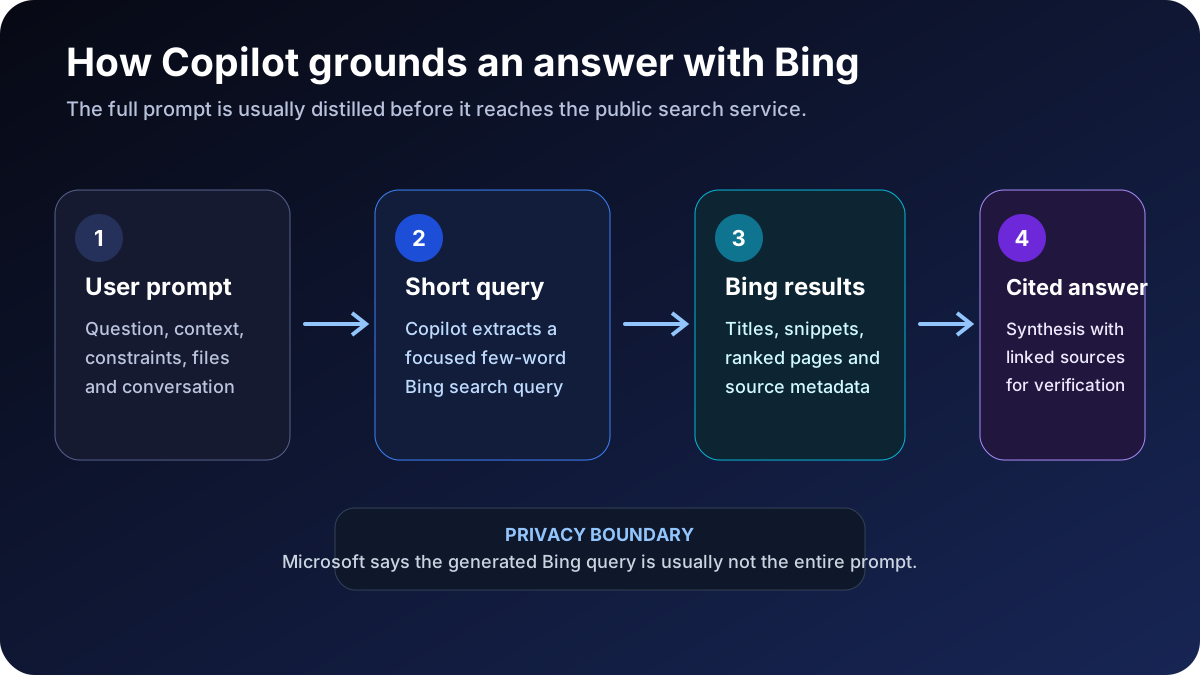
This separation helps diagnose errors. If the correct page never appears in retrieval, the problem is access, indexing, query interpretation, or ranking. If Bing retrieves the page but Copilot misstates it, the error happened during synthesis. If the answer is correct but the citations are hidden or unclear, the failure is in presentation.
How to make consumer Copilot search the web
Open the response-mode menu beside the message field and choose Search. In the current interface, Microsoft describes this mode as “Answers with enhanced references.” You can also request fresh web sources in the prompt, but choosing Search removes ambiguity about the desired mode.
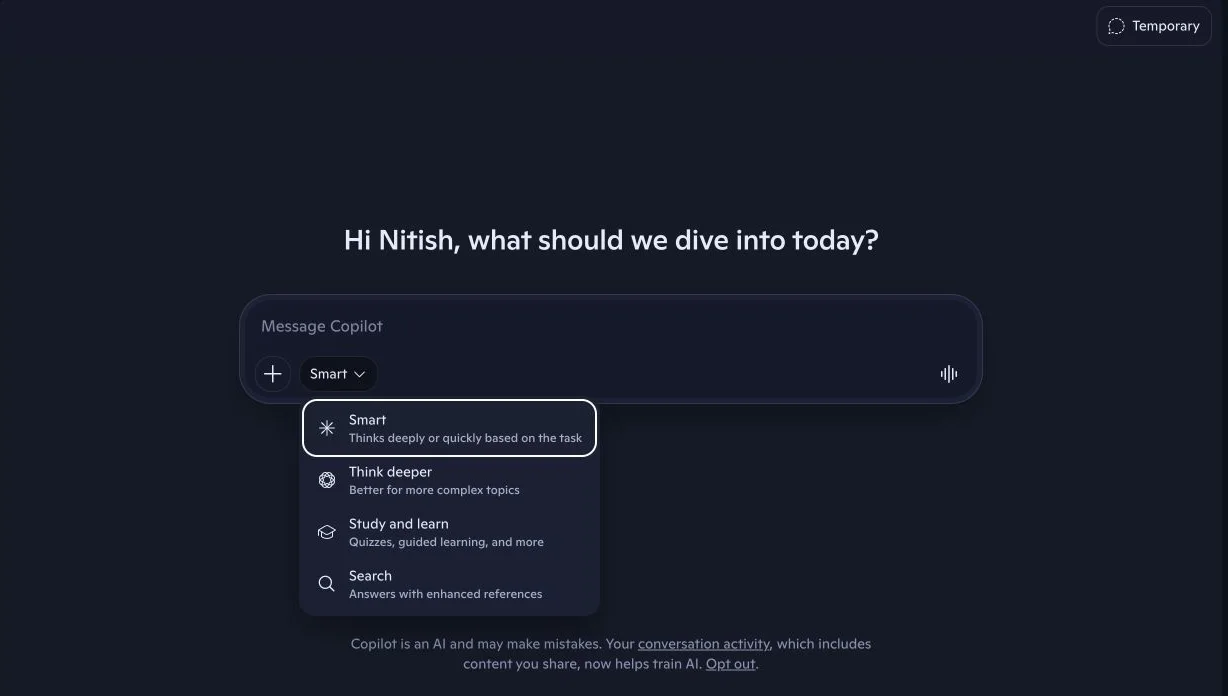
The visible modes serve different goals:
- Smart decides whether to respond quickly or reason more deeply.
- Think deeper allocates more reasoning to a complex question.
- Study and learn emphasizes guided learning.
- Search emphasizes current web retrieval and references.
The labels can change as Microsoft updates Copilot. Use the current interface instead of relying on an old tutorial that still says “Bing Chat,” “Creative mode,” or “Precise mode.”
For a verifiable result, use a prompt such as:
Search the web for information current as of August 11, 2026. Use primary sources. Put a citation beside every date, number, product-status statement, and policy claim. If current official sources conflict with an older page, show the conflict and prefer the newest dated guidance.
That last instruction is important. Search can retrieve a real Microsoft page whose information has already been superseded by a newer Microsoft notice.
How citations and references work
Copilot can place citation controls beside sourced claims and provide source cards below the response. Selecting Show all opens a References panel with cited pages and related results. This lets the user inspect the evidence without reconstructing the search manually.
Microsoft's Copilot Search in Bing announcement says the product uses prominent citations, links passages within generated answers, and places cited and relevant web results where users can reach publisher pages. That approach combines a synthesized answer with conventional search discovery.
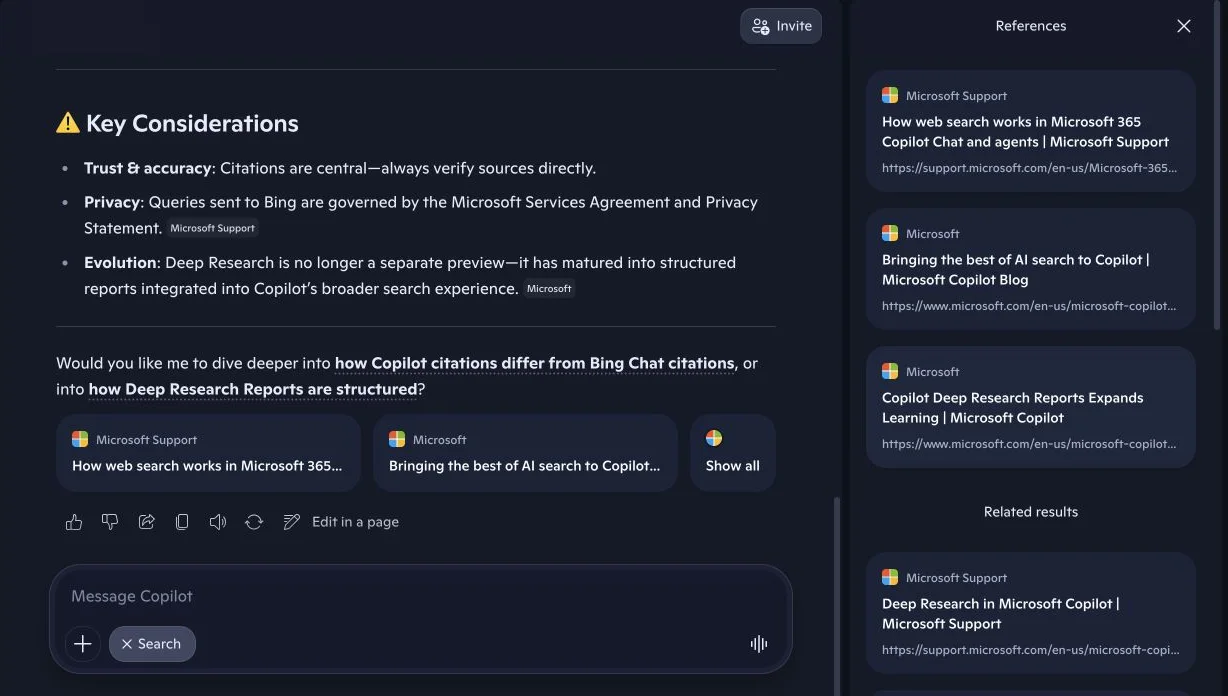
A citation is not a certification. Check:
- Source identity: Is the page the organization that owns the fact?
- Publication status: Is it current support documentation, a preview page, an announcement, or an archived article?
- Entailment: Does the page support the exact sentence beside the citation?
- Scope: Is it about consumer Copilot, Microsoft 365 Copilot, Copilot Studio, Bing, or another product?
- Date: Has a newer Microsoft page changed the policy or feature status?
Microsoft's product family makes scope errors especially easy. A feature available in Microsoft 365 Copilot is not automatically available in the consumer Copilot app.
Copilot creates a Bing query from your prompt
Microsoft says the generated web query is usually a short set of terms, not the full prompt or conversation. An exception can occur when the prompt itself is very short, such as a simple weather query.
For Microsoft 365 Copilot, the query sent to Bing does not include the user's entire Microsoft 365 files, entire uploaded files, entire summarized web pages, or identifiers from Microsoft Entra ID. Microsoft also notes that terms can be informed by a referenced or currently open Microsoft 365 document under certain conditions.
This query-generation layer improves convenience but adds interpretation risk. Consider:
Has the policy changed for our German subsidiary?
Copilot must infer which policy, which company, which regulation, and what “changed” means. A wrong inference can generate a precise Bing query that retrieves authoritative pages about the wrong subject.
For consequential research, state the formal entity, jurisdiction, time frame, document type, and decision you need. Then inspect the cited pages and, in Microsoft 365 Copilot Chat where available, the displayed search-query citations.
Consumer Copilot vs Microsoft 365 Copilot web search
Both can use Bing, but the data context and controls differ.
| Area | Consumer Copilot | Microsoft 365 Copilot |
|---|---|---|
| Main context | Public web and conversation | Public web plus work data the user can access |
| Web control | Search response mode | Admin control and eligible user-level Web content toggle |
| Retrieval | Bing-backed public search | Bing plus Microsoft Graph and semantic indexing where applicable |
| Query transparency | Clickable citations and references | Can include exact generated web-query citations in Copilot Chat |
| Research workflow | Consumer Deep Research is being retired | Researcher remains the long-form research agent |
| Governance | Consumer Microsoft terms and privacy controls | Microsoft 365 service boundary plus separate Bing-search considerations |
Microsoft 365 Copilot can combine web evidence with email, files, meetings, and chats the user is permitted to access. Its Researcher guidance describes multistep research across the web and work content, ending in a structured report with citations and next steps.
Do not publish one universal “how Copilot works” diagram without labeling the surface. A consumer answer, a Word sidebar response, a Copilot Studio agent, and a Researcher report can follow different retrieval and governance paths.
Is Copilot Deep Research still available?
This is the most time-sensitive part of the guide. Microsoft's current support notice says consumer Deep Research begins retiring on August 18, 2026. Existing research remains accessible, while Microsoft 365 Premium subscribers can continue detailed report work through Researcher.
The official Deep Research retirement page is more current than earlier launch pages that describe Deep Research Reports as an active consumer feature.
Our live August 11 test demonstrates why source freshness matters. Copilot Search told us that Deep Research had “matured into structured reports” and presented a Deep Research Reports page as evidence.
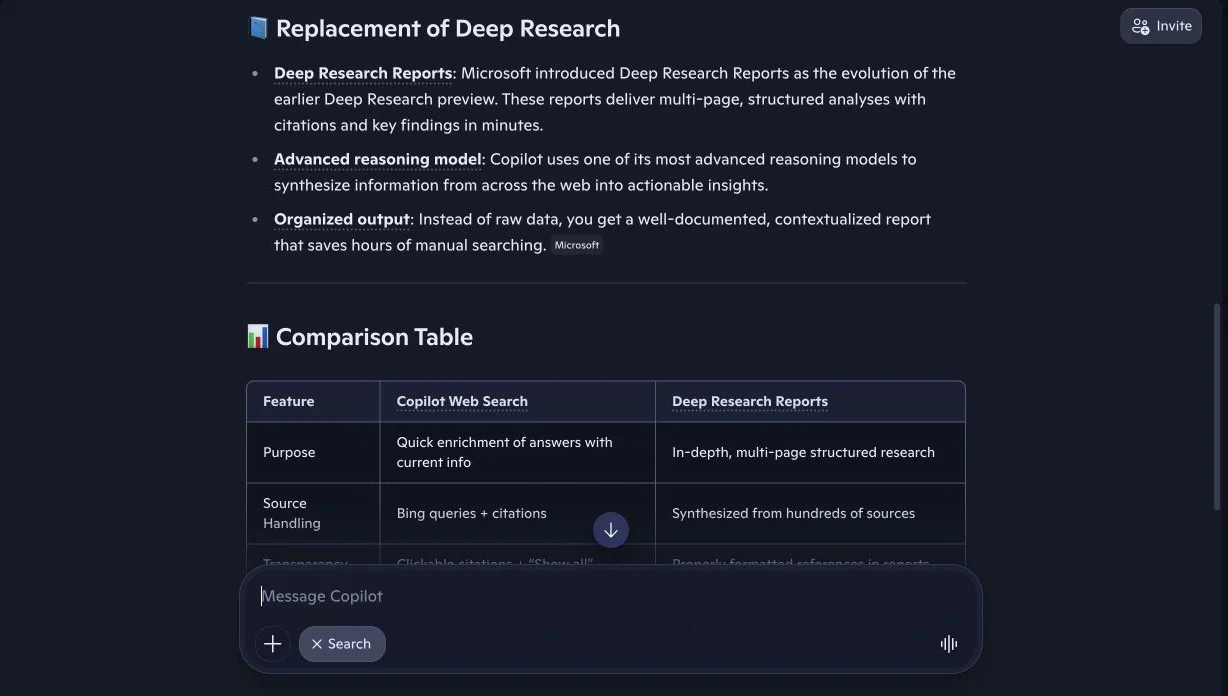
That answer missed the newer support notice even though the notice appeared in Copilot's Related results. The cited launch page was real, but the conclusion was stale. This is not a fabricated-source problem; it is a source-selection and temporal-reconciliation problem.
The accurate August 2026 summary is:
- Consumer Deep Research is being retired beginning August 18, 2026.
- Existing saved research content remains available according to Microsoft's instructions.
- Microsoft 365 Premium and eligible business users can use Researcher for in-depth reports.
- Standard consumer Copilot Search remains available for current web answers and citations.
This example is why “use only official sources” is insufficient. Several official pages can disagree because one documents a launch and another documents a later retirement.
What is Researcher in Microsoft 365 Copilot?
Researcher is Microsoft's current long-form research agent for Microsoft 365. It is designed for complex, multistep questions that require more time and more sources than a normal Copilot Chat response.
Microsoft says Researcher can:
- gather information from the web and work content the user can access;
- ask clarifying questions or proceed from the initial request;
- analyze multiple sources;
- create a structured report with headings and visuals;
- include source citations and suggested next steps; and
- support a reviewable, shareable research deliverable.
Use regular Copilot Chat for a quick current answer. Use Researcher when the task is closer to market analysis, proposal research, policy comparison, account planning, or a literature review.
Researcher is not automatically more correct. A longer report can propagate an incorrect assumption across many sections. Review its scope before it runs and audit the claims that drive the decision afterward.
How Copilot Studio searches the web
Copilot Studio gives makers more explicit control. Its agents can access web content through three mechanisms: specific public URLs, open web search, and Bing Custom Search.
Microsoft's Copilot Studio web-search privacy documentation says an agent generates a brief, focused Bing query derived from the user's question. Bing returns titles, snippets, and citations, and the agent integrates them with other enabled knowledge sources into a summarized answer.
For a configured public website knowledge source, Microsoft says the agent relies on Bing-indexed content rather than directly reading the live source as a private connector. Dynamic content can therefore be missing or older than what a user sees on the page.
Copilot Studio can also restrict grounding to configured domains through Bing Custom Search. Developers should use these product controls instead of assuming a prompt like “only use our help center” creates a hard retrieval boundary.
How does Copilot find websites to cite?
For public web grounding, Bing crawling and indexing are foundational. Bing's current Webmaster Guidelines explicitly connect normal SEO fundamentals with eligibility for Copilot, grounding results, and citations.
The sequence is:
- Bingbot discovers and crawls the page.
- Bing processes canonical, robots, quality, and indexing signals.
- The page becomes eligible for Bing search and grounding experiences.
- A generated Copilot query retrieves a candidate result.
- Copilot selects and synthesizes evidence.
- The answer may cite or link the page.
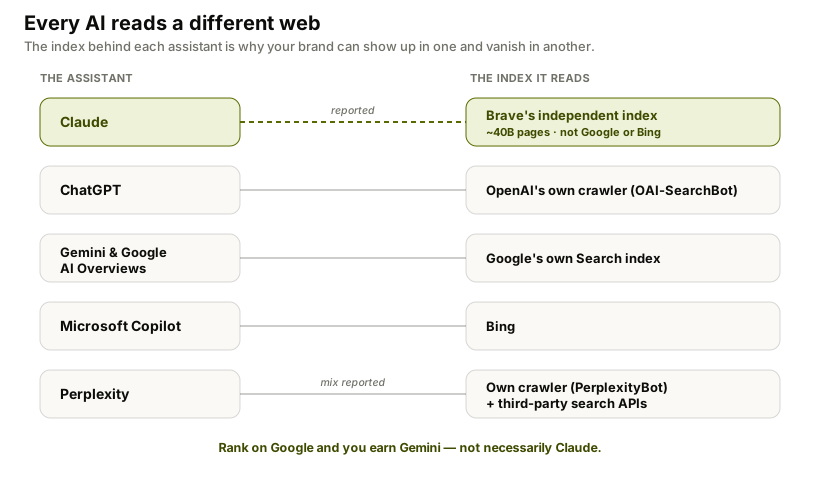
This is why Google ranking alone is not enough for Copilot visibility. A page should be crawlable and understood by Bing, not merely present in Google's index.
Let Bingbot crawl and index the right pages
Bingbot honors robots.txt. A page blocked from crawling generally cannot be fully indexed. Bing also supports noindex through HTML meta tags and response headers when the goal is to keep a page out of the index.
A permissive baseline is:
User-agent: Bingbot
Disallow:

Sitemap: https://example.com/sitemap.xml
Do not add a Bingbot-specific section casually. Bing's robots.txt documentation warns that when Bingbot finds instructions specifically for itself, it ignores the generic section. You must repeat any general restrictions that should still apply.
Use Bing Webmaster Tools to inspect important URLs, submit sitemaps, test robots rules, view crawl issues, and request indexing. Bing's index troubleshooting guide lists common causes: new or undiscovered pages, crawl failures, missing quality links, robots blocks, noindex, blocked URLs, low quality, and penalties.
Access creates eligibility, not a guaranteed citation. The page must still answer the generated query better than competing results.
Publisher controls for AI answers
Bing supports several controls beyond a complete crawl block:
noindexkeeps a page out of Bing's index when Bingbot can read the directive.data-nosnippetcan exclude selected page sections from snippets and AI-generated answers while leaving the rest of the page discoverable.- Bing Webmaster Tools URL blocking can temporarily remove results while a permanent fix is implemented.
robots.txtcontrols crawler access but is not the right tool for confidential data.
Bing introduced data-nosnippet specifically to give publishers selective control over material used in Bing Search and Copilot experiences. That is useful for paywalled, sensitive, or non-essential blocks that should not appear in generated answers.
<div data-nosnippet>
  Subscriber-only analysis that should not appear in previews.
</div>
Private data still requires authentication. Crawler directives are preferences for compliant bots, not a security boundary.
How to measure Copilot citations
In February 2026, Bing introduced an AI Performance public preview in Bing Webmaster Tools. Microsoft says it reports aggregated citation activity across Microsoft Copilot, Bing AI summaries, and selected partner experiences.
The current dashboard includes:
- total citations displayed as sources;
- average unique cited pages per day;
- sampled grounding-query phrases;
- page-level citation counts; and
- citation trends over time.
Microsoft warns that these metrics do not show placement, authority, or the role a page played in one answer. A citation count is evidence of inclusion, not proof that the page was the primary recommendation.
Combine Bing Webmaster Tools with repeated prompt monitoring:
- Bing data shows whether URLs are cited across supported Microsoft AI surfaces.
- Prompt tracking shows which buyer questions mention the brand, what the answer says, and which competitor receives the citation.
- Analytics shows visits and conversions that preserve a referral.
- Qualitative review checks whether the citation supports a favorable, accurate claim.
Why Copilot can search and still miss your page
- Bingbot cannot crawl it. Robots rules, a CDN, or a Web Application Firewall blocks access.
- The page is not indexed. Canonicals,
noindex, low quality, or crawl instability removes eligibility. - The generated query uses different language. The page never states the entity, category, or buyer question clearly.
- A stronger primary source wins. Bing retrieves the regulator, vendor, standard, or original dataset.
- The answer is buried. Essential facts live behind scripts, tabs, charts, or marketing prose.
- The page is stale. Old pricing, dates, or product status lose to current evidence.
- Copilot retrieves but does not cite it. The page appears in the result set but another source better supports the final sentence.
Fix the stage that failed. More copy will not repair a crawler block. A sitemap will not make unsupported claims authoritative.
How to verify a Copilot web answer before trusting it
Start with the answer, but audit the evidence chain rather than accepting the citation count as a quality score.
- Confirm that web search actually ran. Look for linked citations, a References panel, source cards, or query details. A confident answer without these signals may rely mainly on model knowledge.
- Open every source supporting the decision-critical claim. A citation can point to a real page while failing to support the nearby sentence. Read the relevant passage, not only the search-result snippet.
- Check dates and product scope. Microsoft frequently documents consumer Copilot, Microsoft 365 Copilot, Bing, Edge, and Copilot Studio separately. A valid page for one surface may not describe another.
- Look for newer official evidence. Search the exact feature plus terms such as “retirement,” “availability,” “pricing,” “release notes,” or the current year. Our Deep Research test only became accurate after comparing the cited launch post with a newer support notice.
- Separate fact from synthesis. A source may establish a feature name while Copilot infers the replacement, rollout status, or business impact. Label that extra step as an inference until another source confirms it.
- Repeat the question in Search mode. Ask Copilot to use only current primary sources and cite each factual claim. Then change one constraint—country, date, plan, or product edition—to expose hidden assumptions.
- Preserve the evidence. Save the prompt, response mode, answer, citations, and test date. Live answers and indexed pages change, so a screenshot without its context is difficult to reproduce.
For routine research, this takes a few minutes. For decisions involving contracts, compliance, medicine, finance, security, or public claims, it is only the first review layer; the responsible specialist should verify the underlying documents.
A 30-day Copilot visibility experiment
Week 1: establish the Bing and answer baseline
Choose 25–40 real buyer prompts across category discovery, comparisons, alternatives, pricing, security, implementation, objections, and “best for” questions. Run them in Copilot Search and record brand mention, citation, cited URL, sentiment, and competing source.
Verify Bing index status, robots rules, sitemaps, canonicals, noindex, HTTP responses, and rendered text for the most valuable pages. Open Bing Webmaster Tools AI Performance if it is available for the property.
Week 2: close the evidence gaps
Map every missed prompt to the evidence a defensible answer needs. Create or improve the smallest set of pages that covers several gaps: comparison tables, transparent pricing, methodology, security documentation, integration guides, original data, or dated product pages.
State the conclusion early. Identify the organization and product consistently. Show update dates, scope, and caveats. Link primary sources beside claims.
Week 3: improve discovery and corroboration
Add contextual internal links from relevant trusted pages. Submit updated sitemaps or request indexing where appropriate. Earn independent references from partners, customers, trade publications, integration directories, expert contributions, and research citations.
Avoid bulk link schemes. Bing's own guidance prefers a small number of quality, authoritative links over hundreds of random links.
Week 4: repeat and diagnose
Rerun the same prompts in the same mode. Separate four stages:
- Not indexed: fix Bing access and quality signals.
- Indexed but not retrieved: improve query alignment and authority.
- Retrieved but not cited: improve evidence clarity and relevance.
- Cited but not converting: improve the landing-page promise and next step.
FixAEO repeats these checks across major AI search engines. Run the free AI visibility checker and review the FixAEO methodology before interpreting one score or screenshot.
Seven ways a Bing-grounded Copilot answer can still be wrong
- Query rewriting changes the problem. Copilot searches the wrong entity, geography, or time period.
- The best page is absent from Bing. A crawl, indexing, or quality issue removes it from retrieval.
- An outdated official page wins. A launch announcement outranks a later retirement notice.
- The products are mixed together. Consumer Copilot and Microsoft 365 Copilot features are treated as identical.
- The model overstates the source. A preview becomes “generally available,” or an option becomes a default.
- One citation supports only part of a paragraph. The conclusion extends beyond the cited passage.
- Related results are ignored. A newer contradictory source is retrieved but not used in the synthesis.
Our Deep Research test showed failure modes three and seven in one response. The current retirement notice appeared in related results, but Copilot used an older launch page to describe the feature as the current replacement.
For high-stakes decisions, open the newest primary source, inspect the exact passage, and preserve its date and scope. Use qualified human review for legal, medical, financial, security, or public-reporting claims.
Copilot vs ChatGPT, Gemini, Perplexity, and Claude
| Assistant | Public-web relationship | Publisher implication |
|---|---|---|
| Microsoft Copilot | Bing crawling, indexing, and grounding | Bing eligibility and Webmaster Tools matter |
| ChatGPT | OpenAI search systems, crawler, and providers | OAI-SearchBot access matters |
| Gemini | Google Search grounding | Google indexing is central |
| Perplexity | Retrieval-first engine with its crawlers and partners | Sources are central to normal answers |
| Claude | Separate web-search tool | It may search only when fresh information is needed |
The same page can be cited by Copilot and invisible in Gemini or Claude because the systems retrieve from different indexes and rewrite questions differently. Compare how ChatGPT searches the web, how Gemini grounds with Google Search, how Perplexity searches live sources, and how Claude searches the web.
FAQ
Can Microsoft Copilot browse the internet?
Yes. Consumer Copilot has a Search response mode, and Microsoft 365 Copilot can use Bing when public web information would improve an answer. Copilot generates a search query, retrieves Bing results, writes a response, and provides citations where supported.
How do I turn on web search in Copilot?
In consumer Copilot, open the response-mode menu and select Search. In Microsoft 365, web search can depend on administrator settings and an eligible user's Web content control. Copilot Studio makers enable open web search or configured public websites for their agents.
Does Copilot use Bing or Google?
Microsoft's official documentation identifies Bing as the public web-search and grounding service for Copilot experiences. Microsoft 365 Copilot can also use Microsoft Graph and semantic indexing for work data, but its public web retrieval is Bing-backed.
Does Copilot send my entire prompt to Bing?
Microsoft says Copilot usually creates a brief, focused query rather than sending the entire prompt. The full prompt may be used when it is already very short. Microsoft 365 files and Entra ID identifiers are not sent wholesale as the Bing query.
Does Copilot show sources?
Yes. Copilot can show inline citations, source cards, and a References panel. Microsoft 365 Copilot Chat can also display the generated web-search queries in linked citation details for a limited period.
Is Copilot Deep Research being discontinued?
Yes for the consumer Copilot app. Microsoft's current support notice says retirement begins August 18, 2026. Microsoft 365 Premium and eligible business users can use the Researcher agent for longer web-and-work research reports.
What is Microsoft 365 Researcher?
Researcher is a Microsoft 365 Copilot agent for complex, multistep research. It can analyze public web sources and work content the user can access, then produce a structured report with citations, insights, and next steps.
How do I get my website cited by Copilot?
Make the page crawlable and indexable by Bing, follow Bing Webmaster Guidelines, publish a clear answer with current primary evidence, earn credible references, and test the real questions buyers ask. Eligibility does not guarantee retrieval or citation.
Can I see Copilot citations in Bing Webmaster Tools?
Bing's AI Performance preview reports aggregated citation activity across supported Microsoft AI experiences. It includes total citations, cited pages, sampled grounding queries, and trends, but it does not show placement or authority within one answer.
Can a cited Copilot answer still be outdated?
Yes. Copilot can cite a legitimate older page while missing or underweighting a newer update. Check the publication date, product scope, and related results. Prefer the newest authoritative policy or support notice over an earlier launch announcement.
The bottom line
Microsoft Copilot can search the web, and Bing is the retrieval foundation behind its public web answers. The dependable workflow is to select Search when freshness matters, inspect the generated evidence, distinguish consumer from Microsoft 365 features, and verify the newest primary source.
For publishers, Copilot visibility starts with Bingbot access and Bing index quality, then depends on query relevance, evidence, and citation selection. Run a free FixAEO visibility scan to see whether Copilot cites your pages or gives the source slot to a competitor.
Related reading
Can DeepSeek Search the Web? How Smart Search Works
Yes, DeepSeek can search the web and cite sources. Learn how Smart Search works, what it shares, and why the API needs a separate search tool.
21 min readCan Perplexity Search the Web? How Live Search Works
Yes, Perplexity searches the live web and cites its sources. Learn how Search, Pro Search, Research, APIs, and Perplexity's web crawlers work in 2026.
20 min readCan ChatGPT Search the Web? How to Use Search
Yes, ChatGPT can search the live web and cite sources. Follow the current Search steps, fix a missing Search option, and verify cited answers.
22 min readCan Gemini Search the Web? How to Use Google Search
Yes, Gemini can use Google Search, show sources, and run Deep Research. Follow the steps to request current results and verify every citation.
20 min readCan Claude Search the Web? How to Enable It (2026)
Yes. Enable Claude web search in three steps, fix a missing toggle on Team or Enterprise, and learn when Claude searches and cites the live web.
15 min readBest AI Search Engines in 2026: I Tested All 15
I tested 15 AI search engines for a month — Perplexity, ChatGPT, Gemini, Claude, Grok and more. An honest ranking of which to use and what each does best.
37 min read
Free AEO tools
Put this into practice with free FixAEO tools — no signup required.
AI Visibility Checker
Score your brand across 9 AI engines
AEO Audit Tool
Answer-engine readiness scan
Schema Generator
Build valid JSON-LD structured data
llms.txt Generator
Create a spec-compliant llms.txt
Sitemap Validator
Check your XML sitemap for errors
AI Content Grader
Grade content for AI citation readiness