Can DeepSeek Search the Web? How Smart Search Works
Yes, DeepSeek can search the web and cite sources. Learn how Smart Search works, what it shares, and why the API needs a separate search tool.

On this page
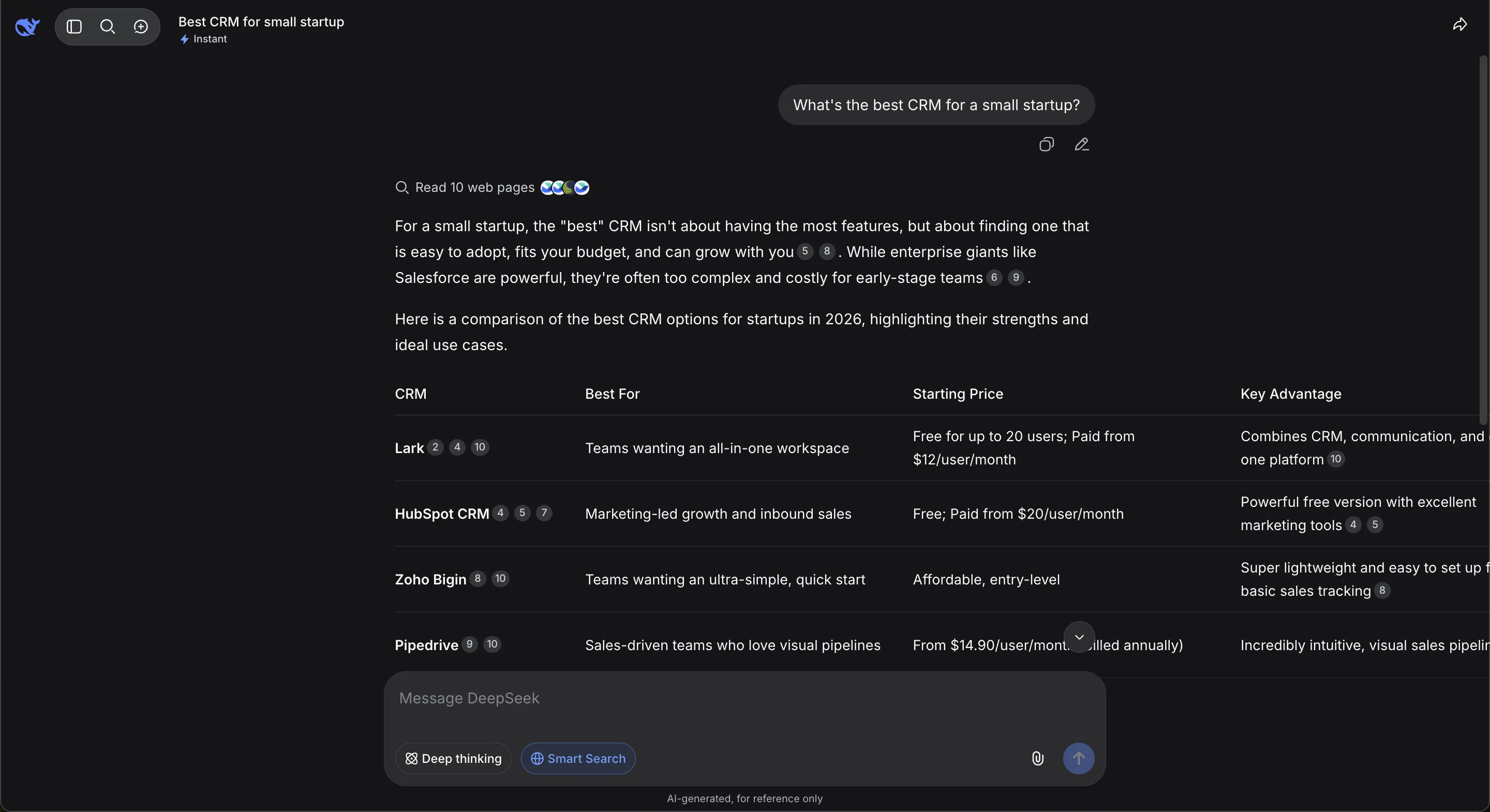
Short answer: yes, DeepSeek can search the web. In DeepSeek's consumer web and mobile products, enable Search or Smart Search before sending a prompt. DeepSeek retrieves current web results, reads pages, synthesizes an answer, and can attach numbered citations. Search is separate from the model's trained knowledge and from its Deep Thinking mode.
The DeepSeek API is different. DeepSeek documents general tool calling, but it does not document a hosted web-search endpoint that automatically reproduces the consumer Search experience. An API developer must connect a search provider, execute the tool, and return its results to the model.
| DeepSeek surface | Can access current web information? | Who provides search? |
|---|---|---|
| DeepSeek website | Yes, when Search is available and enabled | DeepSeek consumer product |
| DeepSeek mobile app | Yes | DeepSeek consumer product |
| Deep Thinking alone | Not necessarily | Reasoning mode is not the same as retrieval |
| DeepSeek API | Yes, if the developer adds a tool | The developer and chosen search provider |
| Open-source DeepSeek model | Not by itself | The application hosting the model |
Reviewed August 11, 2026 against current DeepSeek API documentation, terms, privacy policy, model disclosure, and first-hand FixAEO product tests. DeepSeek changes interface labels frequently, so the control may appear as Search, Smart Search, or inside a response-mode menu.
In this guide
- What DeepSeek web search actually does
- How to turn on Search
- How citations work
- Search versus Deep Thinking
- Consumer product versus API
- Search privacy
- How websites become eligible
- How to verify an answer
What DeepSeek web search actually does
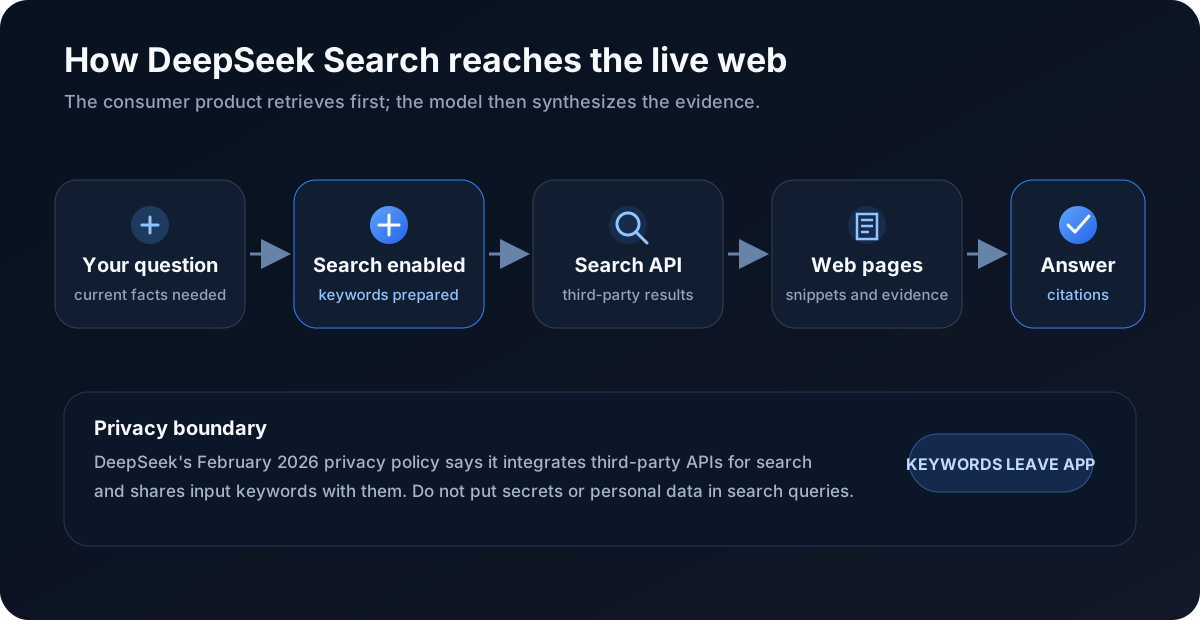
DeepSeek Search is a retrieval layer added to a language model. The model itself predicts text from the context it receives. Search gives it newer evidence that was not necessarily present in training.
The practical sequence is:
- You ask a question and enable Search.
- The product extracts or prepares search keywords.
- A search service retrieves relevant pages or snippets.
- DeepSeek reads the returned material.
- The model combines that evidence with the prompt and its trained knowledge.
- The interface presents a synthesized answer with numbered sources where available.
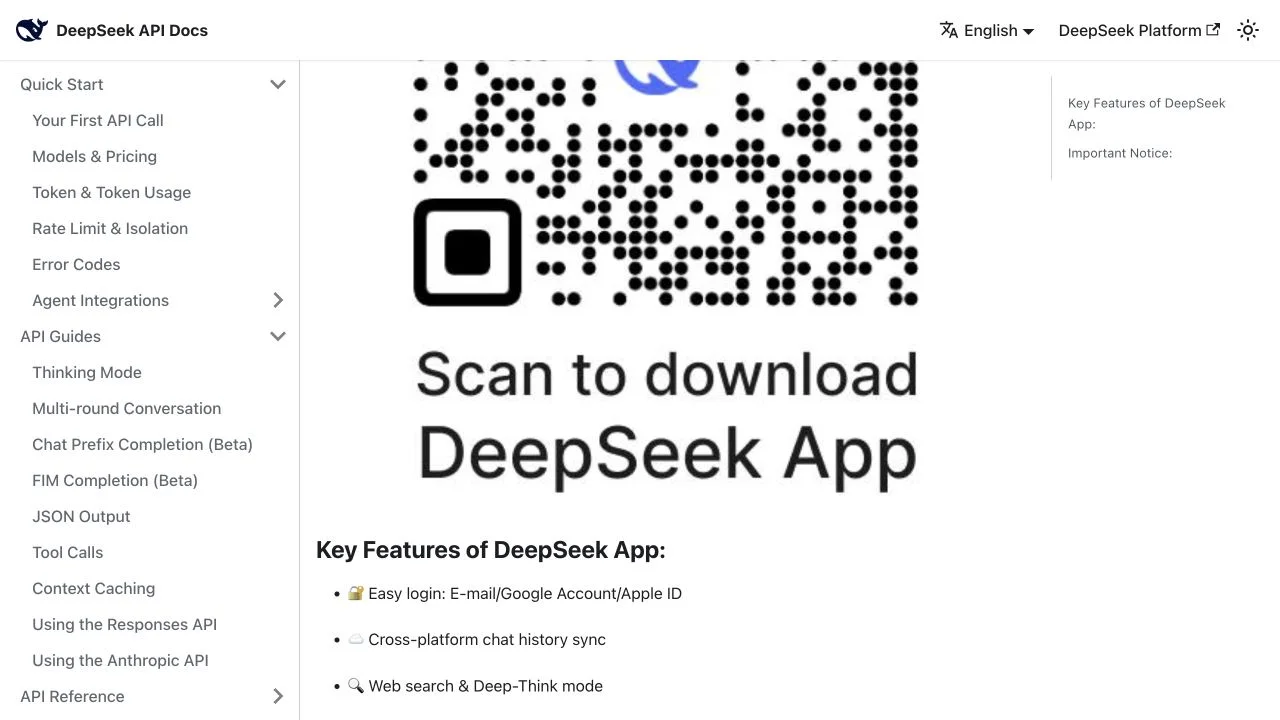
DeepSeek officially advertised “Web search & Deep-Think mode” as separate app features in its January 2025 app announcement. Its current Terms of Use still refer to an optional “Search” function and warn that enabling it can improve accuracy without eliminating incorrect output.
That wording matters. Search can improve freshness and evidence, but it does not convert the answer into a verified database record. Retrieval can miss the best page, a cited page can be stale, and the model can infer more than the source supports.
How to make DeepSeek search the web
On the consumer website or app:
- Start a new conversation.
- Find Search or Smart Search near the message box or response-mode controls.
- Turn it on before sending the question.
- Add freshness and source constraints to the prompt.
- Confirm that the response shows a pages-read indicator or numbered citations.
A stronger prompt is:
Search the current web. Use official primary sources published or updated in 2026. State the date and product edition for every time-sensitive claim. Cite each factual paragraph.
The exact buttons depend on the rollout. A FixAEO test showed Smart Search beside Deep thinking and a “Read 10 web pages” label above the answer. DeepSeek's April 2026 V4 release announcement describes Expert and Instant modes, which is another reminder that model modes and interface labels can change independently.
If the answer lacks search signals, do not assume browsing happened merely because it contains a recent-looking date. Models can confidently guess dates or repeat time-sensitive information learned earlier.
How DeepSeek citations work
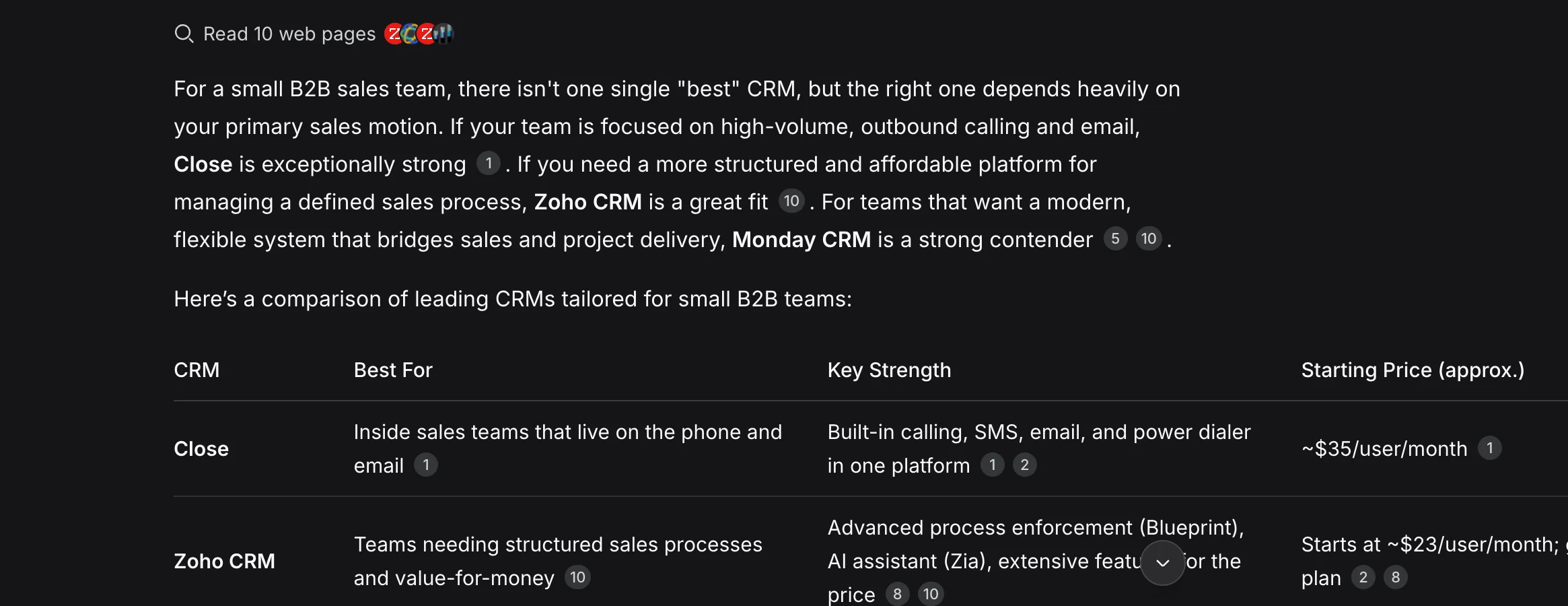
When Search runs, DeepSeek can place numbered citation chips after sentences or table cells. The same number may appear more than once when one source supports several claims. The interface can also show the count of pages read.
Treat each number as a route to evidence, not a truth badge. Open it and ask:
- Does the page contain the claimed fact?
- Is it the correct company, product, geography, and plan?
- Is the publication or update date current enough?
- Is the source primary, independent, or merely repeating another page?
- Does the citation support the entire sentence or only one phrase?
The pages-read count is not a quality score. Ten weak affiliate pages do not outweigh one current regulator notice or vendor document. DeepSeek's own model disclosure says retrieval-augmented generation is one technique used to reduce hallucinations, while explicitly stating that hallucinations cannot be eliminated.
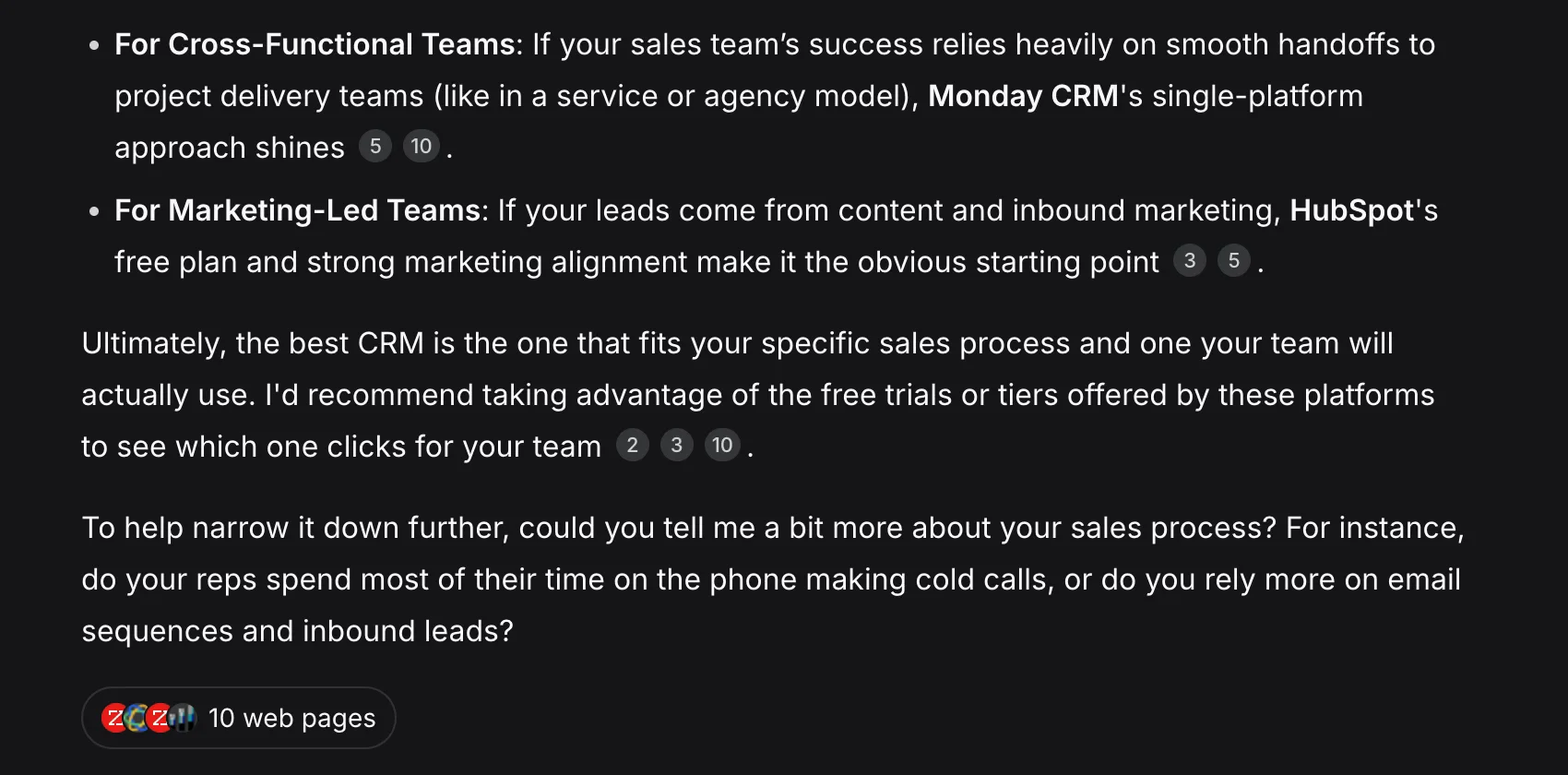
Citation coverage can also be uneven. A paragraph may contain three claims and one citation that supports only the first. Pricing tables are especially risky because an answer can combine current and old plans from different pages.
DeepSeek Search vs Deep Thinking
Search retrieves external information. Deep Thinking spends more computation reasoning over the available information. They solve different problems.
| Mode | Main job | Does it guarantee live web evidence? |
|---|---|---|
| Search / Smart Search | Retrieve current pages and sources | Yes, when the retrieval completes |
| Deep Thinking | Work through a harder reasoning problem | No |
| Search + reasoning | Retrieve, compare, and synthesize | Best combination for research, when supported |
Use Search for breaking news, product availability, pricing, laws, schedules, current executives, current software versions, and claims requiring sources. Use deeper reasoning for mathematics, planning, debugging, trade-off analysis, or questions where the evidence is already in the prompt.
For a complex current question, you want both: retrieval to supply fresh evidence and reasoning to reconcile it. But more reasoning cannot repair missing or low-quality sources. If Search retrieves the wrong company, the model can produce a sophisticated answer to the wrong problem.
Does the DeepSeek API include web search?
The DeepSeek API supports tool calls, but current official documentation does not describe a hosted web_search tool that a developer can invoke without building the retrieval layer.
DeepSeek's Tool Calls guide is explicit about the execution boundary: the model returns a structured function request; the application executes the function and sends its result back. The example uses a weather function, but a search integration follows the same architecture.
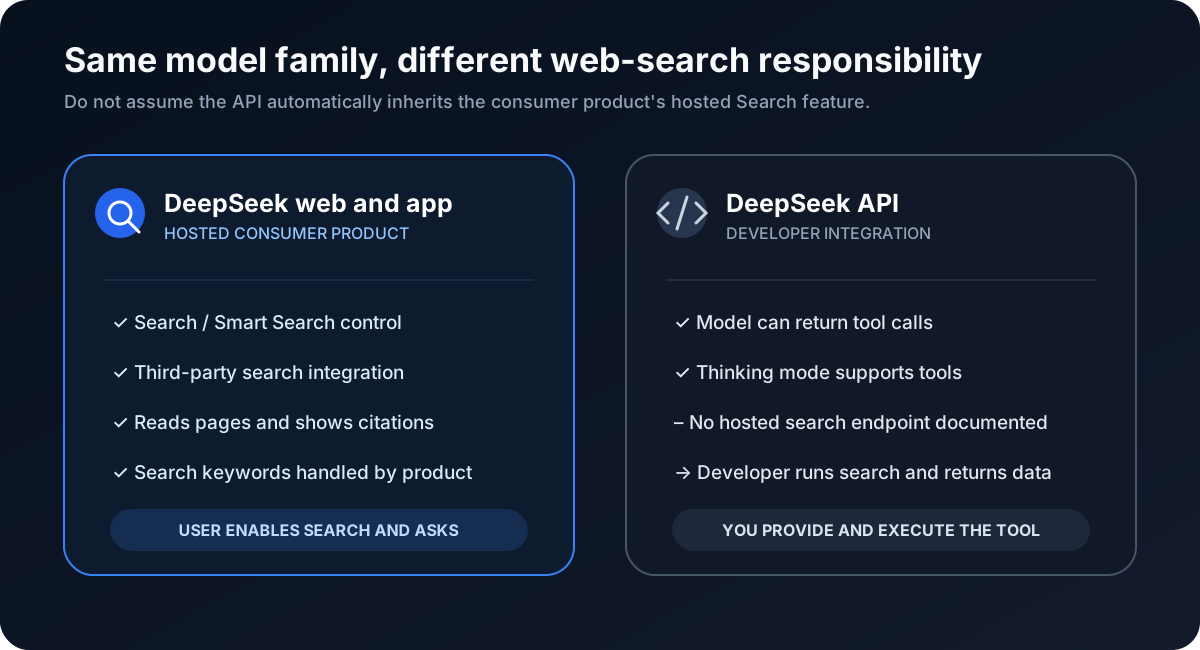
An API search loop normally looks like this:
- Define a
search_webfunction with query and optional domain/date fields. - Send the user's prompt and tool definition to DeepSeek.
- Receive a tool call containing the query.
- Run that query through Bing, Brave Search, Google Programmable Search, Tavily, Exa, your own index, or another permitted provider.
- Return normalized results with title, URL, date, excerpt, and source type.
- Ask DeepSeek to answer only from those results and attach citations.
DeepSeek V4 Flash and V4 Pro list tool-call support in the current model and pricing documentation. Thinking mode also supports multi-turn tool use, according to the Thinking Mode guide.
This distinction prevents a common implementation mistake. Calling deepseek-v4-pro does not, by itself, mean the model has browsed. The application must expose the tool, execute it, preserve the returned URLs, and instruct the model to map claims to sources.
What does DeepSeek share with its search provider?
DeepSeek's Privacy Policy, last updated February 10, 2026, states that it integrates third-party APIs to provide search services and shares input keywords to provide those services.
That disclosure establishes two facts:
- Consumer Search relies on at least one outside API rather than only a fully disclosed DeepSeek-owned index.
- Search keywords can leave the immediate DeepSeek service boundary.
DeepSeek does not name the current third-party search provider in the policy. Do not state that it uses Bing, Google, Baidu, or another engine as a settled fact without product-specific evidence.
Practical privacy rule: never put passwords, API keys, private customer data, unreleased financials, medical details, legal strategy, or confidential document text into a web-search query. Rewrite the question using public entities and non-sensitive terms.
The policy also says DeepSeek's services are controlled by Hangzhou DeepSeek Artificial Intelligence Co., Ltd. and describes data processing and storage provisions, including regional supplements. Organizations should review the current policy and their own compliance obligations before enabling the consumer product for sensitive work.
Can DeepSeek search in Chinese and English?
Yes. DeepSeek can retrieve and answer across languages, though the source set can change with query language. In a FixAEO test, the Chinese version of a CRM question caused DeepSeek to read twelve web pages and return a Chinese answer with numbered citations.

This does not prove that Chinese pages always rank higher or that DeepSeek uses one national search index. It shows that query language affects retrieval and response composition.
For international research, run separate prompts rather than asking for one blended answer:
- English query with country and currency specified.
- Simplified Chinese query with mainland-China scope specified.
- Local-language query for the target European market.
- A final comparison prompt using the saved source sets.
Record which domains appear in each answer. A company visible in English may disappear in Chinese because localized documentation, local marketplaces, regulatory pages, and language-specific authority signals differ.
How does DeepSeek find websites to cite?
DeepSeek does not currently publish enough information to map the complete consumer-search pipeline. Its privacy policy confirms third-party search APIs, but it does not identify the provider. Its official documentation does not publish a named DeepSeek Search crawler, a search webmaster portal, or a guaranteed indexing protocol.
That means several popular claims should be treated as unverified:
- There is no official basis for assuming a
DeepSeekBotrobots.txt group controls consumer Search. - ByteDance's
Bytespidershould not be presented as DeepSeek's crawler. - An
llms.txtfile does not submit a page to DeepSeek Search. - A page appearing once does not prove DeepSeek crawled it directly.
The reliable publisher strategy is provider-neutral:
- Keep important pages crawlable and indexable in major search engines.
- Put the direct answer, entity name, date, scope, and evidence in rendered HTML.
- Use a stable canonical URL and descriptive title.
- Cite primary evidence beside the claim it supports.
- Maintain English and genuinely reviewed local-language pages where the market justifies them.
- Earn independent references from relevant sites rather than manufacturing bulk links.
- Test the exact buyer questions in DeepSeek and inspect which sources actually appear.
Traditional SEO remains the eligibility layer because third-party search systems need to discover and rank the page. AEO adds the evidence structure that helps an answer engine quote and cite it.
How to check a DeepSeek web answer
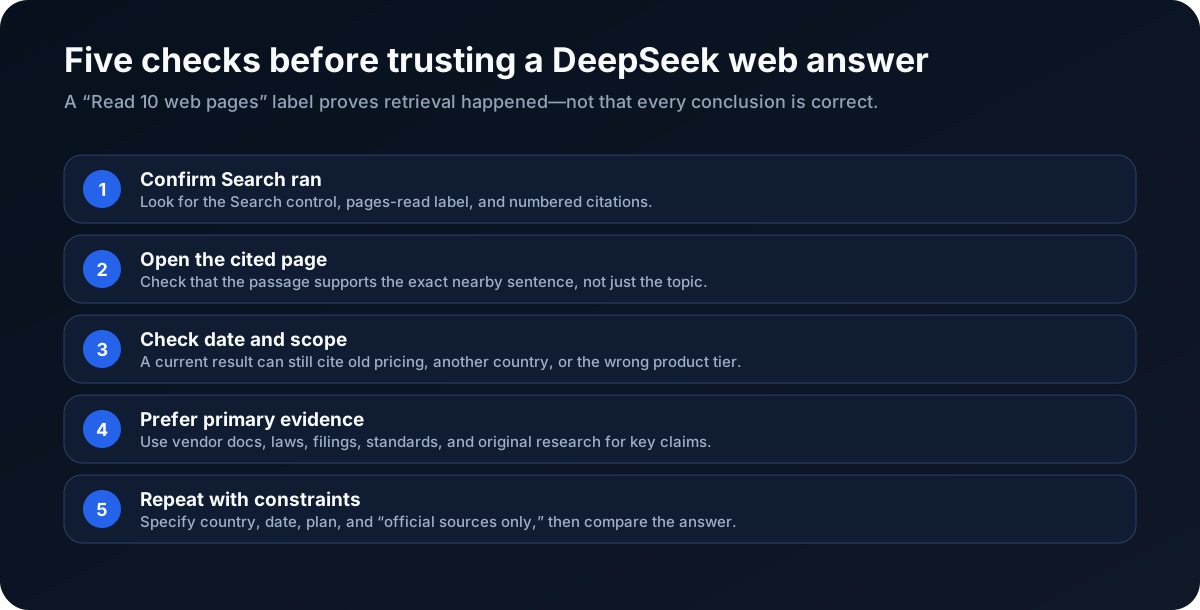
Use this verification workflow for every decision-critical response:
1. Confirm Search actually ran
Look for a selected Search control, a pages-read label, and numbered source markers. If none appears, ask again with Search explicitly enabled.
2. Open the source
Read the exact passage. Search snippets can omit qualifiers, and the model may attach a citation to a broader conclusion than the page supports.
3. Check freshness and scope
Verify the update date, country, currency, product edition, and whether the page is still active. An official launch post can be less current than a later retirement notice.
4. Rank the evidence
Prefer laws, regulators, standards bodies, filings, vendor documentation, and original datasets for factual claims. Independent expert analysis is useful for interpretation, not as a substitute for a primary record.
5. Repeat with constraints
Ask the same question using “official sources only,” a specific date range, and an explicit geography. Compare sources, not just wording. A stable conclusion supported by the same current primary evidence is more dependable than one polished response.
DeepSeek's Terms require human review when output could materially affect credit, education, employment, housing, insurance, legal, medical, or other important decisions. In those cases, the answer is a research lead, not the final authority.
A 30-day DeepSeek visibility test for publishers
Week 1: build a reproducible prompt set
Choose 25 to 40 questions buyers actually ask: category discovery, alternatives, comparisons, pricing, implementation, security, regional availability, and “best for” use cases. Save the prompt, language, mode, date, brand mentions, cited domains, and cited URLs.
Run each prompt with Search enabled. Separate “mentioned” from “cited”; a brand can appear in the answer while a competitor owns every source link.
Week 2: diagnose the evidence gap
For every missed prompt, identify the page type the winning answer needed. Common gaps include a dated pricing page, transparent comparison, technical documentation, integration guide, methodology, security page, original dataset, or localized page.
Improve the smallest number of pages that can support several prompts. State the key conclusion near the top, keep definitions stable, and make update dates visible.
Use the evidence-led guide to getting cited by DeepSeek to check eligibility, choose one owner page per intent, and record a repeatable citation test.
Week 3: strengthen discovery and corroboration
Verify indexability in the major search systems serving your markets. Add contextual internal links and update sitemaps. Seek independent references from customers, partners, integrations, trade publications, expert roundups, and original research citations.
Avoid buying links, automated comments, reciprocal badges, private networks, and mass directory submissions. They do not solve weak evidence and can create search-quality risk.
Week 4: rerun and classify
Repeat the same prompts in the same language and mode. Classify each outcome:
- Page absent: discovery or relevance problem.
- Page present but not cited: evidence mapping or authority problem.
- Cited but brand omitted: entity clarity or synthesis problem.
- Brand mentioned with competitor citation: source ownership problem.
- Cited and accurate: preserve, update, and expand the winning pattern.
Use the FixAEO AI visibility checker to compare the same prompt set across major AI search engines. One DeepSeek screenshot is useful evidence; repeated tests reveal whether the result is durable.
Eight ways a searched DeepSeek answer can still fail
Web access removes one cause of error—stale model knowledge—but introduces a retrieval chain with its own failure points.
1. Search was not actually enabled
The answer may sound current because the model knows recent-seeming dates or follows the wording of the prompt. Without a search indicator or sources, there is no visible evidence that retrieval occurred.
2. The query targeted the wrong entity
Company names, product acronyms, and open-source projects often collide. Add the official domain, organization name, country, or repository to the prompt when the entity is ambiguous.
3. The search provider missed the best page
The authoritative page may be new, blocked, poorly indexed, written in another language, or ranked below derivative articles. Search cannot cite evidence it never retrieves.
4. A stale page outranked a current page
An old launch post can remain more prominent than a quiet support-page update. Ask specifically for pages updated after a date, then compare the newest official documents.
5. The snippet hid a qualifier
A snippet might say a feature is “available” while the full page limits it to a beta, one country, or one enterprise plan. Open the page before repeating the claim.
6. The model merged incompatible sources
DeepSeek can combine US pricing with European availability, consumer features with API behavior, or a current product name with an old plan limit. Tables make this look especially authoritative. Require a source for each row and keep geography consistent.
7. The citation was attached too broadly
One number at the end of a paragraph may support the first clause but not the conclusion. Break a decision-critical paragraph into atomic claims and verify each separately.
8. Translation changed the meaning
A Chinese and English source can use different product names, legal definitions, units, or release status. Preserve the original phrase beside the translation when exact wording matters.
The fix is diagnostic. If the correct page was never retrieved, improve discovery or change the query. If it was retrieved but misrepresented, tighten the prompt and claim-to-source mapping. If official sources conflict, report the conflict instead of forcing a clean answer.
Building reliable web search with the DeepSeek API
Developers have more control than consumer users, but they also inherit responsibility for retrieval quality, privacy, citations, and failure handling.
Choose the retrieval contract first
Define what the tool returns before choosing a provider. A useful result object includes:
- canonical URL and page title;
- publication and last-updated dates when available;
- short evidence excerpt;
- source type such as official documentation, regulation, news, forum, or commercial page;
- language, geography, and retrieval timestamp;
- provider rank or relevance score.
Do not return only a prose blob. Structured records make it possible to deduplicate pages, filter old material, preserve citations, and audit why a claim appeared.
Keep search and synthesis separate
Log the generated query, raw result identifiers, pages selected for reading, and final cited URLs as separate stages. When an answer fails, this tells you whether the problem was query generation, retrieval, reranking, page extraction, or synthesis.
Add source rules proportional to risk
For ordinary discovery, a mixed source set can be useful. For laws, product specifications, security, pricing, or medical information, constrain the tool to current primary domains and require dates. A domain allowlist is not enough if the official site itself contains old and current pages; freshness and document type still matter.
Defend against hostile page content
Retrieved webpages are untrusted input. A page can contain text telling an agent to ignore its task, reveal data, call another tool, or treat advertising as fact. Extract content as evidence, never as instructions. Keep browsing tools read-only unless the user has separately authorized an action.
Preserve citation integrity
Assign each retrieved document a stable source ID and instruct the model to cite only those IDs. Reject citations that are not in the retrieved set. After generation, automatically verify that every cited ID exists and that decision-critical paragraphs have at least one supporting source.
Set a failure state
The system should be able to say “current authoritative evidence was not found.” Do not force a confident answer when the search provider times out, returns low-quality pages, or supplies conflicting dates. An explicit evidence gap is more useful than a fabricated consensus.
Finally, remember that DeepSeek API charges and search-provider charges are separate. Cache safe public results where licensing permits, set query and page limits, and measure accuracy alongside latency and cost.
DeepSeek Search privacy checklist for teams
The consumer product can be convenient for public research, but its keyword-sharing disclosure deserves an operational rule rather than a footnote.
- Classify the question. Public market research and public documentation are lower risk. Customer records, incidents, contracts, source code, and unreleased plans are not.
- Remove sensitive context. Replace names, IDs, exact amounts, internal URLs, and unique incident details with generic placeholders before enabling Search.
- Assume search terms are shared. DeepSeek says input keywords go to third-party search APIs. Write the query so disclosure of those keywords would not harm a person or the company.
- Use an approved API architecture for internal data. Keep private retrieval inside systems governed by your organization, and send the minimum necessary evidence to the model.
- Review regional terms. Data-controller, storage, transfer, retention, and user-right provisions can differ by jurisdiction and policy version.
- Record the policy date. For governance reviews, save the version used for the decision. DeepSeek's current English privacy policy is dated February 10, 2026.
This is not a claim that DeepSeek Search is uniquely unsafe. Search-enabled assistants commonly send queries to retrieval providers. The useful distinction is whether the provider is named, what text is shared, where data is processed, and what controls the organization can enforce.
DeepSeek vs ChatGPT, Gemini, Copilot, Perplexity, and Claude
| Assistant | Consumer web search | Publisher visibility clue |
|---|---|---|
| DeepSeek | Search / Smart Search with numbered citations | Third-party provider is not publicly named |
| ChatGPT | Search with sources | OpenAI documents OAI-SearchBot controls |
| Gemini | Google Search grounding | Google indexing is central |
| Copilot | Bing grounding | Bing Webmaster Tools reports AI citation activity |
| Perplexity | Retrieval-first answers | Sources are visible in normal answer flow |
| Claude | Web Search tool | Browsing activates when current evidence is needed |
The systems do not retrieve an identical web. Compare how ChatGPT searches, how Gemini uses Google Search grounding, how Microsoft Copilot uses Bing, how Perplexity retrieves sources, and how Claude searches the web.
FAQ
Can DeepSeek access the internet?
Yes. DeepSeek's consumer website and mobile app include a Search feature that can retrieve current web pages and attach citations. Search must be available and enabled for the conversation. The underlying language model does not automatically have internet access in every context.
How do I enable web search in DeepSeek?
Open a chat and select Search or Smart Search near the prompt box or response-mode controls before sending the question. Confirm that the answer displays a pages-read indicator or numbered citations. Interface labels can differ across app versions and rollouts.
Is DeepSeek Search the same as Deep Thinking?
No. Search retrieves information from the web. Deep Thinking spends more computation reasoning over the context it has. A difficult current question benefits from both, but Deep Thinking alone does not prove that live web retrieval occurred.
Does DeepSeek use Google, Bing, or Baidu?
DeepSeek's current privacy policy says it integrates third-party APIs for search and shares input keywords with them, but it does not identify the provider. Claims that consumer DeepSeek Search always uses Google, Bing, or Baidu should be treated as unverified unless DeepSeek discloses the relationship.
Does the DeepSeek API search the web automatically?
No automatic hosted search is documented. The API supports tool calls, so a developer can provide a search function, execute it through a chosen search provider, and send results back to DeepSeek. Calling a DeepSeek model without that integration does not prove browsing occurred.
Does DeepSeek show sources?
Yes, searched answers can show numbered citations and a count of web pages read. Citation presentation can vary by interface and response. Open each source because a citation may support only part of the nearby sentence.
Is DeepSeek web search free?
DeepSeek's official app announcement described the consumer app as free with no ads or in-app purchases and listed web search as a feature. Product terms can change, so check the current website or app for regional limits. API use is separately priced by tokens and any external search provider may charge its own fees.
Does DeepSeek send my full prompt to a search provider?
DeepSeek's privacy policy specifically says it shares “input keywords” with third-party APIs to provide search services. It does not fully document the transformation from prompt to keywords. Avoid sensitive data in any search-enabled prompt.
How can I get my website cited by DeepSeek?
Publish crawlable, indexable pages with direct answers, dates, scope, and primary evidence. Earn relevant independent references and test real buyer prompts. DeepSeek does not publish a dedicated webmaster submission system or an officially documented consumer-search crawler, so do not rely on invented bot directives.
The bottom line
DeepSeek can search the web in its consumer products, read multiple pages, and attach numbered citations. Search is different from Deep Thinking, and citations still require verification. The current privacy policy confirms third-party search APIs and keyword sharing without naming the provider.
For developers, the API boundary is the key: tool calling makes web search possible, but the application must provide and execute the search tool. For publishers, stay indexable across major search systems, make evidence easy to extract, and measure the actual prompts that matter. Run a free FixAEO visibility scan to see whether DeepSeek cites your pages or leaves the source slot to a competitor.
Related reading
Can Microsoft Copilot Search the Web? How Bing Grounding Works
Yes, Microsoft Copilot searches the web through Bing and cites sources. Learn how Search mode, grounding, Researcher, privacy, and indexing work.
20 min readCan Perplexity Search the Web? How Live Search Works
Yes, Perplexity searches the live web and cites its sources. Learn how Search, Pro Search, Research, APIs, and Perplexity's web crawlers work in 2026.
20 min readCan ChatGPT Search the Web? How to Use Search
Yes, ChatGPT can search the live web and cite sources. Follow the current Search steps, fix a missing Search option, and verify cited answers.
22 min readCan Gemini Search the Web? How to Use Google Search
Yes, Gemini can use Google Search, show sources, and run Deep Research. Follow the steps to request current results and verify every citation.
20 min readDoes Grok Search the Web? Yes — Here's How (2026)
Yes — Grok searches the web live and reads real-time X posts. How Grok's search and DeepSearch work, what index it uses, the xAI API, and how to get cited.
14 min readHow to Get Cited by DeepSeek in 2026
A practical guide to DeepSeek citations: what DeepSeek documents, what it does not, how to make pages eligible, and how to run repeatable citation tests.
13 min read
Free AEO tools
Put this into practice with free FixAEO tools — no signup required.
AI Visibility Checker
Score your brand across 9 AI engines
AEO Audit Tool
Answer-engine readiness scan
Schema Generator
Build valid JSON-LD structured data
llms.txt Generator
Create a spec-compliant llms.txt
Sitemap Validator
Check your XML sitemap for errors
AI Content Grader
Grade content for AI citation readiness