Can Gemini Search the Web? How to Use Google Search
Yes, Gemini can use Google Search, show sources, and run Deep Research. Follow the steps to request current results and verify every citation.

On this page

Short answer: yes, Gemini can search the web. It can ground an answer in current Google Search results, show links to supporting sources, and use Google Search by default during Deep Research. But a normal Gemini response does not always include web sources, so current information and citations should never be assumed.
| Gemini surface | Can it use the live web? | What you see |
|---|---|---|
| Gemini app | Yes, for some responses | A Sources button or inline links when sources are available |
| Gemini Deep Research | Yes | A research plan, a multi-source report, and citations |
| Gemini API | Yes, when the google_search tool is enabled | Search calls, grounded text, and inline URL citations |
| Gemini without grounding | Not necessarily | An answer based mainly on the model's trained knowledge and supplied context |
Reviewed September 13, 2026 against Google Gemini Apps Help and the Gemini API grounding documentation.
The distinction matters. “Gemini has internet access” can mean three different things: the consumer app may ground a response with Google Search, Deep Research may investigate a topic across many sources, or a developer may explicitly give a Gemini model the Google Search tool. Those routes all reach current information, but they do not behave the same way.
How to make Gemini search the web
Gemini can decide to use Google Search automatically; the normal chat does not have a universal “search every time” switch. For a current, checkable answer:
- Ask a time-sensitive question and say “Use Google Search and current primary sources.” Include the date, country, product, or plan when those details matter.
- Look for inline links or the Sources control. Open the pages and confirm that they support the nearby claim.
- If sources are missing, ask again with a narrower source requirement. For a multi-step investigation, select Deep Research and keep Google Search selected as a source.
Try this reusable prompt:
Use Google Search to answer this as of September 13, 2026. Prefer the organization that owns each fact. Put a source beside every date, price, or product-status claim, and mark anything you cannot verify.
Google says source links do not appear in every Gemini response. A fluent answer without links is not evidence that a live search happened.
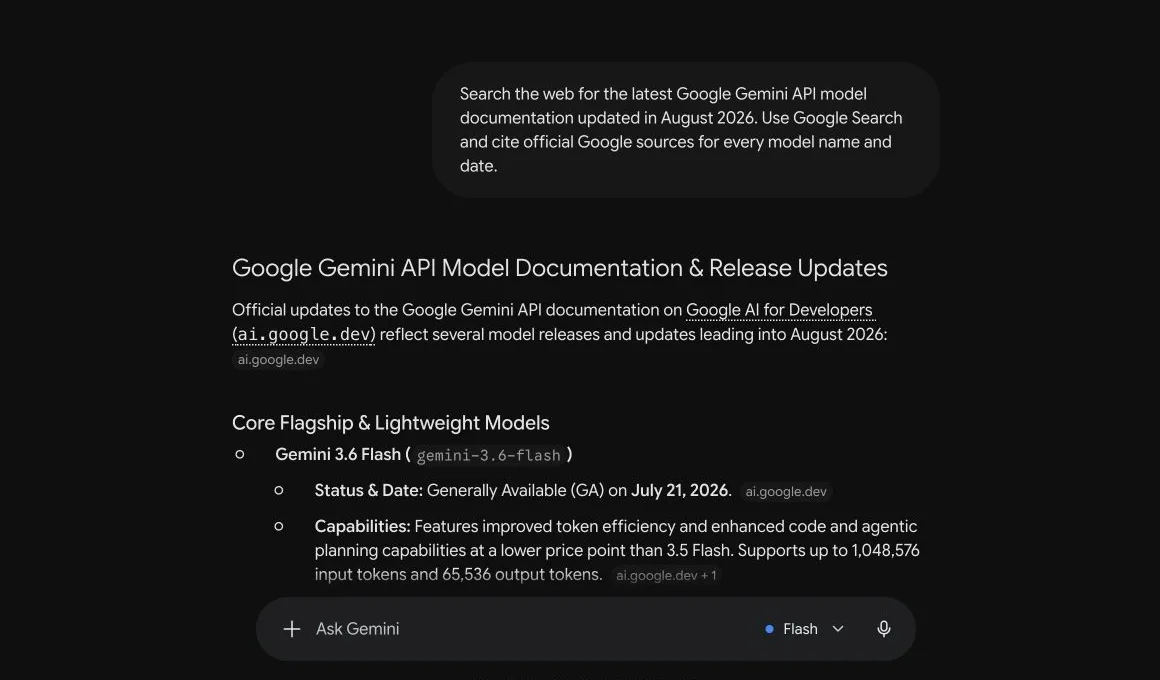
Fresh capture from Gemini on August 11, 2026. The prompt explicitly requests Google Search and official sources; Gemini attaches ai.google.dev citations to the claims it retrieved.
What does it mean when Gemini searches the web?
Gemini does not become a traditional browser with a tab bar. It uses grounding: the model connects its answer to information retrieved from Google Search, processes the results, and attaches sources to claims it can support.
Google's Gemini API documentation describes a five-stage workflow:
- Your prompt reaches the model with Google Search available.
- Gemini analyzes whether searching could improve the answer.
- If needed, it creates one or more Google Search queries.
- It processes the retrieved results and writes a response.
- The response returns with inline citation annotations and details about the search calls.
That is different from a knowledge cutoff. A cutoff describes the latest information built into a model during training. Search grounding can bring in events, prices, documentation, and announcements published after that date. The model still does the reasoning and writing; the web results supply current evidence.
If you need the latest model-by-model dates, use the maintained AI knowledge cutoff reference. It separates provider-published dates from estimates instead of treating every current-looking answer as proof that a model searched.
When is Gemini likely to search?
Google does not publish a simple trigger list, and the decision can change by model and product surface. The useful mental model is expected value: search becomes more valuable when the answer depends on facts that are recent, obscure, local, disputed, or explicitly requested with sources.
| Prompt characteristic | Search value | Example |
|---|---|---|
| News, prices, schedules, releases | High | “What did Google announce this week?” |
| Named page, report, or company claim | High | “Summarize the latest pricing page and cite it.” |
| Local or time-sensitive recommendation | High | “Which coworking spaces are open near me tonight?” |
| Stable concept | Lower | “Explain gradient descent in simple terms.” |
| Creative transformation | Usually low | “Rewrite this paragraph in a warmer tone.” |
This table is a decision aid, not a promise about Gemini's internal routing. A current-looking prompt may still receive a memory-based answer, while an apparently stable prompt can trigger retrieval when the model decides that sources would improve it.
You can make the need clearer by specifying four things:
- Freshness: say “as of today” or provide an exact date.
- Source quality: request primary sources, official documentation, or named publications.
- Citation coverage: ask for a citation beside each material claim rather than one general source list.
- Uncertainty handling: instruct Gemini to say when reliable evidence is missing or conflicting.
Compare these prompts:
What is Google's latest Gemini model?
Search Google's official Gemini model documentation. As of September 13, 2026, identify the latest generally available model in each family, cite the exact page beside every model name, and separate preview models from stable releases.
The second prompt defines what “latest” means, narrows the source universe, and asks Gemini to preserve an important product-status distinction. That makes the output easier to audit even if it does not guarantee correctness.
Does the Gemini app search every time?
No. Google says that some Gemini responses are grounded on Search results, not that every response runs a live search. The Gemini app may show a Sources button at the bottom of a response or place source links inline. If there is no Sources button, Google says Gemini did not provide links for that response.
This creates an important verification rule: do not infer that an answer is current just because it sounds current. Look for the sources Gemini actually shows, open the relevant links, and check whether they support the statement being made. Google's own help page notes that not all Gemini responses include sources.
For a current question, use a prompt that makes the requirement explicit:
Search Google for the latest information available today. Cite the primary source for every date, price, or product claim, and say when no reliable source is available.
That wording does three useful things. It asks for fresh retrieval, prioritizes first-party evidence, and gives Gemini permission to admit uncertainty instead of filling a gap from memory. It still does not guarantee a perfect answer, so material claims should be opened and checked.
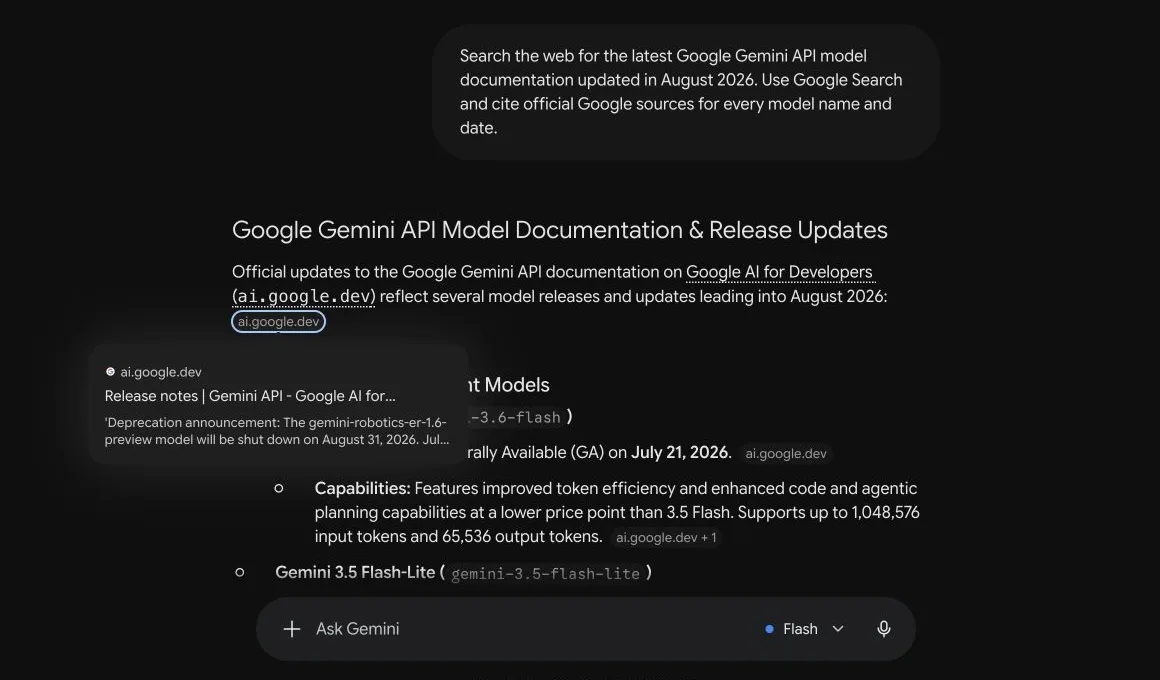
Opening the citation reveals the exact supporting page. This is the verification step that a source chip makes possible.
How Gemini Deep Research uses the web
Deep Research is the heavier option for questions that require more than a quick lookup. In Gemini Apps, it creates a research plan, searches across multiple sources, and produces a longer cited report.
According to Google's current Deep Research instructions, Google Search is included as a source by default. You can also add sources such as files, NotebookLM notebooks, Gmail, or Google Drive when those services are available and connected. Google says a report usually takes 5–10 minutes, with complex investigations sometimes taking longer.
Use normal Gemini for a focused fact or explanation. Use Deep Research when you need Gemini to:
- compare several companies or products;
- reconstruct a timeline from many sources;
- map a market, regulation, or technical ecosystem;
- produce a report whose claims need citations throughout; or
- combine public web research with your own documents.
Deep Research is not automatically more truthful. It can inspect more material, but the report still depends on source quality, correct interpretation, and whether contradictory evidence was handled. Read the citations, especially before publishing financial, legal, medical, or product claims.
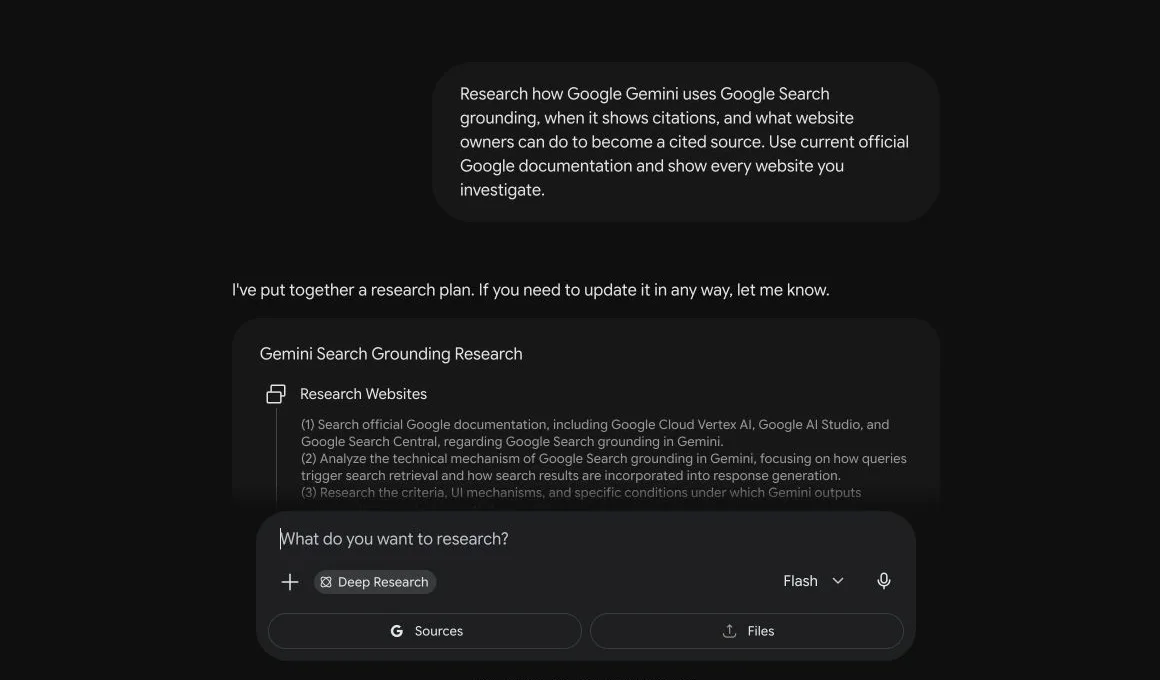
Deep Research first creates a multi-step plan. Google Search is selected as the source before the investigation begins.
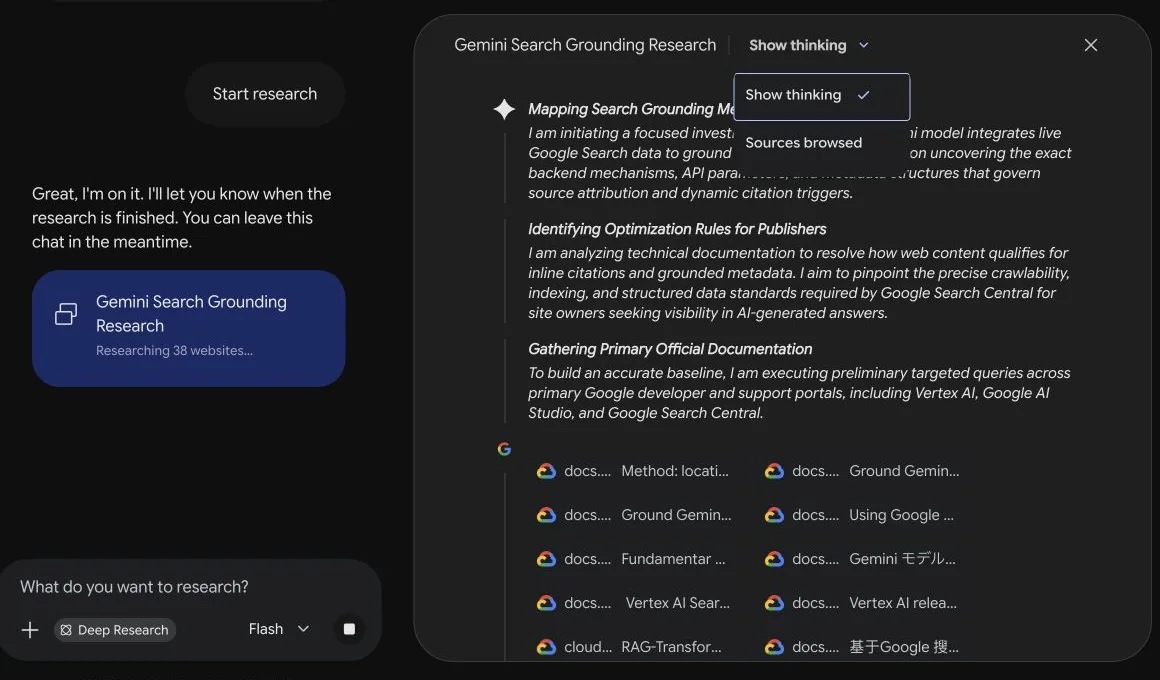
The live research panel exposes both progress and the websites being inspected, including Google Cloud and Google AI developer documentation.
Gemini, AI Overviews, and AI Mode are related—not identical
Google uses Gemini models across several products, but “Gemini searched my site” can describe different systems. Keeping the surfaces separate prevents bad diagnosis.
| Surface | Where the user sees it | Typical job | What a website owner measures |
|---|---|---|---|
| Gemini Apps | Gemini web or mobile app | Conversation, creation, research | Brand mentions, linked sources, answer accuracy |
| AI Overviews | Google Search results | A summary above or among results | Search impressions, cited pages, source-card visibility |
| AI Mode | Google Search's conversational experience | Multi-turn search and exploration | Links and mentions across follow-up questions |
| Gemini API grounding | A developer's product | Custom grounded applications | Search calls, citation metadata, downstream clicks |
They share Google Search infrastructure and model technology, but the interface, query routing, available context, and reporting are different. A page cited in an AI Overview is not proof that the Gemini app will cite it for the same wording. Conversely, a Gemini app citation does not guarantee an AI Overview impression.
This distinction matters when you report results. In Search Console, treat generative-feature impressions as Search visibility. In a Gemini monitoring workflow, record responses from the Gemini product itself. Do not combine the two into one “Gemini traffic” number without labeling the source.
It also changes the optimization work. AI Overviews depend heavily on eligibility and relevance in Google Search. The Gemini app can answer broader conversational questions and may select sources differently. API grounding adds another layer because the developer controls the prompt, system instructions, model, and whether Google Search is available. Across these surfaces, the source mix can include video, forums, documentation, and publisher pages—not only conventional blog articles.
How developers enable Gemini web search
For developers, the control is explicit. Add the google_search tool to a Gemini API request. Gemini then decides whether the prompt needs a search and may issue multiple queries before producing the answer.
One current Interactions API request shape looks like this. Treat the model identifier as an example and confirm the supported-model list before shipping:
import { GoogleGenAI } from "@google/genai";

const client = new GoogleGenAI({});

const interaction = await client.interactions.create({
  model: "gemini-3.6-flash",
  input: "What changed in Google's AI search documentation this month?",
  tools: [{ type: "google_search" }],
});

console.log(interaction.output_text);
A successfully grounded response can include:
google_search_call, containing the queries Gemini executed;google_search_result, containing Search suggestions required by Google's terms; and- URL citation annotations tied to specific spans of generated text.
This is better than adding an unverified “Sources” list after generation. The citation metadata maps a source to the part of the response it supports. Developers can also combine Google Search grounding with the URL context tool when the answer needs both broad web discovery and specific pages supplied by the user.
The supported model list changes. Check Google's Grounding with Google Search documentation before selecting a production model rather than copying a model name from an old tutorial.
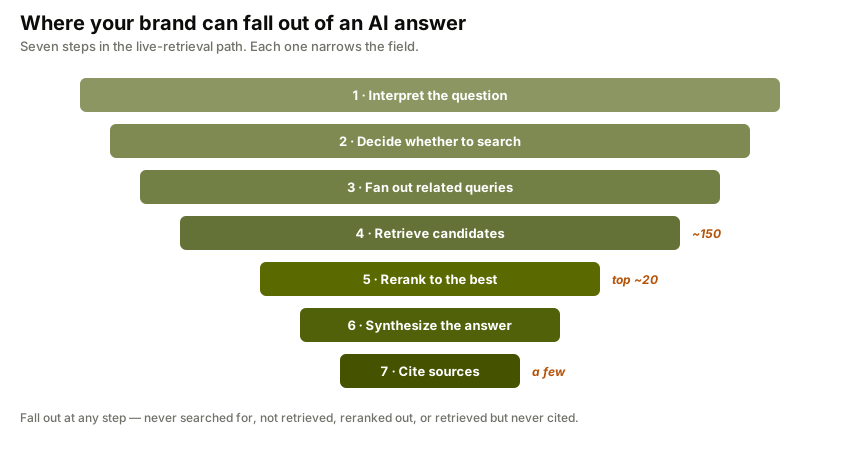
For a production integration, save more than the final prose. Log whether a search call happened, which query was executed, which URLs were returned, which citation supports each span, the model identifier, and the request time. That audit trail lets you distinguish a retrieval failure from a synthesis failure. If no relevant result was found, improving the generation prompt will not fix discoverability. If the correct page was retrieved but the answer distorted it, the problem sits later in the pipeline.
Gemini web search vs its knowledge cutoff
Web access reduces the impact of a knowledge cutoff; it does not erase it.
| Situation | Likely information source | Main risk |
|---|---|---|
| Stable, general question | Trained model knowledge | The answer may reflect an older world state |
| Current event or changing fact | Google Search grounding, when used | Weak sources or incomplete retrieval |
| Deep multi-source investigation | Deep Research with Search and selected sources | A polished synthesis can still misread evidence |
API request with google_search | Google Search results plus model reasoning | Missing or incorrectly displayed citation metadata |
The model's prior knowledge still affects which terms it searches, how it interprets pages, and what it considers plausible. Grounding supplies evidence; it does not turn the model into a neutral database.
This is also why two Gemini answers to the same question can differ. Search availability, selected model, location, language, query wording, and newly indexed pages can all change the retrieved evidence. For monitoring, a repeated prompt set is more useful than one screenshot.
Seven ways a grounded Gemini answer can still be wrong
Grounding improves freshness and traceability, but it is not a truth switch. The retrieval system and the language model can fail at different points.
- The right page was not indexed. Gemini cannot retrieve a page that Google has not discovered, cannot crawl, or has excluded from indexing.
- The query did not express the real need. A broad generated search query can retrieve generic pages while missing the primary document that answers a narrow question.
- An old page outranked a current one. Stronger historical signals may put an outdated URL ahead of a corrected announcement or changelog.
- The source was relevant but not authoritative. A recap can rank above the company, regulator, researcher, or standard body that owns the fact.
- The model merged incompatible contexts. Two sources may use the same term for different products, regions, time periods, or measurement methods.
- The citation is nearby but incomplete. A link attached to a paragraph may support one sentence while the generated paragraph makes several additional claims.
- The synthesis overstates the evidence. “May,” “observed in this sample,” and “available in preview” can become “does,” “always,” or “generally available.”
Use a three-pass verification method for important work:
- Retrieval check: Is the cited page the best available source, and is it current?
- Entailment check: Does the source actually support the precise claim beside the citation?
- Scope check: Did the answer preserve dates, geography, sample size, product tier, and uncertainty?
For research that affects money, health, legal rights, security, or public claims, open the source and inspect the relevant passage. A citation makes verification possible; it does not perform the verification for you.
This failure model also helps publishers. If Gemini consistently cites a secondary explanation instead of your primary page, check whether your page states the answer plainly, exposes a date, identifies the author or organization, links to underlying evidence, and avoids burying the conclusion inside a script-heavy interface.
Gemini vs Claude, ChatGPT, and Perplexity web search
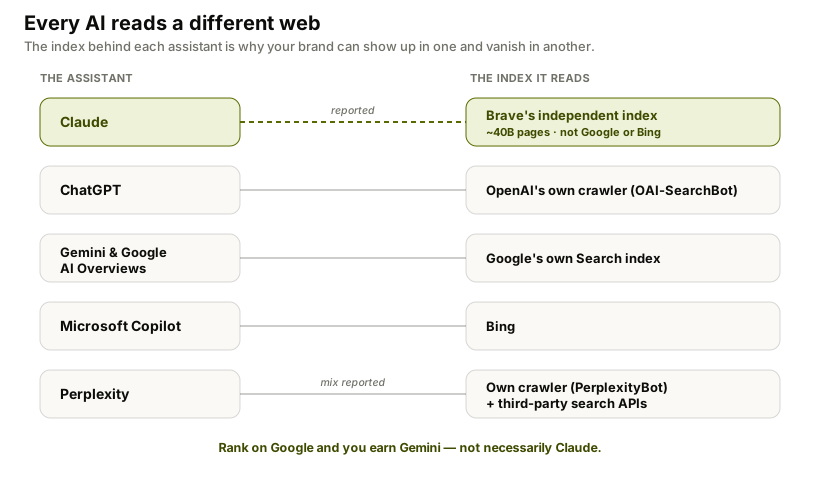
The engines share a retrieval pattern—decide whether current information is needed, retrieve sources, then synthesize—but they do not search the same way.
| AI assistant | Web-search relationship | Practical implication |
|---|---|---|
| Gemini | Grounded with Google Search | Google indexing and Search visibility strongly affect discoverability |
| Claude | Uses a separate web-search tool; Brave is strongly evidenced as the provider | A page visible in Google is not guaranteed to surface in Claude |
| ChatGPT | Uses OpenAI's search systems and web crawlers | OpenAI crawler access and source selection matter |
| Perplexity | Built around live retrieval and citations | Current web visibility is central to most answers |
For Claude's controls, citations, Research mode, and crawler split, see how Claude searches the web. The key lesson is not that one engine is better. It is that a brand can be visible in Gemini and missing from Claude because each retrieval system sees and ranks the web differently.
How to help Gemini find and cite your website
There is no special “Gemini SEO” switch that guarantees a citation. Google's current guidance says the same foundations that make a page eligible and useful in Search remain the foundation for its generative AI features.
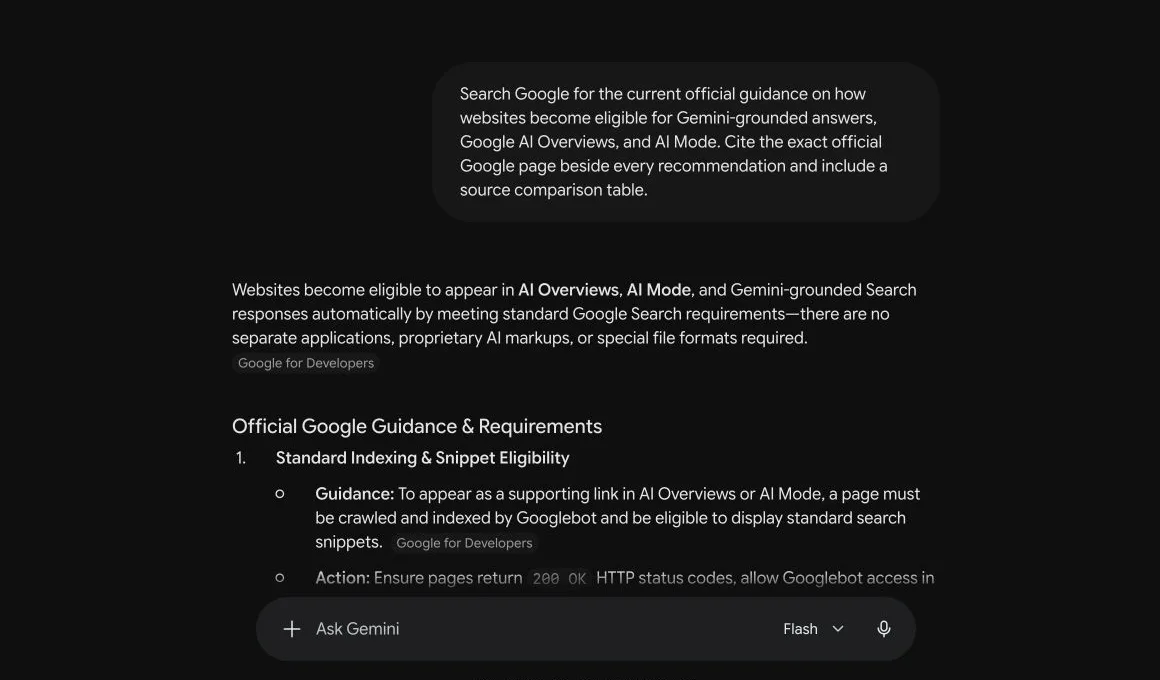
Gemini's sourced answer begins with the same baseline: crawlability, indexing, snippet eligibility, and standard Google Search requirements.
Start with these five checks:
- Keep the page crawlable and indexable. A page cannot become a useful Search-grounded source if Google cannot access or index it.
- Answer a specific question clearly. Put the direct answer near the top, then supply the evidence, limitations, examples, and date context needed to defend it.
- Publish information worth citing. Original measurements, primary documentation, transparent methodology, and maintained reference tables give Gemini something more useful than a rewritten summary.
- Use descriptive internal links. Connect the evidence page to the relevant topic guide and product workflow so both users and crawlers understand the relationship.
- Measure repeatedly. A single Gemini response is a sample, not a visibility trend.
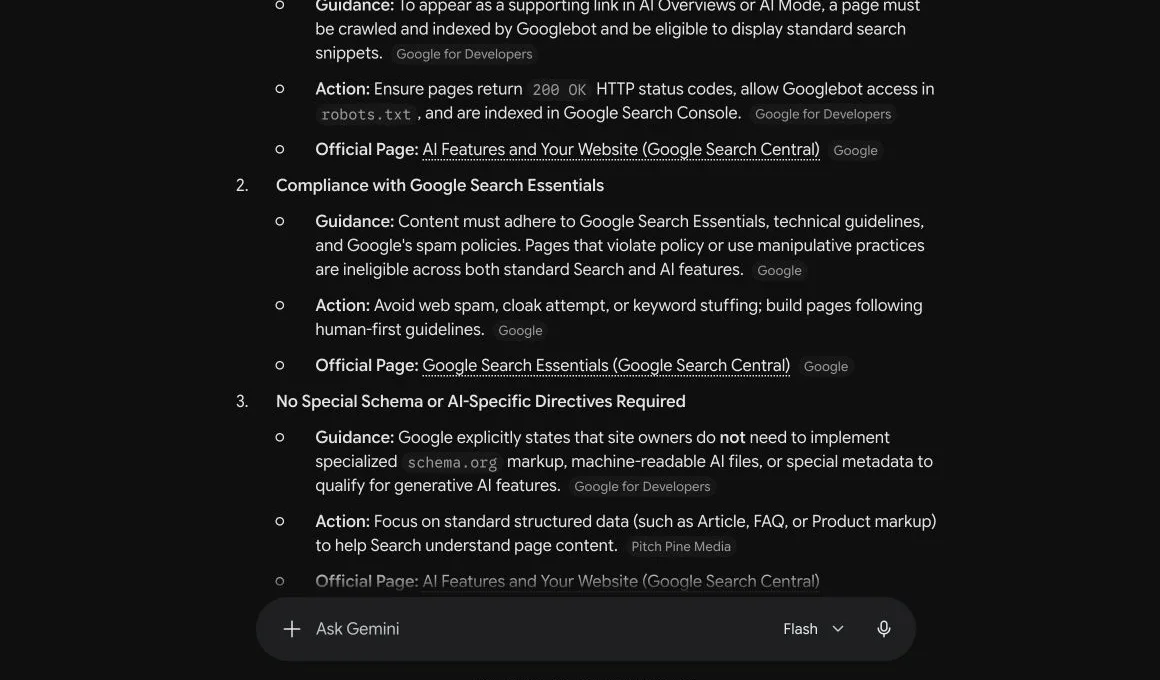
The live answer mixes first-party Google documentation with secondary sources, which is why each citation still needs to be checked individually.
Google's guide to generative AI features in Search specifically warns against chasing special AI tricks. Crawlability, useful original content, clear page structure, and a good user experience remain the durable work.
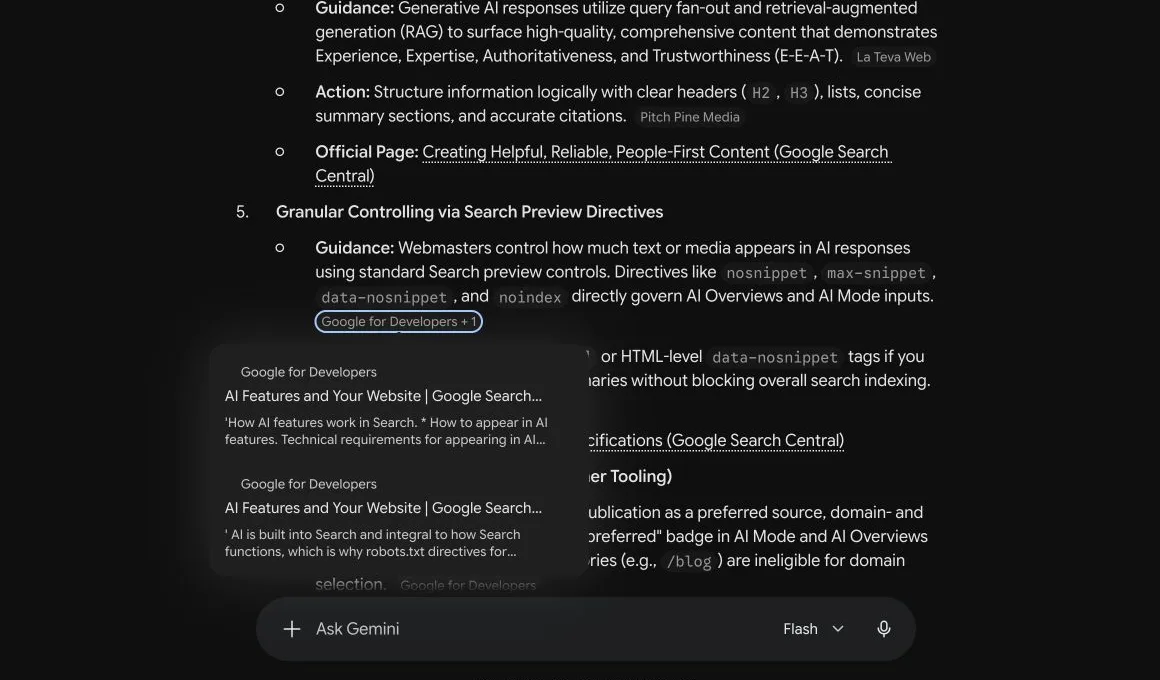
One claim can draw on multiple pages. Opening the +1 source chip exposes both supporting Google documents.
For a Gemini-specific implementation plan, use the guide to getting cited by Gemini. For first-party evidence, the 33-brand Gemini visibility study shows how often selected brands appeared across a fixed prompt set and why being mentioned is different from owning share of voice.
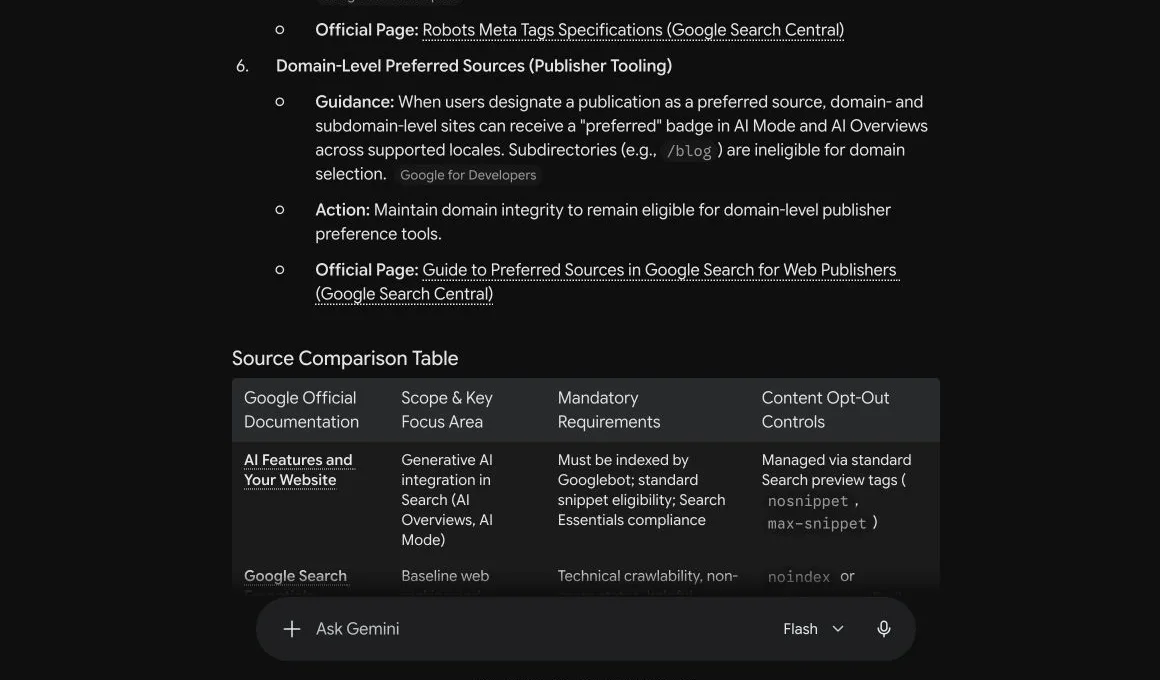
How to check whether Gemini cites your brand
Use a repeatable prompt set instead of asking Gemini only for your company name. Branded prompts test whether the model can repeat facts it already associates with you. Category and buying-intent prompts test whether it recommends you when the user does not provide the answer in the question.
A practical weekly check uses three groups:
- Category prompts: “What are the best tools for monitoring brand visibility in AI search?”
- Problem prompts: “How can a SaaS company find out whether ChatGPT and Gemini recommend it?”
- Comparison prompts: “Which AI visibility platforms include citation and competitor tracking?”
Record whether Gemini mentions the brand, links to the site, cites a third party, names competitors, or gives outdated information. Keep the prompts and location stable so week-to-week movement is interpretable.
You can run the free AI visibility scan to check your brand across major AI search engines, then review the public FixAEO methodology to see how the scoring and limitations are handled.
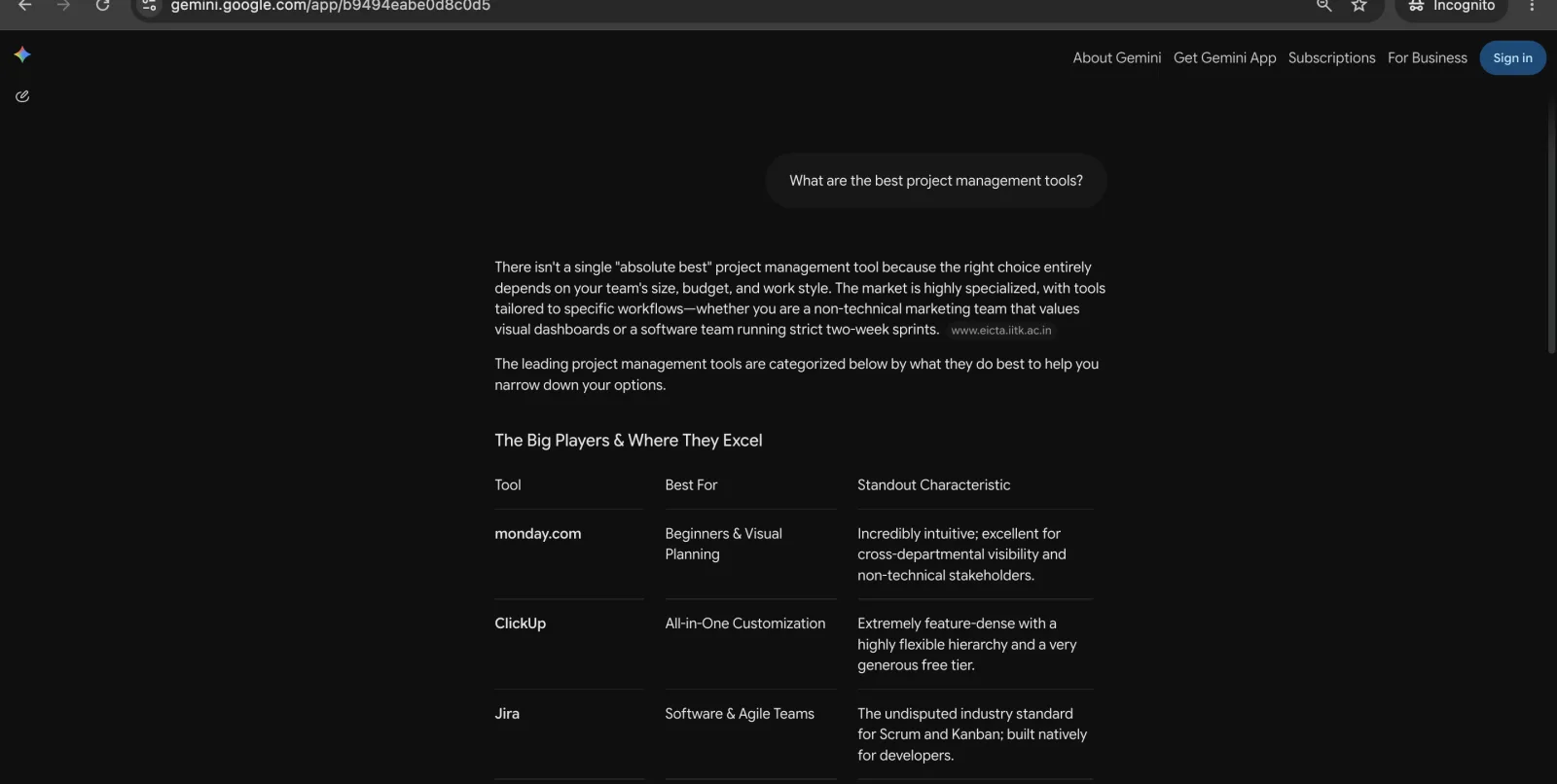
A 30-day Gemini citation experiment
Treat citation work as a controlled publishing experiment rather than a one-time optimization checklist.
Week 1: establish the baseline. Choose 15–25 prompts that represent category discovery, problems, comparisons, and purchase decisions. Run them from the same country, language, account state, and Gemini surface. Save the full answer, source links, date, and model. Count mentions and citations separately: a brand can be recommended without receiving a link.
Week 2: improve one evidence page. Pick the prompt cluster where Gemini cites competitors but not you. Create or revise one page so it directly answers that cluster. Add a concise answer, a comparison table when appropriate, original evidence, clear update date, author information, and links to primary sources. Make sure Google can index the canonical URL and that relevant pages link to it with descriptive anchors.
Week 3: strengthen corroboration. Correct inconsistent facts across your site and profiles. Seek legitimate third-party coverage, reviews, datasets, or expert references that independently support the claims on the page. This is not about manufacturing links. It is about making the entity and its evidence consistent across sources Gemini may retrieve.
Week 4: rerun the fixed prompt set. Compare the new answers with the baseline. Do not change the prompts just because a new wording produces a favorable result. Track four outcomes:
| Metric | What it reveals |
|---|---|
| Mention rate | Whether Gemini includes the brand at all |
| Citation rate | Whether it links to the brand or supporting evidence |
| Share of voice | How often the brand appears relative to named competitors |
| Accuracy rate | Whether the description, features, and positioning are current |
Thirty days may be too short for every page to be recrawled and selected, so a flat result is not proof that the work failed. It is a clean checkpoint. Preserve the same test set, note meaningful site changes, and continue measuring. The goal is not one impressive screenshot; it is a repeatable rise in accurate, relevant mentions and citations.
Frequently asked questions
Does Gemini have internet access?
Yes, Gemini can access current public web information through Google Search grounding. In the Gemini app, some responses include sources or related links. In Deep Research, Google Search is included by default. In the Gemini API, developers enable the google_search tool so the model can retrieve and cite current results.
Does Gemini search Google for every answer?
No. Google says some Gemini responses are grounded on Search results, and its API documentation says the model analyzes whether Search would improve a response. A normal answer may rely on trained knowledge instead. When freshness matters, request current primary sources and verify the links Gemini provides.
How can I tell whether Gemini searched the web?
Look for inline source links or the Sources button in Gemini Apps. In an API integration, inspect the response for google_search_call, google_search_result, and URL citation annotations. A confident tone or a recent-looking date is not evidence that a live search occurred.
Can I force Gemini to search the web?
In the Gemini API, developers can enable the google_search tool, although the model still decides whether a search is useful for the prompt. In Gemini Apps, explicitly ask for current web research and primary-source citations, or select Deep Research when the question requires a multi-source investigation.
What is Gemini Deep Research?
Deep Research is Gemini's multi-step research mode. It creates a plan, investigates across Google Search and any other selected sources, and produces a cited report. Google says reports usually take 5–10 minutes. All users have access with limits, while Google AI Pro and Ultra accounts receive higher limits and additional model options.
How do I get my website cited by Gemini?
Make the page crawlable, indexable, specific, original, and easy to verify. Use clear answers, primary evidence, maintained facts, and descriptive internal links. Then test unbranded category prompts repeatedly. No schema type or keyword guarantees inclusion; Google Search eligibility and content usefulness remain the foundation.
The bottom line
Gemini can search the web, but “Gemini searched” should be treated as a verifiable event, not an assumption. Check the displayed sources, use Deep Research for broad investigations, and enable Google Search grounding explicitly in API applications. For website owners, the opportunity is straightforward: publish the clearest source Google can retrieve, then measure whether Gemini actually uses it.
If you want to test that last part, run a free FixAEO visibility scan and see whether Gemini and other major AI search engines find, describe, and cite your brand.
Related reading
Can ChatGPT Search the Web? How to Use Search
Yes, ChatGPT can search the live web and cite sources. Follow the current Search steps, fix a missing Search option, and verify cited answers.
22 min readCan Claude Search the Web? How to Enable It (2026)
Yes. Enable Claude web search in three steps, fix a missing toggle on Team or Enterprise, and learn when Claude searches and cites the live web.
15 min readHow to Get Cited by Gemini in 2026
How to get cited by Gemini: it runs on classic SEO plus AI-specific signals. Learn the 2026 playbook for rankings in AI Overviews and Gemini answers.
17 min readAI Visibility: 11 Brands Gemini Names Every Time
33 brands tested on Google Gemini: 11 hit perfect AI visibility, but share of voice reveals the real gaps. See the data — then scan your own brand free.
17 min readBest AI Search Engines in 2026: I Tested All 15
I tested 15 AI search engines for a month — Perplexity, ChatGPT, Gemini, Claude, Grok and more. An honest ranking of which to use and what each does best.
37 min readHow LLMs Actually Work — and Why It Decides Whether AI Recommends Your Brand
How does ChatGPT decide what to say about your brand? A plain-English guide to next-token prediction, retrieval, and why answers change every time.
26 min read
Free AEO tools
Put this into practice with free FixAEO tools — no signup required.
AI Visibility Checker
Score your brand across 9 AI engines
AEO Audit Tool
Answer-engine readiness scan
Schema Generator
Build valid JSON-LD structured data
llms.txt Generator
Create a spec-compliant llms.txt
Sitemap Validator
Check your XML sitemap for errors
AI Content Grader
Grade content for AI citation readiness