Can Perplexity Search the Web? How Live Search Works
Yes, Perplexity searches the live web and cites its sources. Learn how Search, Pro Search, Research, APIs, and Perplexity's web crawlers work in 2026.

On this page
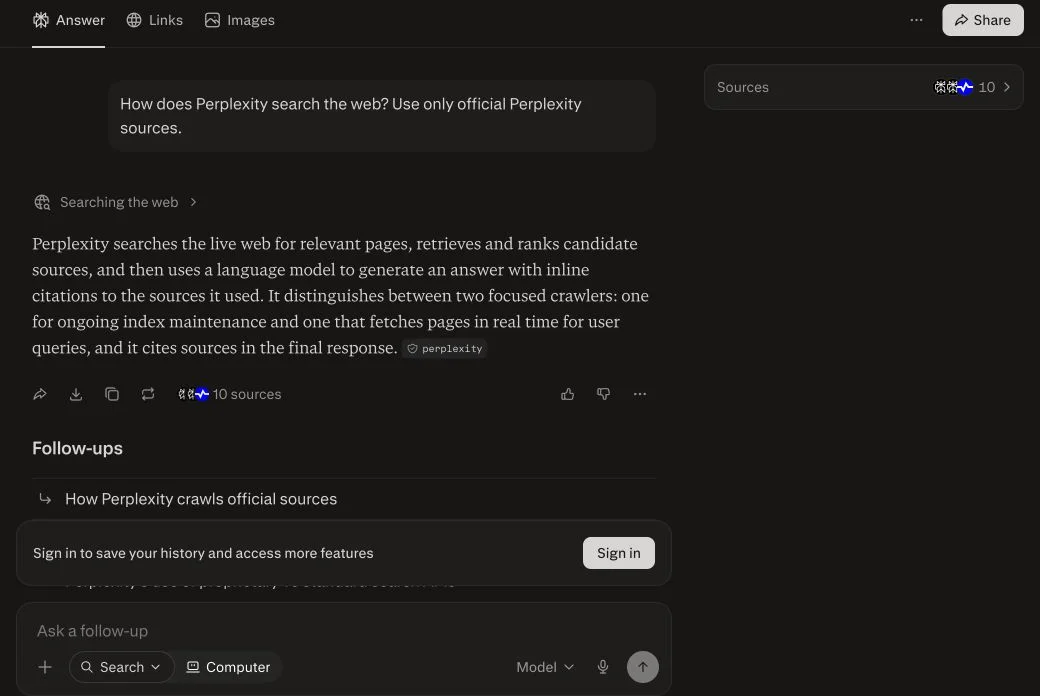
Short answer: yes, Perplexity searches the live web. Web retrieval is central to the product, not an occasional add-on. A normal search retrieves current sources, writes a conversational answer, adds inline citations, and exposes the underlying pages through Sources and Links views.
| Perplexity surface | Uses the live web? | What you receive |
|---|---|---|
| Search | Yes | A quick answer with citations and source links |
| Pro Search | Yes, with more depth | Multiple searches, broader sources, model options, and extensive citations |
| Research | Yes, iteratively | A longer report built from dozens of searches and many source reads |
| Search API | Yes | Ranked web results without an LLM-written answer |
| Sonar API | Yes | A web-grounded AI answer with citations |
| Agent API | Yes, when configured | Third-party models with Perplexity search tools and controls |
Reviewed August 11, 2026 against Perplexity's current Help Center and developer documentation. The product screenshots are fresh tests run by FixAEO on the same date.
That makes Perplexity different from assistants where browsing may or may not trigger. Perplexity describes itself as an AI-powered search engine and says it sources current information from the web as the user asks. But live retrieval is not a guarantee of correctness: the system can still choose weak sources, misunderstand a page, or cite evidence that supports only part of a claim.
What does it mean when Perplexity searches the web?
Perplexity's current product explanation says the service searches the web in real time, produces a direct conversational answer, and links to the original sources. The language model does not replace the search layer. It interprets the question and synthesizes what retrieval returns.
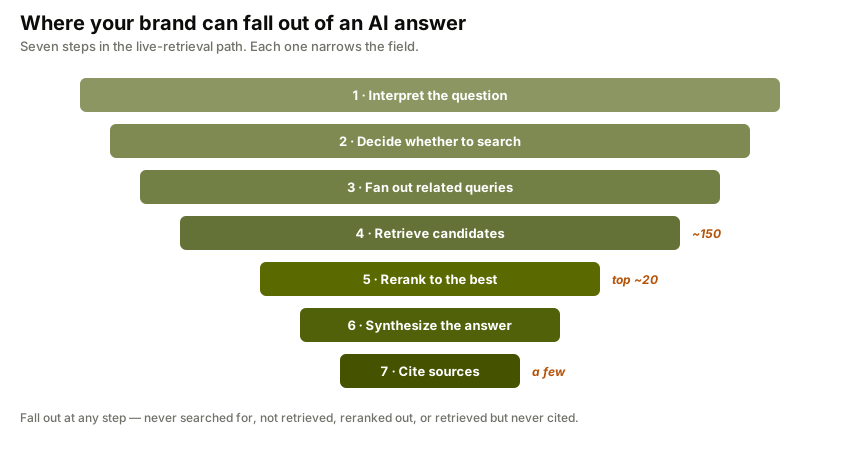
A useful model of the process is:
- Interpret the question. Identify the entities, time frame, constraints, and likely intent.
- Search the web. Retrieve candidate articles, documentation, journals, forums, videos, or other relevant formats.
- Select evidence. Rank and choose passages that appear useful for the question.
- Write the answer. Use a language model to summarize and connect the selected evidence.
- Attach citations. Link claims to pages so the user can verify or continue reading.
- Support follow-ups. Carry the conversation context into the next search.
Perplexity's How does Perplexity work? page confirms the high-level sequence—understanding the question, searching the internet, summarizing the information, and citing sources. It does not publish a complete ranking algorithm, exact candidate-pool sizes, or a fixed formula for which page wins a citation.
That evidence boundary matters. Many third-party posts present precise retrieval-stage counts and ranking weights as facts. Unless Perplexity publishes those figures, treat them as observations or hypotheses rather than official mechanics.
Does Perplexity always search the internet?
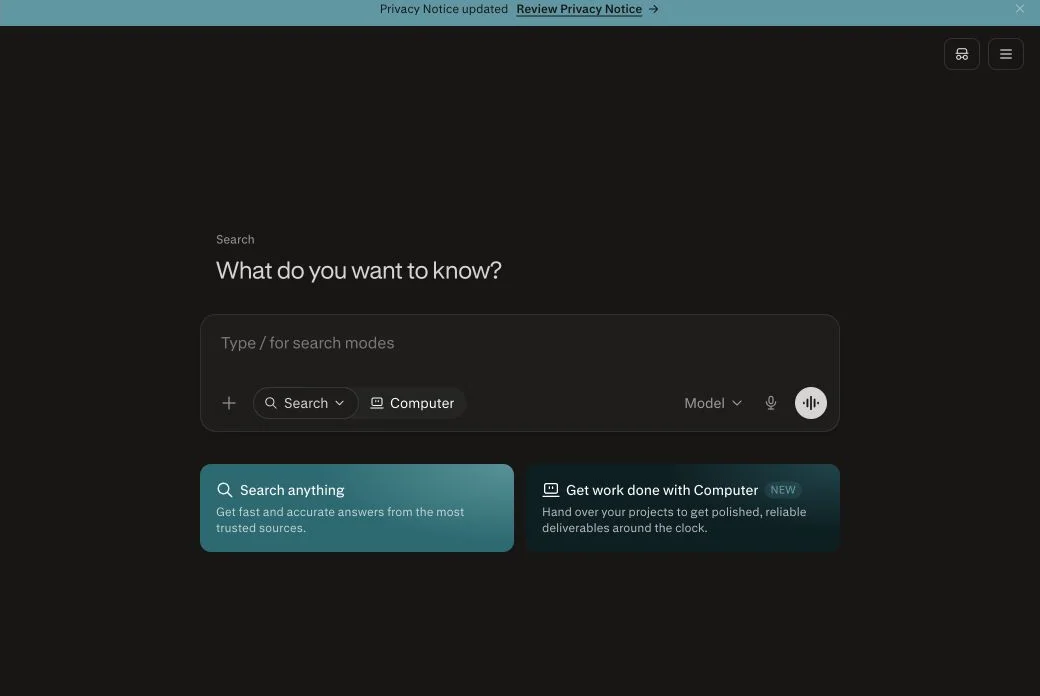
For the standard consumer search experience, web retrieval is the default. Perplexity's own Help Center describes current information and source-backed answers as defining product behavior. The interface also exposes a visible Searching the web step and separates the generated Answer from the retrieved Links.
There are exceptions around source selection and enterprise use. Perplexity Enterprise can search only organization files, only the web, both together, or neither, according to its Internal Knowledge Search documentation. Uploaded files can also become the main context for a thread.
So “Perplexity searched” should be made more specific:
- Did it use public web sources?
- Did it use files or organization knowledge?
- Was the answer a quick Search, a Pro Search, or a Research report?
- Which pages were retrieved, and which were actually cited?
- Did the cited page support the exact claim?
The answer interface makes these questions easier to investigate than a source-free chatbot response, but the user still has to inspect the evidence.
Search, Pro Search, and Research are different
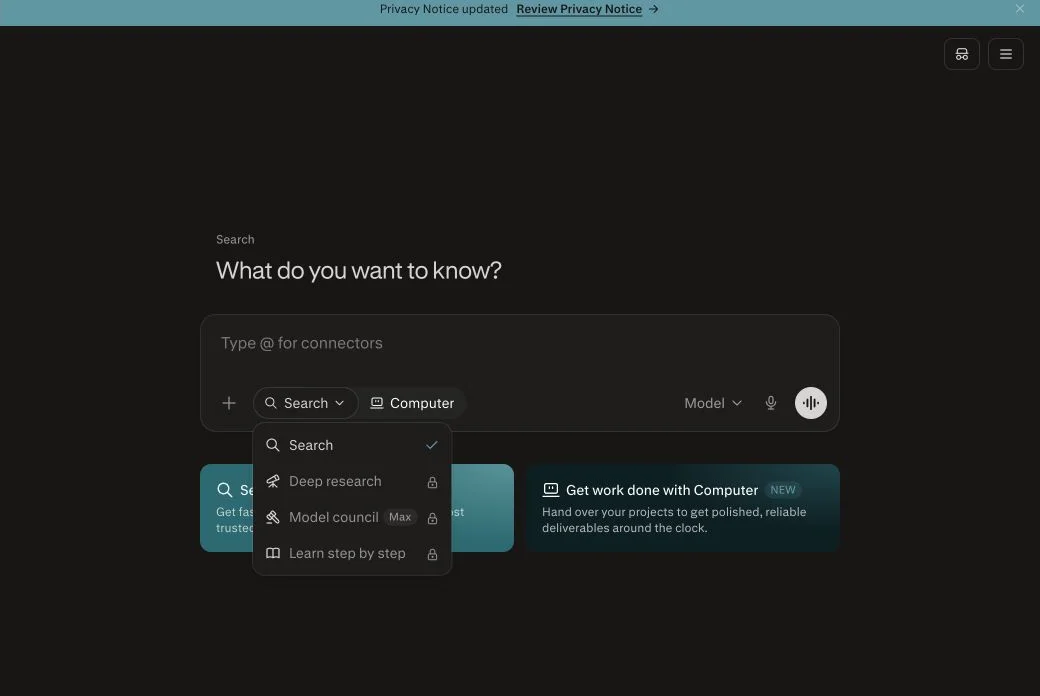
Perplexity currently exposes multiple search modes. The normal Search mode is for fast answers. Pro Search performs a more involved search for complex questions. Research runs an iterative investigation and produces a longer report.
| Feature | Search | Pro Search | Research |
|---|---|---|---|
| Best for | Quick facts and focused questions | Comparisons, analysis, and multifaceted questions | Due diligence, market research, and report-scale work |
| Retrieval depth | Basic | Multiple searches and broader sources | Dozens of searches and many source reads |
| Output | Concise cited answer | More detailed, organized answer | Comprehensive report |
| Model choice | Limited or automatic | Advanced model options for eligible users | Models selected automatically by the system |
| Extra tools | Basic search | Can include code interpretation and source focuses | Iterative reasoning, coding, documents, export, and sharing |
Perplexity's Pro Search guide says Pro Search conducts multiple searches and can synthesize material from dozens of sources. It can work across web, academic, finance, and file sources depending on the available focus or source controls. The guide also distinguishes it from standard Search, which is intended for quicker, simpler questions.
Perplexity's Research mode guide says Research performs dozens of searches, reads hundreds of sources, and reasons about next steps while refining its plan. It can export the final report as PDF or a document, or turn it into a shareable Perplexity Page. Free users receive limited Research access, while paid plans receive more.
Use the lightest mode that can answer the question. A long Research report is unnecessary for a product release date. A one-paragraph Search answer is insufficient for a six-country regulatory comparison.
How Perplexity citations and sources work
A Perplexity answer can show an inline citation beside the sentence it supports. The Sources panel presents pages associated with the answer. The Links tab exposes search results separately from the generated prose, letting the user inspect more of the retrieval set.
In our August 11 test, Perplexity returned a concise answer with one visible inline citation and a set of ten sources. Opening the Sources panel showed both official Perplexity pages and third-party explanations.
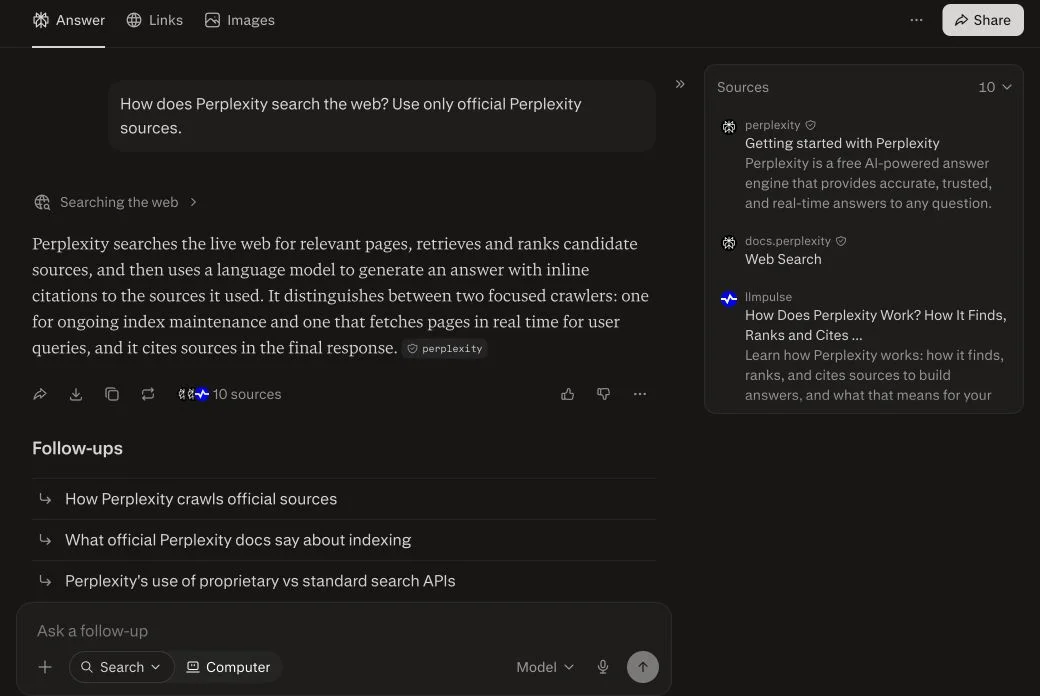
That result illustrates an important limitation: asking for “only official sources” does not guarantee that every retrieved page will be official. The prose cited an official Perplexity page, but the wider source list included other sites. Source instructions influence retrieval and synthesis; they are not an infallible domain filter in the consumer interface.
Use a four-part citation check:
- Identity: Is the source actually the organization, regulator, vendor, or researcher responsible for the fact?
- Entailment: Does the page support the precise claim beside the citation?
- Freshness: Is the page current enough for the question?
- Scope: Do geography, plan, model, date, and definition match the answer?
A citation is valuable because it creates a path to verification. It does not perform that verification for you.
The Answer, Links, and Images tabs
Perplexity separates three kinds of output in its current interface:
- Answer contains the generated synthesis and inline citations.
- Links shows the retrieved web results in a more conventional list.
- Images surfaces visual results relevant to the query.
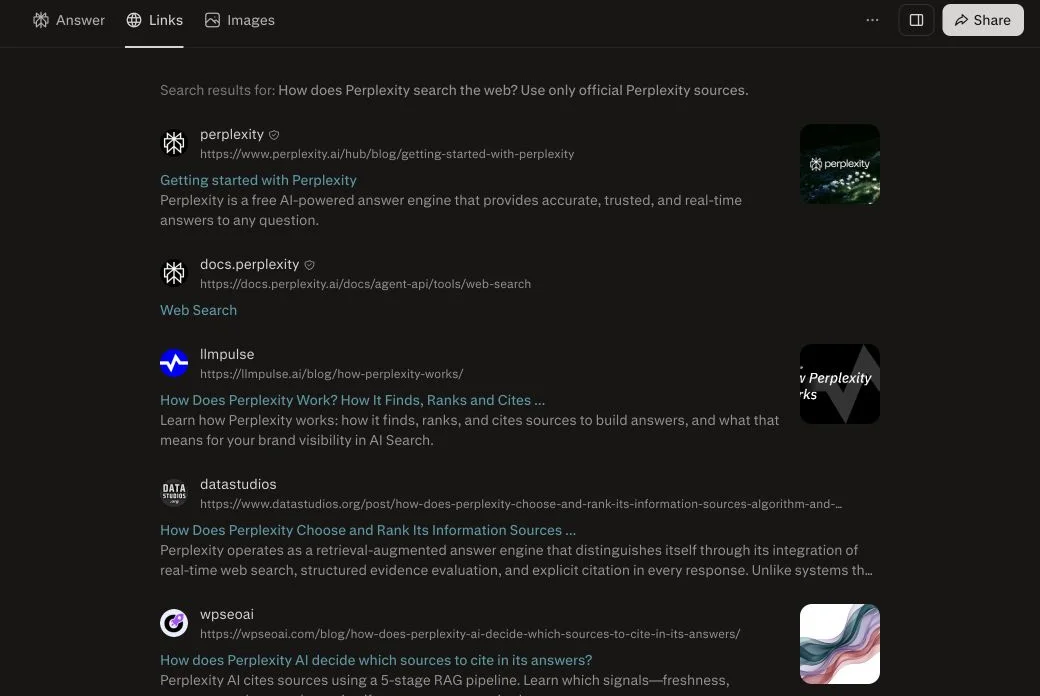
The Links view is useful when the answer feels too compressed. It can reveal primary pages that were retrieved but not cited, show whether the result set is dominated by secondary summaries, and help diagnose why a questionable claim appeared.
For research work, do not read only the answer. Scan the Links list for the strongest primary source, open it, and compare the exact wording. If the result list is weak, revise the query with the formal entity name, date range, jurisdiction, or requested source domains.
Which AI model does Perplexity use to search?
The search system and the answer-writing model are related but distinct. Eligible users can choose among Perplexity's own Sonar models and supported models from other providers. Changing the model can change reasoning, tone, organization, and how evidence is synthesized, but the search capability still comes from Perplexity's retrieval infrastructure.
Perplexity's current model and subscription guide says the available list evolves as modes and models update. That is why an article should not hard-code a model roster as if it were permanent.
The practical distinction is:
- Retrieval quality determines whether the right evidence reaches the model.
- Synthesis quality determines whether the model interprets and communicates that evidence correctly.
- Citation rendering determines whether the user can audit the result.
If the correct page never appears in Links or Sources, changing the writing model may not fix the problem. If the right source appears but the answer misstates it, the failure happened later in the pipeline.
Does Perplexity have a knowledge cutoff?
The language models available inside Perplexity have knowledge cutoffs, but live web retrieval reduces how much those dates constrain current questions. A page published today can be retrieved and cited even if the selected model's built-in knowledge ends earlier.
Search does not make the cutoff irrelevant. Prior model knowledge still affects query interpretation, ambiguity resolution, and which explanation appears plausible. If retrieval fails, the model may have less current context than the interface implies.
| Situation | Main information source | Main risk |
|---|---|---|
| Normal current question | Live retrieved web pages | Weak or incomplete source selection |
| Stable explanation | Retrieved pages plus model knowledge | Search may add noise without improving the answer |
| Pro Search | Broader multi-search retrieval | More sources can introduce contradictions |
| Research | Iterative search, reading, and reasoning | A polished long report can amplify a bad assumption |
| File or organization search | User-provided or internal documents | Stale files, permissions, and document quality |
Use the maintained AI knowledge cutoff reference for provider-published dates and clearly labeled estimates. A current-looking answer is not proof that every claim came from the web.
Perplexity web search for developers
Perplexity now documents four core API groups: Agent, Search, Sonar, and Embeddings. Three of them matter directly to web search.
| API | Output | Best use |
|---|---|---|
| Search API | Ranked titles, URLs, and snippets | Feed raw search results into your own workflow |
| Sonar API | A web-grounded generated answer with citations | Build a cited Q&A or research assistant quickly |
| Agent API | Third-party models with configurable tools and presets | Build multi-model agents with search and reasoning controls |
The current Perplexity API quickstart says the Search API returns ranked web results without LLM processing, while Sonar provides researched answers with built-in citations and conversation context. The Agent API can use models from multiple providers with Perplexity search tools.
A production application should store:
- the original user query;
- search mode or API used;
- any query, domain, recency, or location controls;
- ranked result URLs and timestamps;
- the generated answer;
- citation-to-text mappings;
- model and tool version; and
- user-visible output.
This record separates retrieval failure from answer failure. It also lets a team re-check a cited page after it changes.
Perplexity's developer documentation supports domain and other search controls for API use. Prefer those explicit parameters over trying to control retrieval entirely through a prose instruction. The Agent API prompt guide specifically says to use built-in search parameters for search behavior rather than relying on the system prompt.
How Perplexity crawls websites
Perplexity documents two agents: PerplexityBot and Perplexity-User. They have different jobs and should not be treated as one generic AI crawler.
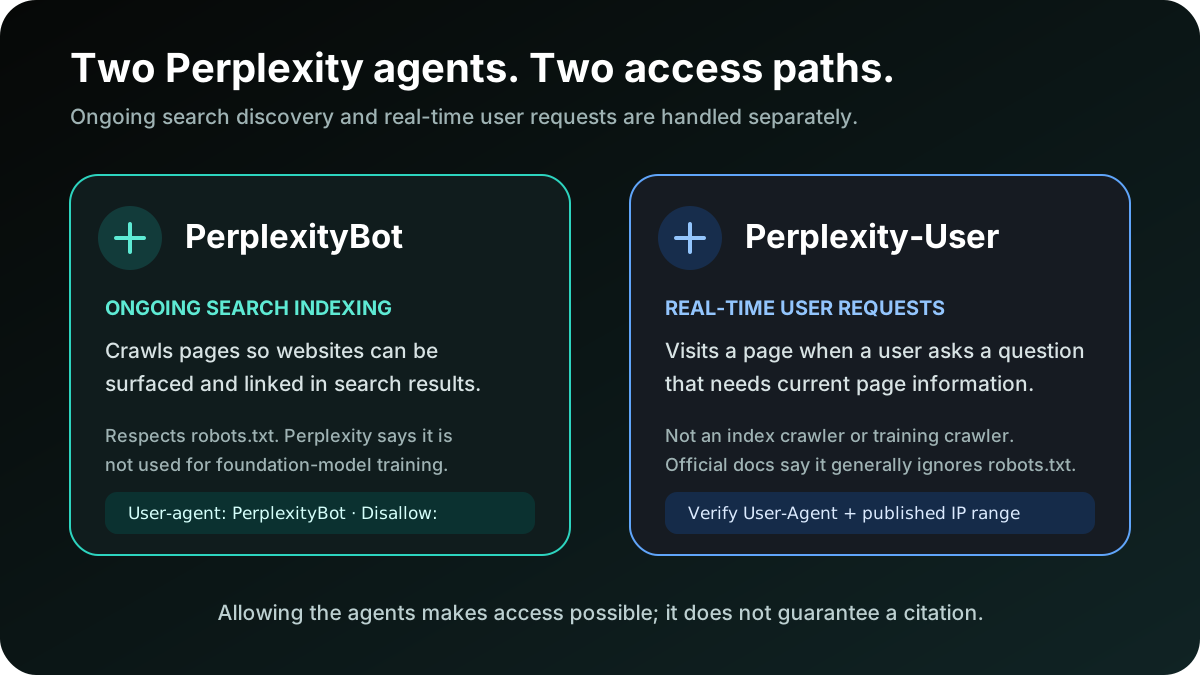
According to the official Perplexity Crawlers documentation:
PerplexityBotcrawls and indexes pages so websites can be surfaced and linked in Perplexity search results. Perplexity says it is not used to crawl content for foundation-model training.Perplexity-Userfetches pages in response to user actions or questions. It is not an index crawler and is not used for foundation-model training.- The two agents publish separate User-Agent strings and IP-address endpoints.
- Perplexity says crawler-control changes can take up to 24 hours to appear in its systems.
A minimal rule allowing the indexing crawler is:
User-agent: PerplexityBot
Disallow:
An empty Disallow: means allowed. Robots access is only one layer. A CDN or Web Application Firewall can still challenge or block the request. Perplexity recommends matching the User-Agent with its published IP ranges when configuring Cloudflare, AWS WAF, or another security layer.
Does Perplexity respect robots.txt?
Perplexity says PerplexityBot respects robots.txt and will not index the full or partial text of a site that blocks it. Its July 2026 robots.txt help article adds an important nuance: a blocked page may still leave the domain, headline, and a short factual summary discoverable.
The same article says that an older ability to summarize a specific blocked URL was disabled to prevent misuse. Perplexity also says it updated agreements with third-party crawlers that help build its search index so they respect robots.txt, especially for news publishers.
The current crawler documentation describes Perplexity-User differently because it is a user-requested fetcher, not the index crawler, and says it generally ignores robots rules. If your security policy needs to distinguish ongoing indexing from user-requested access, verify both the User-Agent and the official IP list rather than matching text alone.
Do not use robots.txt to protect private data. It is a crawler directive, not authentication. Sensitive content should require authorization and should not be exposed in public sitemaps, feeds, or links.
How can a website appear in Perplexity answers?
Technical eligibility begins with allowing PerplexityBot and ensuring the page returns accessible HTML to legitimate crawler traffic. Citation selection then depends on whether the page is relevant and useful for the actual question.
Work through this sequence:
- Access: return a successful response without a bot challenge, login wall, or regional block.
- Discovery: expose the page through internal links and an accurate sitemap.
- Interpretation: state the answer, entity, date, and scope in text that can be extracted reliably.
- Evidence: support material claims with primary documents, methods, data, and visible qualifications.
- Corroboration: earn references from credible industry, partner, customer, and editorial sources.
- Measurement: repeat the buyer prompts and record which page and competitor receive the citation.
There is no official form that guarantees a citation. Allowing a bot creates access, not placement. Avoid claims that a specific heading count, schema type, content length, or backlink automatically wins Perplexity; those may be useful tests, but Perplexity does not publish them as guaranteed ranking rules.
For a tactical content checklist, use the Perplexity citation playbook. Treat its recommendations as experiments to validate against your own prompt set, not fixed algorithm weights.
Why Perplexity can search and still miss your page
- The page is blocked.
robots.txt, a CDN, or a WAF stops the legitimate request. - The page is hard to interpret. The answer sits behind scripts, tabs, images, or an interactive tool without explanatory HTML.
- The query and page use different entity language. Acronyms, product names, categories, or regional terms do not line up.
- A stronger primary source exists. The system reasonably prefers the vendor, regulator, standard, paper, or dataset that owns the fact.
- A competitor gives a clearer answer. Their page states the conclusion, date, and evidence more directly.
- The page is stale. Old pricing, screenshots, or update markers make it weaker for a current question.
- The result set is noisy. Query rewriting or ambiguous intent retrieves the wrong topic.
These failures require different fixes. Technical access will not repair weak evidence. Adding prose will not fix a WAF block. Diagnose whether your page was absent from the Links set, present but uncited, cited inaccurately, or cited without driving a meaningful visit.
A 30-day Perplexity visibility experiment
Week 1: establish retrieval and citation baselines
Choose 25–40 commercial and informational prompts from real customer conversations. Include category discovery, comparisons, alternatives, pricing, implementation, objections, security, and “best for” questions. Record mentions, cited URLs, source position, answer sentiment, and competing domains.
Audit PerplexityBot access in robots.txt, CDN and WAF rules, server logs, status codes, canonicals, noindex, sitemap membership, and rendered text. Verify crawler requests with the official IP endpoint.
Week 2: fix the highest-value evidence gaps
Map each missed prompt to the evidence a useful answer requires. Publish or improve the minimum set of pages that closes several gaps: a dated comparison, transparent pricing explanation, methodology, integration guide, security evidence, or original dataset.
Lead with a direct answer. Define the entity and audience. Show update dates and limitations. Link to primary material. Add useful internal links from pages already trusted by users and crawlers.
Week 3: build independent confirmation
Seek relevant coverage and references where buyers already research. Partner documentation, integration marketplaces, customer stories, standards bodies, credible reviews, expert roundups, podcasts with transcripts, and original research citations can all clarify what the brand is and why it belongs in an answer.
Do not buy bulk profiles or manufacture forum praise. Low-quality repetition does not substitute for evidence and creates reputation risk.
Week 4: repeat the same tests
Rerun the fixed prompt set in the same mode. Separate four outcomes: retrieved, cited, mentioned, and clicked. A page can move through those stages independently.
- Not retrieved: investigate access, discovery, entity matching, and authority.
- Retrieved but not cited: strengthen answer clarity, evidence, and freshness.
- Cited inaccurately: remove ambiguity and place qualifications beside the relevant fact.
- Cited but no conversion: improve the landing page's promise, proof, and next action.
FixAEO runs these repeated checks across major AI search engines so a team does not have to tally every prompt manually. Start with the free AI visibility checker and review the FixAEO methodology before interpreting the score.
Seven ways a cited Perplexity answer can still be wrong
- The retrieval query misunderstood the question. It searched the wrong entity, time frame, or geography.
- The primary page was unavailable. A block or rendering failure pushed a secondary summary into the result set.
- The source was outdated. An old but authoritative page outranked the corrected one.
- Sources used incompatible definitions. The answer combined metrics that were not comparable.
- The model overstated evidence. “May” became “does,” or a limited observation became a universal rule.
- The citation covered only part of a sentence. The linked passage supported one clause but not the conclusion.
- The source list created false confidence. Ten retrieved pages are not ten independent confirmations.
For high-stakes work, open the primary source, locate the exact passage, check date and scope, and record any uncertainty. Use qualified human review for medical, legal, financial, security, or public-reporting decisions.
Perplexity vs ChatGPT, Gemini, and Claude web search
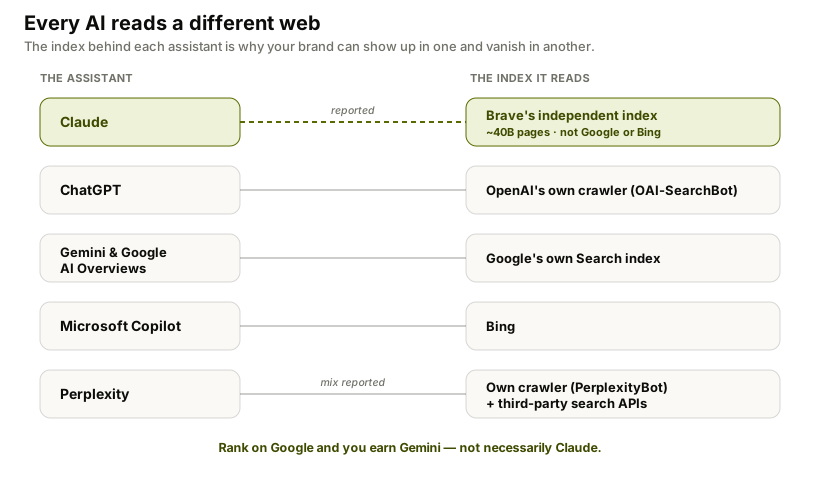
| Assistant | Relationship to web search | Practical implication |
|---|---|---|
| Perplexity | Retrieval-first answer engine with its own crawlers and third-party index partners | Sources and citations are central to the normal experience |
| ChatGPT | Searches when helpful or manually selected | Some answers may come without live retrieval |
| Gemini | Grounds selected answers through Google Search | Google indexing strongly affects discoverability |
| Claude | Uses a separate web-search tool | Search may trigger only when fresh information is needed |
The systems do not retrieve an identical web. A page visible in Perplexity can be absent from ChatGPT, Gemini, or Claude for the same buyer question. Compare how ChatGPT searches the web, how Gemini uses Google Search grounding, and how Claude searches and cites sources.
FAQ
Can Perplexity access the internet in real time?
Yes. Perplexity describes its core product as searching the web in real time, synthesizing current information, and linking the original sources. Search results can still be incomplete or wrong, so important claims should be checked against the cited page.
Does Perplexity search the web for every question?
Public web retrieval is central to normal Perplexity Search. Enterprise source controls can use the web, organization files, both, or neither. Uploaded documents can also supply context. Check the Sources and Links views to see what the specific answer used.
What is the difference between Perplexity Search and Pro Search?
Search is designed for quick, focused answers. Pro Search performs multiple searches, works across broader source sets, and provides more detailed analysis and citations. Eligible users can also choose from supported advanced answer-writing models.
What is Perplexity Research mode?
Research is the deeper mode for report-scale questions. Perplexity says it performs dozens of searches, reads hundreds of sources, reasons iteratively, and produces a comprehensive report that can be exported or shared. The system selects the model combination automatically.
Does Perplexity show its sources?
Yes. Perplexity can attach inline citations to claims, show a Sources panel, and expose retrieved pages in a separate Links tab. These features make verification possible, but a user should still check whether each page supports the exact claim.
Which search engine does Perplexity use?
Perplexity operates PerplexityBot for its search index and says it also works with third-party crawlers or index partners. It does not publish one permanent, exclusive provider for every query. Describe the system as a mix rather than reducing it to a single traditional engine.
What is PerplexityBot?
PerplexityBot is Perplexity's ongoing web crawler for discovering and linking pages in search results. Perplexity says it respects robots.txt and is not used to collect content for foundation-model training.
What is Perplexity-User?
Perplexity-User fetches pages in response to user requests. Perplexity says it is not an indexing crawler or a foundation-model training crawler. The official documentation provides a separate User-Agent and IP-address endpoint for verifying it.
How do I let Perplexity crawl my website?
Allow PerplexityBot in robots.txt, permit its official IP ranges through your CDN or WAF, return accessible HTML, and expose the page through internal links and a sitemap. Access makes the page eligible; it does not guarantee a citation.
Can I use Perplexity search in an application?
Yes. The Search API returns ranked web results, Sonar returns web-grounded answers with citations, and the Agent API supports configurable models and search tools. Use the current official quickstart because endpoints, models, and parameters evolve.
Is a Perplexity citation proof that the answer is correct?
No. A citation shows where evidence came from. The page can be weak or outdated, and the model can misread it or overstate what it proves. Verify authority, entailment, freshness, and scope before relying on an important claim.
The bottom line
Perplexity can search the web, and live retrieval is the product's default operating model. The interface makes evidence unusually visible through inline citations, Sources, and Links. That transparency is useful, but only if the user opens the source and checks it.
For publishers, the path is equally concrete: let the correct crawler reach public pages, make answers and evidence extractable, earn independent corroboration, and repeat the same buyer prompts over time. Run a free FixAEO visibility scan to see whether Perplexity cites your site or sends the citation to a competitor.
Related reading
Can Microsoft Copilot Search the Web? How Bing Grounding Works
Yes, Microsoft Copilot searches the web through Bing and cites sources. Learn how Search mode, grounding, Researcher, privacy, and indexing work.
20 min readCan ChatGPT Search the Web? How to Use Search
Yes, ChatGPT can search the live web and cite sources. Follow the current Search steps, fix a missing Search option, and verify cited answers.
22 min readCan Gemini Search the Web? How to Use Google Search
Yes, Gemini can use Google Search, show sources, and run Deep Research. Follow the steps to request current results and verify every citation.
20 min readCan Claude Search the Web? How to Enable It (2026)
Yes. Enable Claude web search in three steps, fix a missing toggle on Team or Enterprise, and learn when Claude searches and cites the live web.
15 min readHow to get cited by Perplexity: a 2026 playbook
Perplexity cites 4-8 sources per answer and the patterns are learnable. Here are the 8 patterns we see in cited content, with the tactics that got FixAEO cited in our own category.
16 min readBest AI Search Engines in 2026: I Tested All 15
I tested 15 AI search engines for a month — Perplexity, ChatGPT, Gemini, Claude, Grok and more. An honest ranking of which to use and what each does best.
37 min read
Free AEO tools
Put this into practice with free FixAEO tools — no signup required.
AI Visibility Checker
Score your brand across 9 AI engines
AEO Audit Tool
Answer-engine readiness scan
Schema Generator
Build valid JSON-LD structured data
llms.txt Generator
Create a spec-compliant llms.txt
Sitemap Validator
Check your XML sitemap for errors
AI Content Grader
Grade content for AI citation readiness