GA4 Setup for AI Traffic: Surface ChatGPT Referrals
Default GA4 hides AI referrals in 'Direct' and 'Other'. Here's the 20-minute setup that surfaces them — channel group, dimensions, and dashboard.

On this page

Open your Google Analytics 4 acquisition report right now and find the row for AI traffic. You can't. Even if you have hundreds of users arriving from ChatGPT, Claude, Copilot, Perplexity, and Gemini every month, GA4's default channel groupings bucket them as "Direct," "Referral," or sometimes "Organic Search" — never as their own category. (If AI Overviews are eating your organic clicks, this measurement gap hides the damage too.) The data is sitting in your account; the report is gaslighting you.
This is the implementation companion to How to measure AEO ROI. Where that post was framework and spreadsheet, this one is hands-on technical: the exact GA4 filters, custom dimensions, audiences, and Looker Studio dashboard you need to surface AI traffic as a first-class channel.
GA4 captures the people who arrive from an AI answer. The step before that is whether AI engines are reading your site at all — Agent Analytics shows which AI crawlers visit your pages, so you can pair 'who's crawling me' with 'who's arriving from AI.'
Allow 20 minutes for setup. The data you've already been collecting will start showing up correctly the moment you save the changes. No tag updates, no SDK changes, no developer time required.
The default GA4 problem
GA4's default Channel Group has 16 categories: Direct, Organic Search, Paid Search, Organic Social, Paid Social, Email, Affiliates, Referral, etc. None of them know what ChatGPT is. When a user clicks a link inside an AI answer and lands on your site, GA4 captures the document.referrer header — and then bucketize-logic looks at the hostname.
Here's where it goes wrong:
chatgpt.com→ bucketed as Referral (sometimes Direct, depending on platform)claude.ai→ Referralperplexity.ai→ Referralgemini.google.com→ often Organic Search (because of the.google.comparent — yes, really)grok.com→ Referral- iOS app referrals from ChatGPT app → Direct (no referrer header)
- Android ChatGPT app → Direct
So your AI traffic is sprayed across three different channels, with no easy way to tell whether your AEO investment is paying off. You can build per-source filters every time you want to know, but it's tedious and fragile. The cleaner fix is a custom Channel Group that has "AI Search" as its own category — and a custom dimension that captures the specific engine for drill-downs.
Step 1 — Create a custom Channel Group
In GA4: Admin → Property → Data display → Channel groups → Create custom channel group.
Name it AI Search-aware. Set it as the default for your property (you can flip back to default any time).
Add a new channel called AI Search with these rules:
Source matches regex:
  chatgpt\.com|chat\.openai\.com|claude\.ai|perplexity\.ai|gemini\.google\.com|grok\.com|grok\.x\.ai|chat\.deepseek\.com|copilot\.microsoft\.com|you\.com|phind\.com|kagi\.com|searchgpt\.com|metaai\.com

OR Medium matches:
  ai-search

OR Source contains:
  ai-bot|llm-citation
Position this channel rule above "Organic Search" and "Referral" in the priority list — first match wins, and you want AI traffic claimed before the referrer-based defaults claim it.
Save. Wait 24-48 hours for GA4 to backfill the new channel against historical data. From this point on, your acquisition reports will show AI Search as its own row.
Step 2 — Capture per-engine detail with a custom dimension
The channel group tells you "AI Search drove X sessions." The next question is always "which engine?" For that you need a custom dimension.
In GA4: Admin → Property → Custom definitions → Create custom dimension.
| Field | Value |
|---|---|
| Dimension name | AI Engine |
| Scope | Event |
| Description | The specific AI assistant that referred this session (chatgpt, claude, perplexity, etc.) |
| Event parameter | ai_engine |
Now populate the parameter. The cleanest way is via Google Tag Manager (GTM):
- Create a new tag: Custom Event → GA4 event
- Trigger: All Pages, where Referrer matches the AI engine regex above
- Event name:
page_view(so the dimension attaches to every view from AI sources) - Parameter:
ai_engine→ lookup table:
chatgpt.com → "chatgpt"
chat.openai.com → "chatgpt"
claude.ai → "claude"
perplexity.ai → "perplexity"
gemini.google.com → "gemini"
grok.com → "grok"
grok.x.ai → "grok"
chat.deepseek.com → "deepseek"
copilot.microsoft.com → "copilot"
default → "other-ai"
Save, publish the GTM container, and the dimension starts populating within ~10 minutes for new sessions.
If you don't use GTM, you can do the same with a 12-line dataLayer push in your site's analytics initialization. The trade-off is one more thing to maintain in your codebase versus one more tag in GTM.
Step 3 — Block stale referrer-clobbering
Some AI engines wrap their citation URLs through a redirect or tracking proxy (Perplexity does this for some sources; Gemini's "verify in source" link does too). When that happens, the referrer GA4 captures may be a generic tracking domain instead of the AI engine's own.
In GA4: Admin → Property → Data Streams → [your stream] → More tagging settings → List unwanted referrals.
Add the known proxy domains (current as of mid-2026):
vertexaisearch.cloud.google.com
www.bing.com/search
duckduckgo.com/?q=
These get treated as "Direct" by GA4 instead of clobbering the actual AI referrer that came before them in the user's journey. Without this, you'll under-count AI traffic by ~10-15%.
Step 4 — Build the AI Search audience
A custom audience for AI Search lets you compare AI-referred user behavior against the rest of your traffic — average session duration, conversion rate, LTV.
In GA4: Admin → Property → Audiences → New audience → Custom.
| Setting | Value |
|---|---|
| Name | AI Search Visitors |
| Description | Users referred from any AI assistant in the last 30 days |
| Condition | Channel exactly matches AI Search |
| Membership duration | 30 days |
You can layer more conditions — e.g. "AI Search Visitors who reached the pricing page" or "AI Search Visitors who didn't convert in 30 days" — once the base audience is collecting data. If you run this across several brands, see how to track AEO across multiple brands.
Step 5 — The Looker Studio dashboard
The fastest way to surface your AI Search data weekly is a Looker Studio dashboard. Connect your GA4 property as a data source, then build these four cards.
Card 1: AI Search sessions over time
Line chart, x-axis Date, y-axis Sessions, breakdown by AI Engine (custom dimension). Date range: last 90 days. This is your "is AEO working" tile.
Card 2: AI Search conversion rate vs site average
Two scorecards side by side:
- Filter 1:
Channel = AI Search→ metricConversion rate - Filter 2: no filter → metric
Conversion rate
The delta is the most-quoted internal stat for AEO ROI conversations. Expect 2-5× lift in AI-referred conversion rate. If your delta is below 1.5×, your AEO work is reaching the wrong queries.
Card 3: Landing-page distribution from AI Search
Table: dimensions Landing page + AI Engine, metrics Sessions + Conversions. Sort by Sessions descending. Filter Channel = AI Search.
This tells you which pages AI engines are sending traffic to, which you can cross-reference with your citation data from AI visibility checker to confirm "the pages I'm being cited on" matches "the pages I'm getting traffic on." Mismatches are interesting — they mean citations exist on pages users aren't bothering to click through to.
Card 4: Engine share of AI Search
Pie chart, dimension AI Engine, metric Sessions, filter Channel = AI Search. Tells you whether your AI traffic comes mostly from ChatGPT (the default for most brands) or whether you've diversified across Claude / Copilot / Perplexity / Gemini / Grok / DeepSeek.
A heavy ChatGPT skew (90%+) means your AEO work is implicitly optimizing for one engine. The per-engine playbooks are the antidote — each one helps you grow citation share on the engines you're currently invisible on.
Step 6 — The conversion-pathing analysis
The hardest AEO measurement question: "what's the multi-touch contribution of AI traffic to conversions?" GA4 can answer this if you set it up.
Admin → Property → Attribution → Cross-channel data-driven model.
Set the model to "Data-driven" (not last-click). Now in Explore → Path exploration, drop in:
- Starting point: First Channel =
AI Search - Ending point:
purchaseevent (or your conversion of choice)
This surfaces the pattern: user arrives from Claude → bounces → returns 2 days later via direct search → converts on the third visit. Without this analysis, the conversion gets credited to direct/branded search and AEO looks like nothing.
You'll typically find AI Search appears in 2-4× more conversion paths than it appears as last-click. That multiplier is the real ROI of AEO, and it's invisible by default.
What goes wrong (and how to debug)
Four issues that crater this setup if you don't watch for them:
1. AI traffic gets reclassified as "Organic Search" because of gemini.google.com. GA4's default Organic Search rule matches anything ending in .google.com. This is also why getting cited by Gemini ties into Google's own surfaces. Your custom channel group fixes this — but only if the AI Search channel sits above Organic Search in the priority order. Double-check after creating.
2. App referrals show up as Direct. When users tap a citation link in the ChatGPT iOS app, no referrer is sent. There's no GA4-side fix — these will remain attributed as Direct. The workaround: monitor your branded Direct traffic delta over time. A 30%+ rise in branded Direct visits with no other channel change is a strong AI-app-referral signal.
3. Custom dimensions don't backfill. Once you create the AI Engine dimension, only future sessions get populated. Historical AI sessions sit there with empty values. Plan for a 30-day data-gathering window before the dashboard becomes useful.
4. Looker Studio scoring conversions wrong. If you use multiple conversion events (purchase, signup, demo-request), make sure your scorecards filter to ONE event each. Otherwise the conversion rate looks impossibly high because Looker is summing across event types.
The hard part this doesn't solve
GA4 captures clicks. AEO impact extends beyond clicks. The brand-recall mechanic — buyer reads "X is the best CRM for SaaS" in ChatGPT, doesn't click, opens a new tab the next morning and types "x.com" directly — is the largest source of AEO conversion uplift and GA4 will never see it as AI-attributed.
The compensating play: track branded search lift in Google Search Console alongside this GA4 setup. If your AI Search sessions go up 200% AND your branded search impressions go up 50%, you can defensibly attribute both to AEO. Without the GSC half, you're showing direct-only impact and selling AEO short to whoever's reviewing the budget.
The automation pitch
If wiring up GA4 + GTM + Looker Studio is more configuration than you want to maintain, our AEO platform's integrations layer connects your GA4 directly to per-prompt citation data — so you can see "this Claude citation in week 3 drove these conversions in week 5" without rebuilding the pipeline manually. It's a paid feature — Lite starts at $25-29/mo, with a Growth tier at $79/mo — and the GA4 connection takes about 90 seconds once you've authorized.
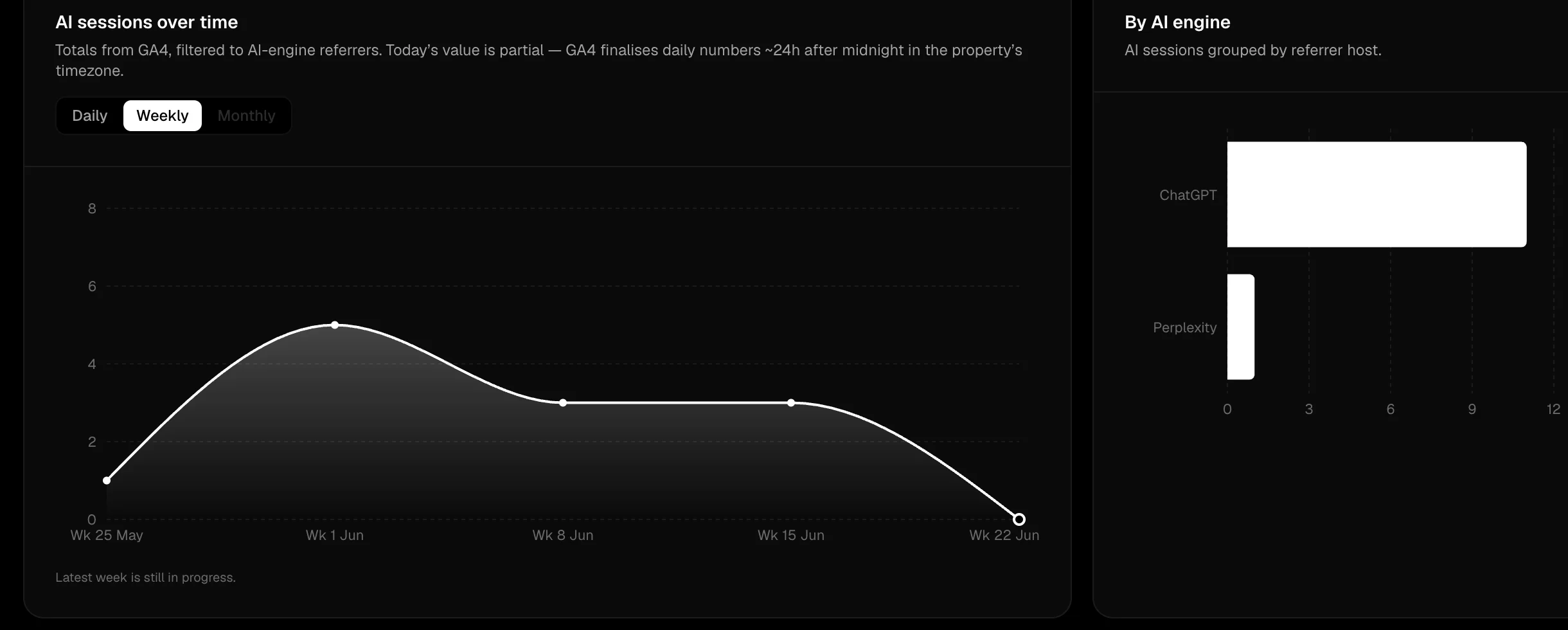
The automated path: this Attribution view pulls AI sessions straight from your GA4 property, already filtered to AI-engine referrers and split by engine, so you skip the manual channel-group, custom-dimension, and Looker build above.
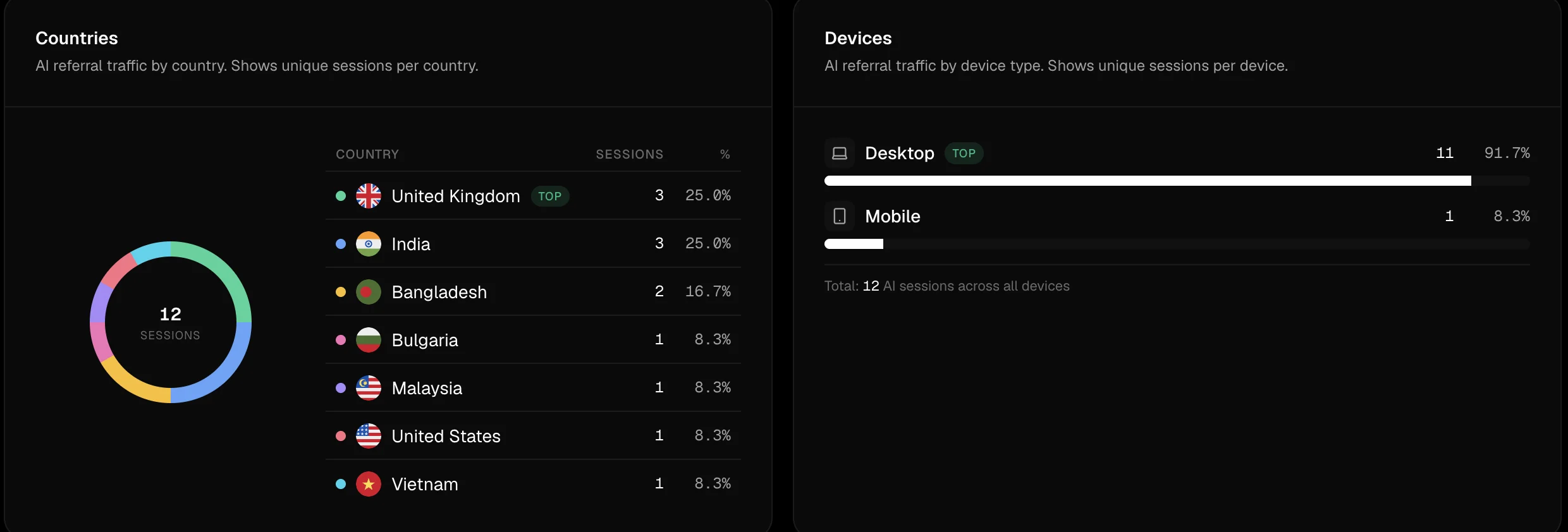
The same view also segments your AI traffic by country and device, the kind of breakdown you'd otherwise build as separate GA4 explorations.
The free path is genuinely fine for one brand with a handful of conversion goals. The paid path saves you the per-quarter "did we update the AI engine list" maintenance, and the cross-source correlation (which AI citation produced which conversion) isn't doable in raw GA4 without custom event instrumentation that breaks the moment OpenAI launches a new sub-domain.
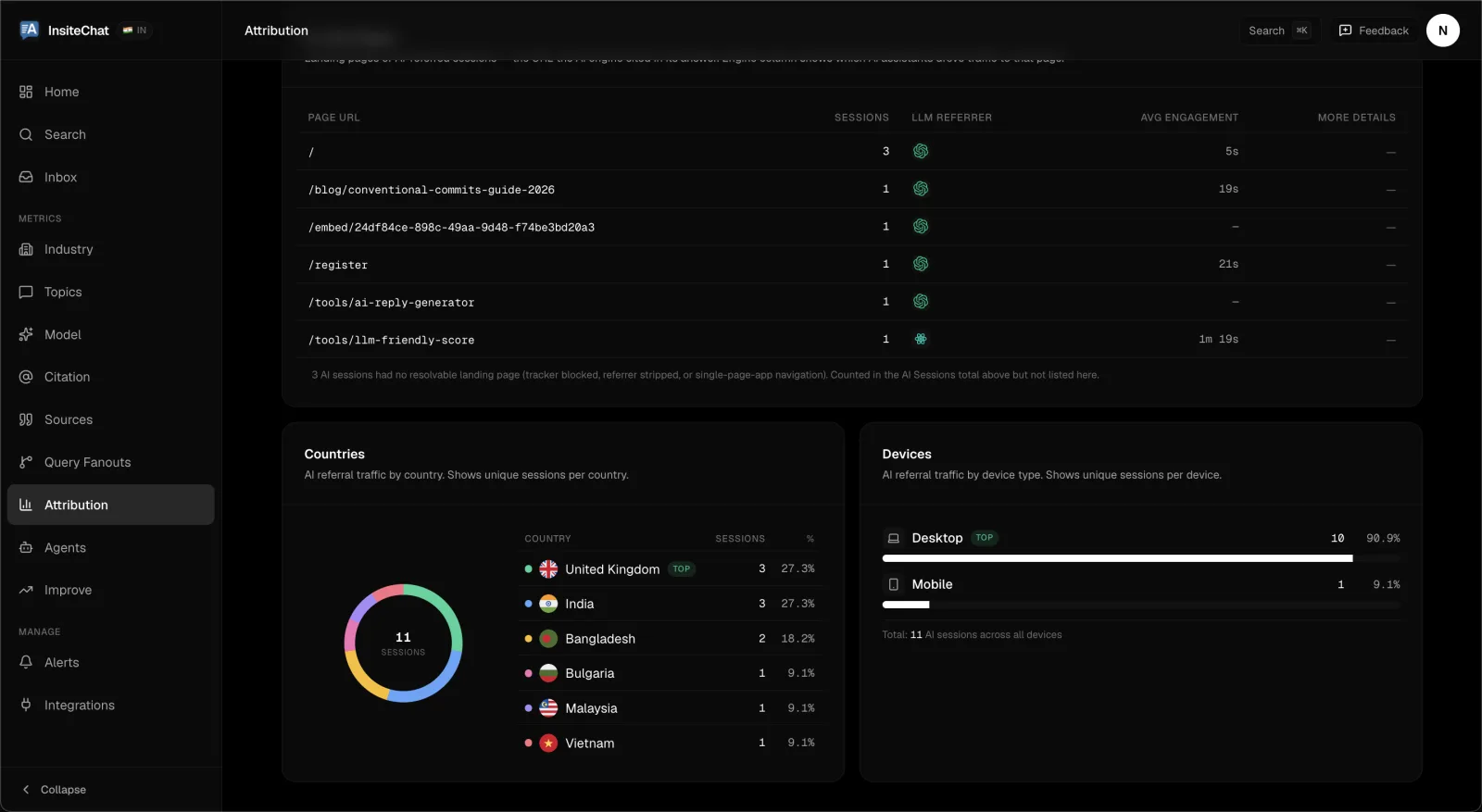
Example: AI referral traffic by page, country, and device for InsiteChat — FixAEO + GA4.
Either way, see our AEO report sample for what the unified citation + traffic + sentiment view looks like end-to-end.
TL;DR
Default GA4 hides AI traffic. The fix is 20 minutes of configuration:
- Custom Channel Group with an
AI Searchchannel that catches the 8+ AI engine domains - Custom dimension (
ai_engine) populated via GTM to break down by engine - Unwanted-referrals list to stop tracking-proxy domains from clobbering attribution
- Audience for AI-referred users so you can compare behavior vs site average
- Looker Studio dashboard with the four cards above for weekly review
- Data-driven attribution + path exploration to capture multi-touch AEO impact
This is the slice of AEO measurement that's directly tied to revenue numbers your CFO will accept. Combine with the AEO ROI framework for the indirect/brand half, and you have the full picture.
If you only do one thing from this post: create the custom channel group right now. That alone separates AI traffic from the Direct/Referral noise and gives you a baseline number. Everything else amplifies that signal.
The full AEO tools catalog covers the upstream side — citation tracking, source radar, schema generation — that this measurement layer reads from. They're complementary; the measurement is only as useful as the AEO work it's measuring.
FAQ
Why doesn't GA4 show AI traffic from ChatGPT and other engines?
GA4's default Channel Group has 16 categories and none of them recognize AI engines. Traffic from chatgpt.com, claude.ai, and perplexity.ai gets bucketed as Referral, gemini.google.com often lands in Organic Search, and iOS/Android app referrals show up as Direct.
How long does this GA4 setup take?
Allow 20 minutes for setup. No tag updates, SDK changes, or developer time are required, and the data you've already been collecting starts showing up correctly the moment you save the changes.
How do I separate AI traffic into its own channel in GA4?
Create a custom Channel Group with an AI Search channel that matches the AI engine domains by regex, then position that rule above Organic Search and Referral in the priority list so first-match wins. Save and wait 24-48 hours for GA4 to backfill the new channel against historical data.
How do I break down AI traffic by specific engine?
Create an event-scoped custom dimension named AI Engine with the event parameter ai_engine, then populate it via Google Tag Manager using a lookup table that maps each AI domain to an engine name like chatgpt, claude, or perplexity. If you don't use GTM, a 12-line dataLayer push in your analytics initialization does the same job.
Can GA4 measure the full ROI of AEO?
No. GA4 captures clicks, but the brand-recall mechanic where a buyer reads a recommendation in ChatGPT and later types your domain directly is the largest source of AEO conversion uplift and GA4 will never attribute it to AI. The compensating play is to track branded search lift in Google Search Console alongside this GA4 setup.
Related reading
How to measure AEO ROI: a copy-paste spreadsheet
Measure AEO ROI with attributable visits, conversion rate, gross profit, and cost. Includes a transparent worked example, spreadsheet layout, and limitations.
13 min readHow to track AEO across multiple brands
Multi-brand AEO portfolio tracking — a practical framework for agencies, holding companies, and multi-product teams to measure AI visibility at scale.
17 min readHow to win back traffic lost to Google AI Overviews
Google AI Overviews run on a third of commercial queries and keep clicks in the SERP. Here are 7 changes that get your brand named in the answer, plus a 30-minute audit and 2-month plan.
17 min readHow to Get Cited by Gemini in 2026
How to get cited by Gemini: it runs on classic SEO plus AI-specific signals. Learn the 2026 playbook for rankings in AI Overviews and Gemini answers.
17 min readWhat is AEO? Answer Engine Optimization explained
Answer Engine Optimization (AEO) means getting AI assistants to recommend your brand. Learn what AEO is, why it matters more than SEO, and how to start.
18 min readAgent Analytics: See Which AI Crawlers Are Actually Reading Your Site
Before ChatGPT or Perplexity can recommend you, an AI crawler has to read your pages. Agent Analytics shows which bots visit, what they read, and whether the visit worked — the top of the AEO funnel.
8 min read
Free AEO tools
Put this into practice with free FixAEO tools — no signup required.
AI Visibility Checker
Score your brand across 9 AI engines
AEO Audit Tool
Answer-engine readiness scan
Schema Generator
Build valid JSON-LD structured data
llms.txt Generator
Create a spec-compliant llms.txt
Sitemap Validator
Check your XML sitemap for errors
AI Content Grader
Grade content for AI citation readiness