How to Validate Your XML Sitemap (and Fix It)
A practical guide to validate your sitemap online, fix the most common XML errors, and make sure both Google and AI crawlers can read every page you publish.

On this page

A broken sitemap is one of those problems that costs you traffic for months before you notice, because nothing throws an error. The pages just quietly don't get crawled. I built FixAEO's free sitemap validator after seeing the same handful of mistakes in scan after scan, and this post walks through what to check, why each thing matters, and how to fix it.
If you just want the fast path: paste your sitemap XML or your sitemap URL into the sitemap validator and it'll flag everything below in a couple of seconds. The rest of this is for when you want to understand what it's telling you.
Curious how your site does?
See how AI engines describe your site — free, about 60 seconds, no signup.
The real cost of a broken sitemap
Let me start with a story that made me build this tool. A friend of mine runs a mid-market SaaS company. Solid product, good SEO. In late 2025 they launched a new content initiative — 40 new blog posts over three months, all shipped clean, all promoted. Google Analytics traffic barely moved. Ahrefs showed the pages weren't ranking. Search Console reported them as "discovered but not indexed."
We pulled up their sitemap. It hadn't been regenerated in nine months. The new blog posts weren't in it. Google didn't know they existed. Fix took an afternoon (regenerate on deploy). Traffic to the new posts caught up over the next six weeks. But those six weeks of lost momentum cost them an estimated $40K in pipeline they never got back.
A broken sitemap doesn't crash. It doesn't page you. It just silently makes your work invisible. Which is why validating one is the least glamorous, highest-ROI hour you'll spend on your site this quarter.
What a sitemap actually does (and who reads it now)
A sitemap is a plain XML file that lists the URLs you want crawled, usually at https://yoursite.com/sitemap.xml. It's a hint, not a command. Google still decides what to index. But the hint matters more than people think, because it tells crawlers what's new and what changed without making them re-walk your whole site.
Here's the part most "validate your sitemap" guides written before 2024 miss. It's no longer just Googlebot reading these files. AI crawlers like GPTBot, ClaudeBot, PerplexityBot, and Google's own AI Overviews pipeline use sitemaps and lastmod dates to decide what to fetch and how often. If your sitemap is malformed or lists dead URLs, you're not just hurting your Google indexing. You're making it harder for the engines that answer "what's the best tool for X" to ever see your page. That's the whole reason a technical file like this shows up on an AEO site.
So validating your sitemap is table stakes for both search and AI visibility. Let's go through the errors I see most.
The six errors I see in almost every bad sitemap
1. Malformed XML
The file won't parse. Usually it's an unescaped & in a URL (it has to be &), a missing closing tag, or a stray character before the <?xml declaration. Even a single byte-order mark or a blank line at the very top can break strict parsers.
How to spot it: the validator either fails outright or warns that the XML declaration is missing. Open the raw file (view-source on the URL, not the rendered version) and check that the very first characters are <?xml version="1.0" encoding="UTF-8"?> with nothing before them. Encoding matters too. If it's not UTF-8, some crawlers choke on accented characters in your URLs.
Fix: regenerate the file from your CMS or build step rather than hand-editing. Hand-edits are how the stray & got there in the first place. If your CMS is the culprit, look for a plugin update or a config flag for entity encoding — most modern CMS platforms handle this correctly by default, so if you're seeing malformed XML from one, you likely have an outdated version.
2. URLs that 404 or redirect
Your sitemap should list canonical, final, 200-status URLs only. No 404s, no 301 redirects, no http:// links that bounce to https://. Every dead URL in your sitemap is wasted crawl budget, and it tells Google your sitemap is stale and less trustworthy.
This is the most common one by far. A page gets deleted or its slug changes, but the static sitemap generator never gets re-run, so the old URL lingers. The fix is process, not a one-time cleanup: regenerate the sitemap on every deploy.
I've watched teams try to work around this with "smart" sitemap generators that check each URL for a 200 status before including it. Don't do this — you're adding a slow HTTP fan-out to every deploy and papering over the real problem, which is that your sitemap generation isn't tied to your publishing workflow. Fix the workflow.
3. noindex pages sitting in the sitemap
This is the contradiction that confuses crawlers most. A sitemap says "please index this." A noindex meta tag or X-Robots-Tag header says "do not index this." When the same URL does both, you're sending mixed signals, and Google will sometimes flag it in Search Console as a coverage error.
Common culprits: tag pages, paginated archives, internal search results, thank-you pages, and staging URLs that leaked in. Pick one rule per page. If it shouldn't be indexed, keep it out of the sitemap. If it should, remove the noindex. Don't hedge.
There's an edge case worth mentioning: transitional noindex. Sometimes you set a page to noindex while you're rebuilding it, plan to remove the flag, but forget. Six months later the page is in your sitemap and blocked from indexing. If you have a lot of these, a quick audit script that greps your rendered HTML for noindex and cross-references your sitemap URLs will catch them all in one pass.
4. Wrong or missing lastmod
lastmod is the date a page last meaningfully changed. Crawlers use it to prioritize what to re-fetch. Two failure modes here. One, the field is missing entirely, so crawlers fall back to guessing and re-index your changed pages slowly. Two, and this is worse, your generator stamps today's date on every URL on every build. When every page claims it changed five minutes ago, the signal is worthless and crawlers learn to ignore it.
The validator reports your lastmod coverage as a percentage and flags how many URLs haven't been touched in over 12 months. Aim for real dates that reflect actual content changes. If a page genuinely hasn't changed in two years, let its lastmod say so. That honesty is what makes the recent dates meaningful.
Concrete fix for most CMS platforms: derive lastmod from the page's last-modified database timestamp, not the build time. Next.js, Astro, Ghost, WordPress, and Contentful all support this if you configure it. A good sitemap has some pages with lastmod from years ago and some from yesterday — that's what real content looks like.
5. Sitemap too big
The hard limits are 50,000 URLs and 50 MB uncompressed per sitemap file. Go over either and crawlers may ignore the whole thing. Plenty of ecommerce and programmatic sites blow past 50,000 without realizing it.
The fix is a sitemap index: one parent file that points to multiple child sitemaps, each under the limit. The validator detects whether you've handed it a regular sitemap or an index, and counts your URLs so you know how close you are. I'd start splitting around 40,000 rather than waiting for the wall.
The typical split patterns: by content type (blog posts in one, product pages in another, category pages in a third), by locale (/en/sitemap.xml, /de/sitemap.xml), or by date range for very large news/blog sites (/sitemap-2026.xml). Pick the split that reflects how your content actually organizes — future-you will thank you when you need to debug why one section stopped getting indexed.
6. Never submitted to Google Search Console
You can have a perfect sitemap that Google has never been told about. Submitting it in Search Console (Sitemaps section, paste the path, hit submit) does two things: it speeds up discovery, and it gives you a report showing how many URLs Google actually read and indexed versus how many you listed. That gap is one of the most useful diagnostics you have. Also reference the sitemap in your robots.txt with a Sitemap: line so any crawler that reads your robots file finds it automatically.
For AI crawlers, there's no "Search Console" equivalent yet — GPTBot doesn't have a submit form. What you can do is make sure your sitemap is discoverable (root URL, robots.txt reference) and use Agent Analytics to confirm AI crawlers are actually fetching it. If your GPTBot fetches per day are zero, either your sitemap isn't findable or something else is blocking access — the "Agent Analytics" side of the stack is how you verify the plumbing works.

The full FixAEO free tools index — the sitemap validator is one of 24 free tools. If you're running a sitemap audit, you're likely also checking robots.txt, schema, and llms.txt from the same hub.
Sitemap variants: news, image, video, hreflang
The default XML sitemap format handles most sites, but there are four variants worth knowing.
News sitemap. For publishers with fresh content. Include <news:news> metadata and Google may surface pages in Google News faster. If you don't publish daily news, skip it.
Image sitemap. Add <image:image> blocks with a <image:loc> and optional caption. Useful if you rely heavily on image search (ecommerce, portfolio sites, food blogs). Modern Googlebot can also discover images by crawling your HTML, so this is optional but low-cost.
Video sitemap. <video:video> blocks with thumbnail, title, and description. If you host video on your own domain (not just YouTube embeds), this is how you get it into video search results.
Hreflang sitemap. Use the <xhtml:link> attribute inside each <url> block to signal language/region alternatives. Better than putting hreflang tags in every page's <head> if you have hundreds of locale pages, because it's centralized and easier to audit. Only relevant for multi-locale sites.
Most sites need only the plain sitemap. If your CMS auto-generates any of the variants, keep them. If not, don't bolt them on for the sake of completeness — Google handles most of what they add through other channels.
How to regenerate on every deploy — by platform
The single fix that eliminates most sitemap errors is regenerating on every deploy. Here's how to do that on the platforms I get asked about most.
Next.js. Use the built-in app/sitemap.ts (App Router) or pages/sitemap.xml.js (Pages Router). Both regenerate on every build. Don't hand-maintain a static file in public/.
WordPress. Yoast SEO, Rank Math, and All in One SEO all generate sitemaps automatically on publish/update. Don't use "static XML sitemap" plugins from 2015 — they don't regenerate on content changes.
Ghost. Built-in /sitemap.xml regenerates on every content change. If you're not on the latest Ghost version, upgrade — the sitemap generator got much better in 5.x.
Astro / Eleventy / Hugo. Use the framework's official sitemap integration (@astrojs/sitemap, eleventy-plugin-sitemap, Hugo's built-in). Both run on every build.
Shopify. Auto-generated at /sitemap.xml and updated automatically when products, collections, or pages change. You can't customize it much, but you also can't break it.
Webflow. Auto-generated but with limitations — you can exclude specific pages via page settings. If you need a custom sitemap, generate it externally and serve it via a Cloudflare Worker.
Custom / Django / Rails / Laravel. Use the framework's sitemap module (django.contrib.sitemaps, sitemap_generator gem, spatie/laravel-sitemap). Wire it into your deploy step so the file regenerates before assets are served.
The rule across all of them: never edit sitemap.xml by hand. Every hand-edit is a future stale sitemap waiting to happen.
How to validate your sitemap online in two minutes
You don't need to install anything. Here's the routine I run:
- Open the sitemap validator and paste either your raw XML or your sitemap URL.
- Read the findings. It checks the XML declaration and encoding, confirms it's a valid sitemap or index, counts URLs against the 50,000 / 50 MB limits, flags duplicates, reports
lastmodcoverage, and calls out stale entries older than 12 months. - Spot-check 5 to 10 of your live URLs in a browser. Make sure they return 200 and aren't redirecting. The validator checks structure; this catches dead links.
- Confirm none of the listed URLs carry a
noindextag. - Submit (or re-submit) the file in Google Search Console and check back in a few days for the indexed-vs-submitted count.
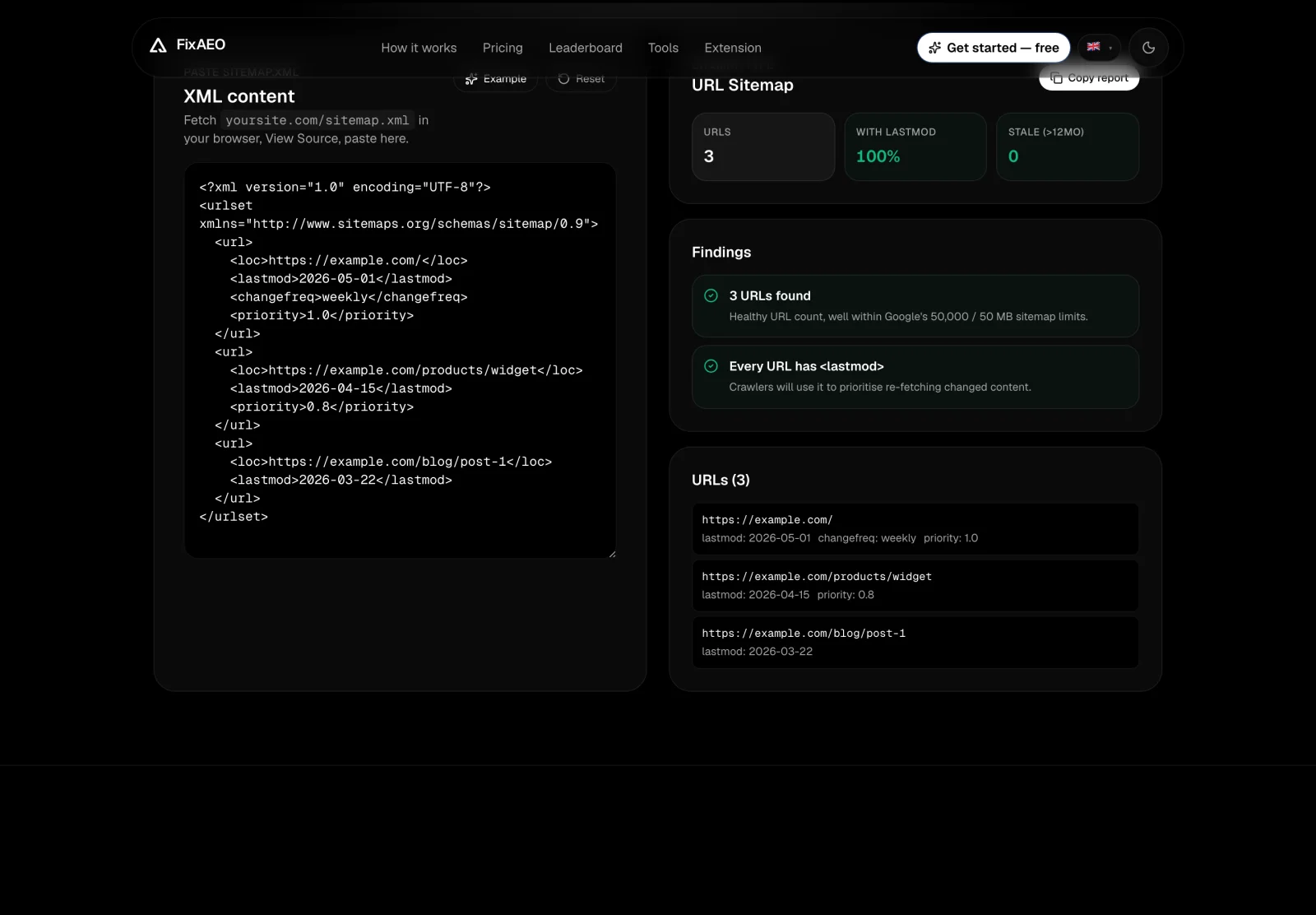
FixAEO's free sitemap validator: paste your sitemap.xml and it reports URL count, lastmod coverage, staleness, HTTPS, and duplicates, with pass/fail findings in a couple of seconds.
Do this whenever you ship a big batch of pages, change your URL structure, or migrate platforms. Those are the moments sitemaps quietly break.
Debugging: when Search Console flags a sitemap error
Search Console's sitemap report is under-documented but useful once you know how to read it.
"Couldn't fetch sitemap" almost always means one of three things: the URL is wrong (typo, missing trailing slash), the file returns 404, or a rewrite rule intercepts it. Test the URL in a private browser window and confirm it returns valid XML.
"Sitemap could not be read" means Google fetched the file but couldn't parse it. This is malformed XML — run the validator to find the specific line.
"Sitemap has errors" with specific rows means Google parsed the file but individual URLs failed. Click into each error. Common ones: URL not owned by your site (a stray absolute URL to another domain), URL is not a valid HTTPS URL, URL exceeds character limits.
Indexed vs submitted mismatch (e.g., "500 submitted, 320 indexed") is not an error, it's a diagnostic. The 180 that didn't get indexed are worth investigating — they might be thin content, duplicates, or pages Google decided weren't worth indexing. Use Search Console's URL Inspection on a sample to see the reason per URL.
Don't panic on the first error. Read the specific message, cross-reference the validator output, and fix in isolation. Batch-fixing "everything Search Console warned about" is how you accidentally break something else.
The connection between sitemap, robots.txt, and llms.txt
These three files are the technical crawlability triangle. They work together, and they're what any AEO/SEO audit checks first.
robots.txt— crawl rules. Which bots are allowed where.sitemap.xml— URL inventory. What pages exist and when they changed.llms.txt— natural-language site description. What your site is about for AI.
A common failure pattern: someone updates robots.txt to block a subdirectory, forgets to update the sitemap to remove those URLs, and now Google gets a sitemap listing URLs it's not allowed to crawl. Search Console flags this as "URL blocked by robots.txt." Fix by keeping the three files in sync — anything blocked in robots should not be in the sitemap, and vice versa.
Reference your sitemap in robots.txt: Sitemap: https://yoursite.com/sitemap.xml. That single line lets any crawler (Google, Bing, AI bots) auto-discover your sitemap without you having to submit it. If you have a sitemap index, reference the index, not each child file.
Finally, if you're serious about AI visibility, ship llms.txt alongside these two. The three files together give AI crawlers everything they need to understand and cite your site.
Once your sitemap is clean, run the FixAEO checker on the same URL. It looks at sitemap + llms.txt + robots.txt + schema + citation presence in one pass — the surrounding checks that a sitemap by itself can't tell you about.
The monthly sitemap-health ritual I actually run
Every first Monday of the month, I run the same 15-minute pass across our sites and the customer sites I advise. It's boring and it catches problems before they become expensive. Here's the exact checklist.
- Open the sitemap URL in a private browser tab. Confirm it loads, returns XML, and the timestamp shows a recent regeneration.
- Paste it into the FixAEO validator. Read every finding, not just the reds.
- Open Search Console → Sitemaps. Compare submitted vs indexed count against last month. If the gap widened by more than 5%, dig in.
- Random spot-check: pick 3 URLs from the sitemap at random, open each in a browser. Confirm 200 status, no unexpected redirect.
- Check
robots.txt. Confirm theSitemap:line still points at the right URL. Confirm no accidentalDisallow: /was committed by a well-meaning developer.
Fifteen minutes. Prevents the six-month "why isn't our new content ranking?" mystery. If you don't have a ritual, use this one.
Why this matters for AI search, not just Google
I'll be blunt about why this lives on an AEO blog. AI engines are reading the same plumbing. A clean sitemap with accurate lastmod dates helps GPTBot and friends fetch your freshest content faster, which means your latest comparison page or product update has a better shot at being the thing an AI assistant cites.
A sitemap pairs naturally with two other files crawlers look for. One is your llms.txt, which curates your highest-value pages for AI specifically. The other is your robots.txt, where a Sitemap: line and unblocked AI bots do a lot of quiet work. If you're doing a broader pass, the AEO audit checklist walks through all of these in order, and it's worth knowing how to measure whether any of it moves traffic so you're not just guessing.
The sitemap is the least glamorous file on your site. It's also one of the cheapest things to get right, and one of the most expensive to get wrong, because the cost shows up as months of pages that never got seen.
FAQ
How do I validate my sitemap online for free?
Paste your XML or sitemap URL into a free tool like the FixAEO sitemap validator. It checks the XML structure, encoding, URL count against Google's 50,000 limit, duplicate URLs, and lastmod coverage in a couple of seconds. For dead-link checks, also spot-check a handful of your live URLs in a browser to confirm they return a 200 status.
What's the maximum size for an XML sitemap?
A single sitemap file can hold up to 50,000 URLs and must be no larger than 50 MB uncompressed. If you exceed either limit, split your URLs across multiple sitemap files and list them all in one parent sitemap index file. I'd start splitting around 40,000 URLs rather than waiting until you hit the ceiling.
Should noindex pages be in my sitemap?
No. A sitemap tells crawlers "index this," while a noindex tag says "don't." Putting both on the same URL sends a contradictory signal and often shows up as a coverage error in Search Console. Keep noindex pages, like tag archives and thank-you pages, out of the sitemap entirely.
Do AI search engines like ChatGPT and Perplexity use sitemaps?
Yes. AI crawlers such as GPTBot, ClaudeBot, and PerplexityBot use sitemaps and lastmod dates to find and prioritize content, the same way Googlebot does. A malformed sitemap or one full of dead URLs makes it harder for these engines to discover and cite your pages, which is why sitemap hygiene matters for AI visibility, not just traditional SEO.
How often should I regenerate my sitemap?
Automatically, on every deploy. Not manually, not weekly, not "when we remember." If your sitemap can be out of date by more than a few hours, your process is wrong. Every modern CMS and framework has a way to auto-regenerate; use it.
Should I include images and videos in my sitemap?
Only if search visibility for those images/videos is a real KPI. For most sites, Googlebot discovers images by crawling your HTML and doesn't need a separate image sitemap. For ecommerce, food blogs, and portfolio sites where image search drives traffic, yes.
What if my sitemap has 100,000+ URLs?
Split it into a sitemap index that references multiple child sitemaps, each under 50,000 URLs. Split by content type (blog, products, category pages) or by date range for very large news sites. Reference the index in robots.txt and submit the index in Search Console — you don't need to submit each child.
Can I use a sitemap for a JavaScript SPA?
Yes, but be careful. A sitemap that lists client-side-rendered URLs is only useful if Googlebot (and AI crawlers) can render them. Test with curl and confirm the response includes the page content, not just an empty <div> waiting for React. If you're not sure, run Search Console's URL Inspection and check the rendered HTML.
If you haven't checked yours lately, run it through the free sitemap validator. It takes about two minutes and usually surfaces at least one thing worth fixing.
Related reading
The 30-point AEO audit checklist (2026)
AEO audit checklist: 30 signals across 7 categories — from crawler access to per-engine verification. Copy it into Notion and run your audit today.
16 min readHow to add llms.txt to your website in 10 minutes
llms.txt tells AI assistants what your site is about. Get the exact format, a copy-paste template, deployment steps for every major host, and how to prove it's working.
17 min readGA4 Setup for AI Traffic: Surface ChatGPT Referrals
Default GA4 hides AI referrals in 'Direct' and 'Other'. Here's the 20-minute setup that surfaces them — channel group, dimensions, and dashboard.
13 min readWhat is AEO? Answer Engine Optimization explained
Answer Engine Optimization (AEO) means getting AI assistants to recommend your brand. Learn what AEO is, why it matters more than SEO, and how to start.
18 min read
Free AEO tools
Put this into practice with free FixAEO tools — no signup required.
AI Visibility Checker
Score your brand across 9 AI engines
AEO Audit Tool
Answer-engine readiness scan
Schema Generator
Build valid JSON-LD structured data
llms.txt Generator
Create a spec-compliant llms.txt
Sitemap Validator
Check your XML sitemap for errors
AI Content Grader
Grade content for AI citation readiness
Find the gap. Then fix it.
Check how AI engines find, describe, and cite your site. Free, no signup. On a paid plan, AI Marketer can turn the evidence into briefs, drafts, optimizations, and reports.