How to Check Whether AI Crawlers Can Access Your Website
Check AI crawler access by testing robots.txt, HTTP responses, CDN and WAF rules, useful page HTML, and verified server logs.

On this page

A crawler can be allowed in robots.txt and still never reach your content.
That is the mistake I see most often when people check whether ChatGPT, Claude, Perplexity, or Google can access a site. They open robots.txt, find no obvious block, and assume the job is done. Meanwhile, a firewall returns 403, a JavaScript challenge waits for a browser that never arrives, or the page itself contains noindex.
I checked FixAEO's own setup while writing this guide. Its policy file was reachable, the relevant crawlers were allowed, and test requests returned the full homepage. That was useful evidence. It still was not proof that a genuine crawler had visited. Only verified request data or server logs can show that.
This guide follows the same order I use when diagnosing access: permission first, delivery second, and evidence last.
Disclosure: I founded FixAEO, which helps companies understand how AI search engines access and represent their websites. Links to FixAEO in this article are first-party resources, not affiliate links. Every diagnostic step below can be performed manually.
Quick answer
To check AI crawler access, review the crawler's robots.txt group, request an important page with its user-agent, inspect the final HTTP status and HTML, check CDN or WAF events, and look for a verified provider request in server logs. A clean robots rule shows permission. It does not prove that the crawler reached, rendered, indexed, or cited the page.
What this guide covers
- Choosing between AI search, user-fetch, and training crawlers
- Testing
robots.txtfor AI crawlers - Running a live AI crawler access test
- Finding Cloudflare, CDN, and WAF blocks
- Verifying AI bot traffic in server logs
- Checking whether the returned HTML is usable
- Diagnosing access without a command line
- Answering common AI crawler questions
This guide is for developers, technical SEO teams, site owners, and marketers who need to distinguish a robots permission from a real, usable crawler response. It does not cover model-training policy in depth or promise that technical access will produce an AI citation.
First, decide which kind of access you want
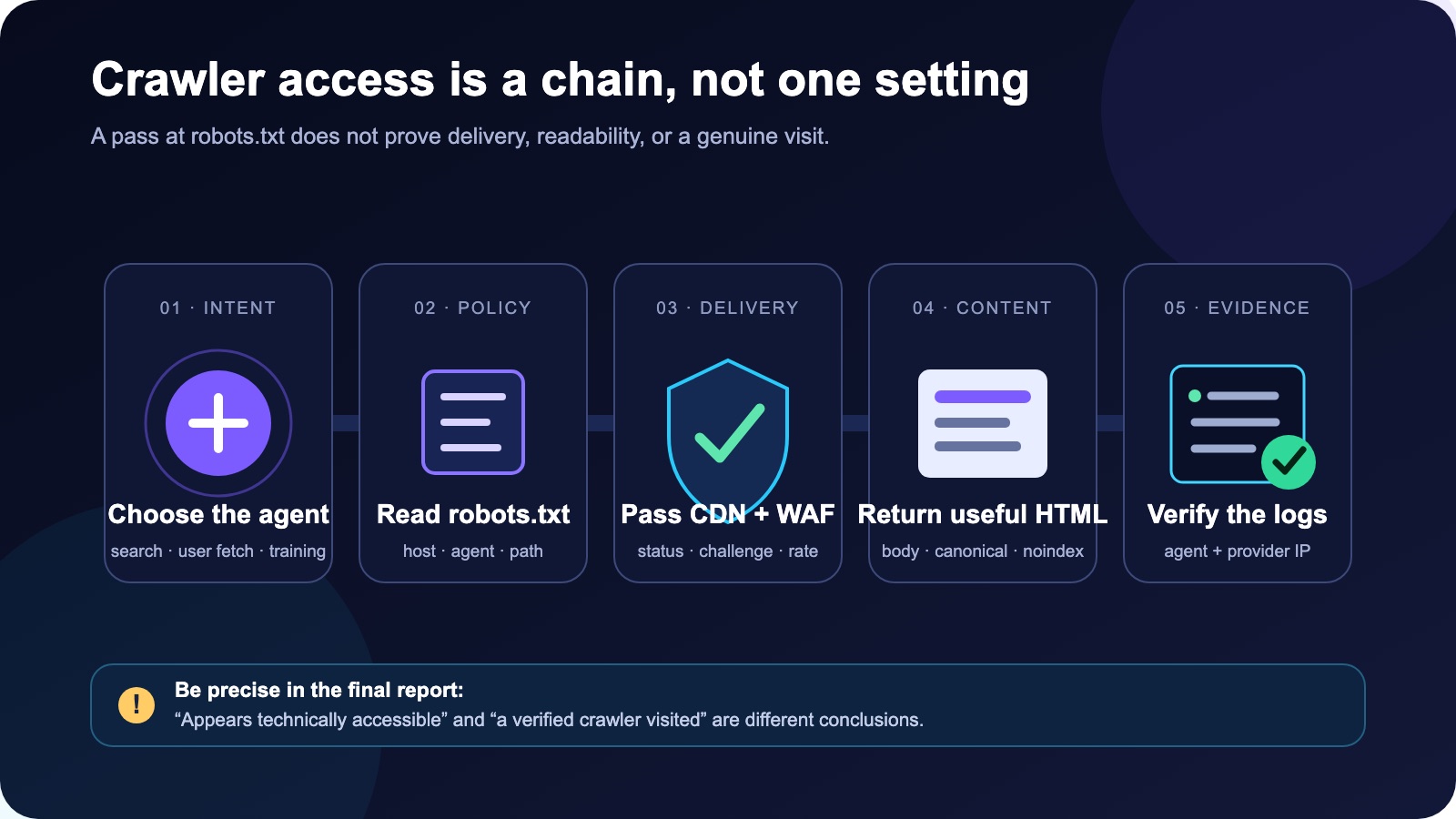
Crawler access is a chain. Passing one check does not prove the next one.
"AI crawler" is a convenient label, but it hides several different jobs. Search crawlers, training crawlers, and user-triggered fetchers are not interchangeable.
For example, OpenAI documents three separate agents:
| Agent | Main purpose | The control that matters |
|---|---|---|
OAI-SearchBot | Surface pages in ChatGPT search | Allow it if you want pages considered for search answers |
GPTBot | Collect content that may be used to improve foundation models | Allow or block it according to your training preference |
ChatGPT-User | Fetch a page after a user asks ChatGPT to visit it | Treat it as a user-triggered fetcher, not a search crawler |
OpenAI says these controls are independent. A site can allow OAI-SearchBot for search visibility while blocking GPTBot for training.
Anthropic makes a similar distinction among Claude-SearchBot, ClaudeBot, and Claude-User. Perplexity separates PerplexityBot, which supports search results, from the user-triggered Perplexity-User fetcher.
Google is the easy one to misread. Google says Googlebot controls crawling for AI features in Google Search, including AI Overviews and AI Mode. Google-Extended is a separate robots token for certain Gemini training and grounding uses. It has no separate HTTP user-agent, and blocking it does not remove a site from Google Search or affect rankings.
Before changing anything, write down the outcome you want:
- Appear in AI search results and citations
- Allow user-requested page visits
- Allow or decline model-training collection
- Keep private, account, checkout, or report pages out of automated access
Those choices lead to different rules. A single "block all AI" list cannot express them well.
Why AI crawler access matters for AI visibility
Crawler access is not a guarantee of a mention or citation. It is the technical starting point.
An AI search system still has to discover the URL, understand the page, decide that it answers a question, and trust it enough to use. If the first fetch fails, the later steps never get a fair chance. That is why I treat crawler access as part of technical AEO, alongside indexability, canonical signals, structured content, and internal discovery.
This also explains a frustrating situation: a page can rank in Google and still be unavailable to a different AI search crawler. The two systems may use different agents, IP ranges, fetch schedules, rendering behavior, and security paths. A rule written only for Googlebot says nothing about OAI-SearchBot or Claude-SearchBot.
The opposite can happen too. A crawler may fetch a page successfully, yet the brand never appears in AI answers. In that case, stop debugging access and investigate content quality, entity clarity, source authority, citations, and query fit. Access answers can the system retrieve this page? AI visibility asks does the system choose to use it? Mixing those questions wastes time.
Check 1: Can crawlers read your robots.txt file?
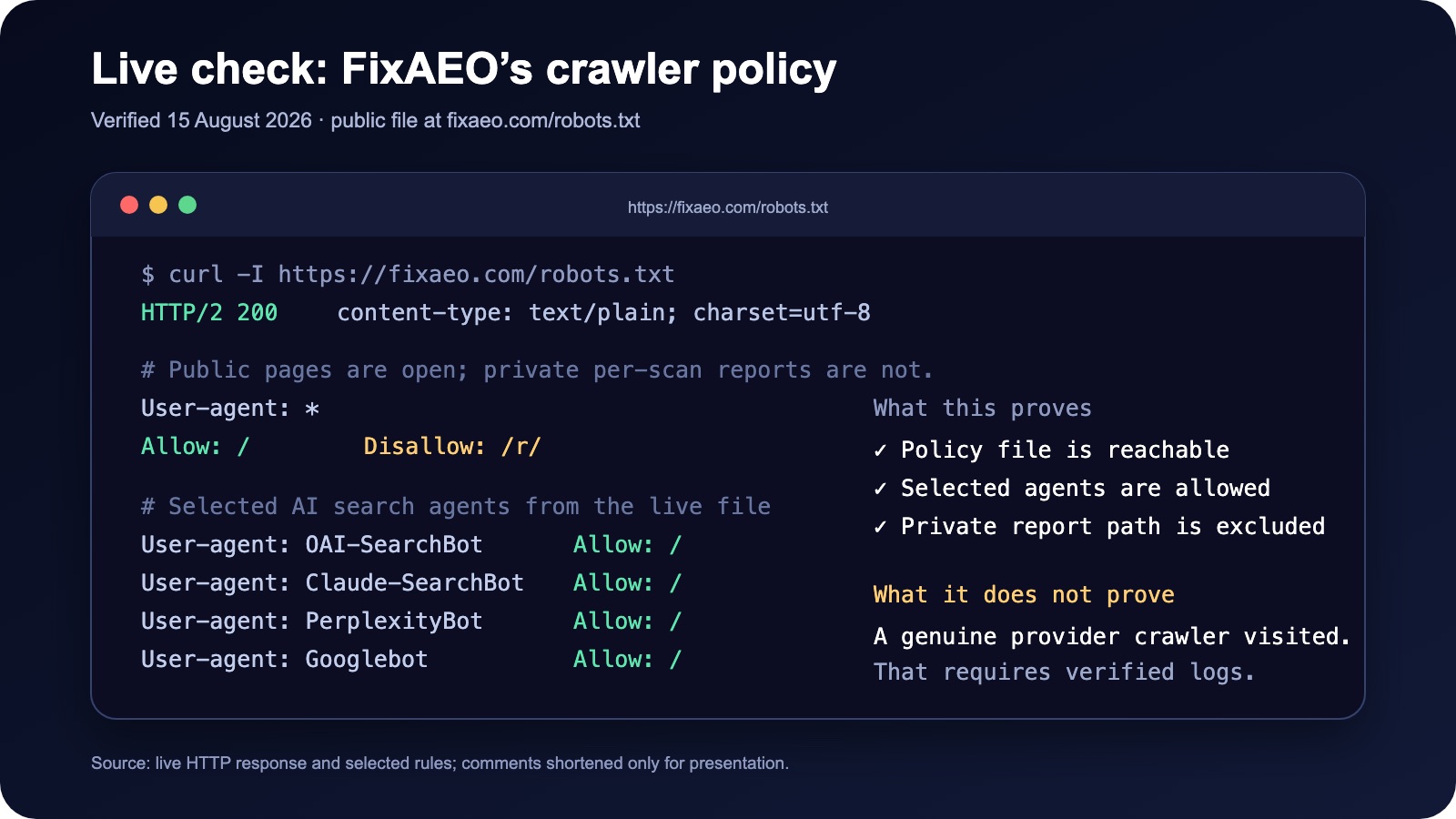
Selected rules from FixAEO's live policy file, verified on August 15, 2026.
Open the file at the root of the exact host you are testing:
https://example.com/robots.txt
Do the same for important subdomains. A rule on www.example.com does not automatically control docs.example.com.
The file should return a successful response and plain text. A redirect, login page, HTML error document, or intermittent 5xx response can leave crawlers without a usable policy.
Then look for the specific agent, not only User-agent: *.
This is a reasonable starting point for a site that wants OpenAI and Anthropic search access but does not want their training crawlers:
User-agent: OAI-SearchBot
Allow: /

User-agent: GPTBot
Disallow: /

User-agent: Claude-SearchBot
Allow: /

User-agent: ClaudeBot
Disallow: /

User-agent: PerplexityBot
Allow: /

User-agent: Googlebot
Allow: /
Do not paste this blindly. Check existing wildcard and path-specific groups first, and test the actual public paths you care about. A documentation site, ecommerce store, and logged-in SaaS application should not use identical rules.
Also remember what robots.txt is not. It is a crawling preference file, not an access-control system. Sensitive pages need authentication. If a URL is public, blocking a bot does not make the underlying data private.
Google's robots.txt specification is a useful reference when rules overlap or a pattern behaves differently than expected.
If you prefer a browser-based first pass, FixAEO's robots.txt checker shows the crawler groups and path rules it finds. Treat that result as a policy check; it cannot replace WAF events or verified request logs.
Check 2: Does the page return useful HTML to the crawler?
A permitted crawler can still receive an empty page or an error.
Start with a normal request to the page. Check the final status after redirects, the content type, and the amount of content returned.
curl -L -o /dev/null \
  -w 'status=%{http_code} type=%{content_type} bytes=%{size_download}\n' \
  https://example.com/important-page
Then repeat the request with an official crawler user-agent. Use the current full string from the provider's documentation because version numbers change.
curl -L -A 'OFFICIAL_CRAWLER_USER_AGENT_HERE' \
  -o /dev/null \
  -w 'status=%{http_code} type=%{content_type} bytes=%{size_download}\n' \
  https://example.com/important-page
For a public HTML page, you normally want a 200 response and a meaningful HTML body. Watch for:
401or403: authentication or security rules are blocking access429: rate limiting is rejecting automated traffic3xxloops: the crawler never reaches the final page5xx: the origin or an edge service is failing- A
200response with a tiny body: often a challenge, consent wall, or shell page rather than the article itself
One warning matters here: changing your own user-agent does not turn your request into a real OpenAI or Perplexity crawler. Anyone can copy a bot name. This test shows how your server responds to that label; it does not verify crawler identity.
The AI crawler access evidence ladder
I use a four-stage evidence ladder in audit notes because each stage answers a different question and needs different proof:
| Stage | Question | Best evidence |
|---|---|---|
| Access | Is the agent permitted and able to request the URL? | robots rules, HTTP test, WAF event |
| Crawl | Did a genuine provider agent fetch it? | verified server or CDN log |
| Index or retrieval | Can the system store, retrieve, or use the page for search? | provider behavior, search appearance, repeated observations |
| Citation | Did an answer select and link to the page? | a captured answer with the query, date, and cited URL |
A 200 response proves only part of the first row. It does not prove indexing. Finding OAI-SearchBot in a verified log proves a crawl, but it does not promise that ChatGPT will cite the page for a target prompt.
This distinction is useful when reporting to a client or manager. Instead of saying "ChatGPT cannot see us," say what you observed: "Our product page returns 403 to an OAI-SearchBot-labelled request," or "The page is accessible, but we have not observed a verified search crawler visit." The second version gives an engineer something concrete to investigate.
What I found on FixAEO
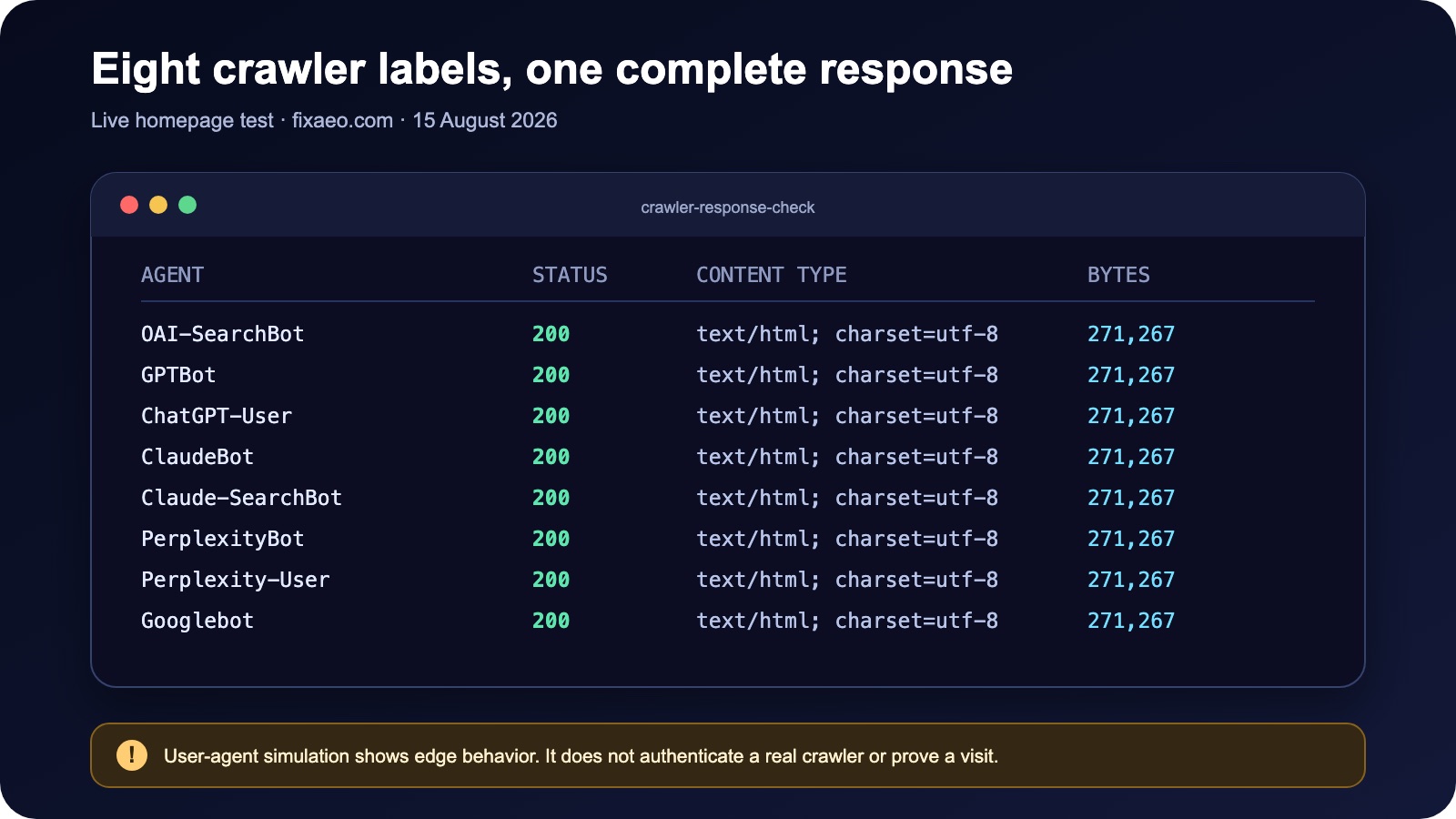
The response test checks edge behavior. It does not authenticate the requester.
I recorded the method so the result can be reproduced or challenged:
| Test field | Value |
|---|---|
| Date | August 15, 2026 |
| Target | https://fixaeo.com/ and https://fixaeo.com/robots.txt |
| Request behavior | GET, follow redirects, no logged-in cookies |
| Crawler labels | Eight named user-agent tokens listed below |
| Measurements | Final status, content type, and downloaded bytes |
| Important limitation | The test did not authenticate the source IP or prove a provider visit |
On August 15, 2026, https://fixaeo.com/robots.txt returned 200 as plain text. The file allowed the main search agents and protected the private /r/ report path.
I then requested the homepage using eight crawler labels: OAI-SearchBot, GPTBot, ChatGPT-User, ClaudeBot, Claude-SearchBot, PerplexityBot, Perplexity-User, and Googlebot. Every request returned status 200, text/html, and the same 271,267-byte response in that test.
That tells me the public edge did not treat those user-agent labels differently at that moment. It does not tell me that each provider successfully crawled the site. For that, I would need genuine requests in the logs and would verify their source against the provider's current IP data.
Check 3: Is your CDN or firewall stopping the real bot?
This is where a clean robots.txt result often falls apart.
Cloudflare, Akamai, AWS WAF, hosting security plugins, and custom anti-bot rules sit in front of the application. They can block a crawler before the request reaches your server. JavaScript challenges and CAPTCHAs are especially risky because a crawler may not complete them like a human browser.
Review the security events for the affected URL and time window. Look for:
- Bot-score or browser-integrity rules
- Managed challenges and CAPTCHAs
- Country or region restrictions
- IP reputation blocks
- Aggressive rate limits
- Rules that require cookies, a logged-in session, or browser JavaScript
Do not allow traffic based on a user-agent alone. Confirm the source too. OpenAI publishes IP ranges for OAI-SearchBot, GPTBot, and ChatGPT-User. Perplexity publishes separate IP lists and recommends combining the user-agent with IP verification in WAF rules. Anthropic also publishes crawler IP ranges.
Use the providers' live files rather than copying IPs into a blog post or spreadsheet that will go stale:
- OpenAI crawler documentation and IP links
- Anthropic crawler controls
- Perplexity crawler and WAF guidance
Three AI crawler blocking patterns I check first
A challenge page returned as 200. This is more deceptive than a clear 403. The status looks healthy, but the body contains a browser check rather than the article. Compare page size and search the returned HTML for a sentence you know should be present.
A broad bot rule catches the good agent. Teams often add a rule to stop scraping and forget that the same condition matches search crawlers. Look at the exact firewall rule that fired, not only the friendly name shown in the dashboard.
The homepage works but deeper templates fail. Product, documentation, and article routes may pass through different edge functions, caching rules, or authentication middleware. Testing one URL is not enough. I use at least one URL from every template that matters.
When fixing a block, avoid a blanket allow rule based only on User-Agent. Anyone can spoof that header. Prefer a provider-verified bot feature or combine the documented user-agent with the provider's current IP ranges. Then keep the rule narrow enough that it does not bypass authentication or expose private paths.
Check 4: Do your logs show a verified visit?
Server, CDN, or load-balancer logs are the closest thing to proof.
Search recent requests by agent name, but do not stop there. For each candidate request, inspect:
- Timestamp
- Requested path
- Response status
- Bytes sent
- Source IP
- User-agent
- Cache or firewall outcome
An agent name plus a published provider IP is stronger evidence than either signal alone. If your platform offers a verified-bot label, record that too.
The absence of a log entry does not always mean a block. The provider may not have tried to visit the page yet. That is why I separate two conclusions:
- The site is technically accessible: rules and tests show no known barrier.
- The crawler accessed the site: a verified request appears in the logs.
Only the second statement proves a visit.
Check 5: Can the crawler understand the page it receives?
Access to a URL is not the same as access to its useful content.
Save the returned HTML and inspect it without relying on a browser's visual rendering. The response should contain the primary title, main text, important links, and enough context to identify the page.
Check for these common problems:
- The article is inserted only after client-side JavaScript runs
- A cookie banner or region wall replaces the main content
- The page includes a
noindexrobots meta tag or response header - The canonical tag points to an unrelated or incorrect URL
- The server sends different or thinner content to automated agents
- The useful text sits behind a login, click, accordion, or API request
- Important images have no meaningful alternative text or nearby explanation
JavaScript rendering support varies. Google can render JavaScript, but you should not assume every search or user-fetch agent behaves like Googlebot. Server-rendering the essential answer remains the safer baseline.
For Google AI Overviews and AI Mode, use Google Search Console's URL Inspection tool to see what Googlebot received. Google explicitly says normal Googlebot controls apply to AI features in Search; Google-Extended is not the search switch.
If this distinction is new, read What Is Answer Engine Optimization? before changing technical controls. Crawler access is only one part of being understood and cited.
After access works, measure visibility separately
Once the policy, response, HTML, and logs look healthy, stop using access tests as a proxy for visibility. Track whether important pages are discovered, indexed, shown, clicked, mentioned, and cited. These are later stages with different evidence.
Google began rolling out dedicated generative AI performance reports in Search Console in June 2026. If the report is available for your property, use it alongside URL Inspection and normal Search performance data. It can show visibility in Google AI features; it does not verify OpenAI, Anthropic, or Perplexity crawler access.
How to check AI crawler access without a command line
You can still perform a useful first pass if you do not use a terminal.
- Open
/robots.txtin a private browser window and confirm it is readable. - Search the file for
OAI-SearchBot,GPTBot,Claude-SearchBot,ClaudeBot,PerplexityBot,Googlebot, andGoogle-Extended. - Check whether each specific group allows or disallows the public path you care about.
- Open your CDN or security dashboard and filter recent events by the page path, response code, and bot category.
- Use Google Search Console URL Inspection for Googlebot's view of the page.
- Ask an engineer or hosting provider for a log export containing the path, timestamp, status, IP, and user-agent.
An online AI crawler checker can speed up the robots and HTTP portions, but read what it actually tests. Some tools parse only robots.txt; others send labelled requests. Neither method can prove a genuine provider visit without access to your logs.
A crawler-access checklist I would run today
Use one representative homepage, article, documentation page, product page, and any path template that matters commercially.
-
robots.txtloads on every important host and returns plain text - Search crawlers you want are not disallowed
- Training crawlers match your actual policy rather than a copied default
- Private areas use authentication and are also excluded from crawling
- Each public test URL returns a final
200with useful HTML - Crawler-labelled requests do not receive a challenge or smaller shell page
- CDN and WAF events show no unintended
403, challenge, or rate limit - Allow rules verify both current provider IP ranges and user-agents where possible
- Server logs distinguish a possible test from a verified crawler visit
- Main content appears in the initial HTML
-
noindex, canonical, and response-header directives are correct - Google Search Console can inspect important pages
- Tests are repeated after firewall, hosting, or framework changes
For a wider site review, the AEO audit checklist covers the content and authority signals that come after access.
When an automated check is useful
Manual checks are best when you are debugging one path or reviewing a sensitive firewall rule. They become repetitive across many templates and crawler identities.
FixAEO's free AEO audit provides a quick access and technical check for major AI crawlers. I built it to shorten the first pass, not to replace CDN events or verified server logs. If a scan reports a block, confirm the exact rule and response before changing production security.
Frequently asked questions about AI crawler access
How can I check whether ChatGPT can crawl my website?
Check robots.txt for OAI-SearchBot, then request a public page with OpenAI's current published user-agent and inspect its status, redirects, and HTML. Review WAF events for blocks and verify any real OAI-SearchBot request against OpenAI's published IP ranges. GPTBot is a separate training crawler.
Should I allow GPTBot in robots.txt?
Allowing GPTBot is a training-policy choice, not a requirement for ChatGPT search visibility. OpenAI uses OAI-SearchBot for search and documents the controls independently. A publisher can allow OAI-SearchBot while disallowing GPTBot. Record the decision so a future robots update does not accidentally reverse it.
Does Google-Extended control AI Overviews?
No. Google says Googlebot controls crawling for AI features in Google Search, including AI Overviews and AI Mode. Google-Extended is a separate robots token for certain Gemini training and grounding uses. It has no separate HTTP user-agent and does not affect inclusion or ranking in Google Search.
How can I measure whether my pages appear in Google AI features?
Use Search Console's generative AI performance report if Google has enabled it for your property, and combine it with URL Inspection and the normal Performance report. Treat impressions and clicks as visibility evidence, not proof that another AI provider crawled or cited the page. Each provider needs its own logs and citation observations.
Can Cloudflare block AI crawlers even when robots.txt allows them?
Yes. A CDN or WAF can return 403, issue a JavaScript challenge, apply rate limits, or serve a small challenge page with status 200. Check security events for the exact URL and time. When allowlisting, verify both the agent and current provider IP data rather than trusting a copied user-agent alone.
Is llms.txt required for AI crawlers to access a website?
No. A crawler does not need llms.txt to fetch a public page. The file can provide a concise map of important content, but it does not override robots.txt, authentication, firewall rules, noindex, or broken HTML. Fix basic crawl access and page delivery before treating llms.txt as a discovery aid.
How often should I repeat an AI crawler access test?
Retest after changing your CDN, WAF, hosting platform, authentication middleware, rendering framework, redirects, or robots rules. For important templates, a monthly check is a reasonable operational baseline. Also rerun it immediately when logs show new 403, 429, redirect, or challenge responses for known AI bot user-agents.
The conclusion should be precise
Do not report "AI crawlers can access the site" because one file looked correct.
A defensible result sounds more like this:
The public pages allow the intended search crawlers, return complete HTML without a challenge, and show no known WAF block. We have verified visits from these named providers in server logs. Training-crawler access follows our stated policy.
If you do not have logs, say the site appears accessible under the checks performed. That wording may feel less satisfying, but it is more useful than confidence the evidence does not support.
Editorial and corrections note
The crawler identities, Google controls, provider links, and FixAEO response measurements in this guide were rechecked on August 15, 2026. If a provider changes its crawler policy or you find a factual error, email hello@fixaeo.com with the URL and supporting evidence so the article can be corrected and reverified.
Sources checked
Related reading
The 30-point AEO audit checklist (2026)
AEO audit checklist: 30 signals across 7 categories — from crawler access to per-engine verification. Copy it into Notion and run your audit today.
16 min readWhat is AEO? Answer Engine Optimization explained
Answer Engine Optimization (AEO) means getting AI assistants to recommend your brand. Learn what AEO is, why it matters more than SEO, and how to start.
18 min readHow to add llms.txt to your website in 10 minutes
llms.txt tells AI assistants what your site is about. Get the exact format, a copy-paste template, deployment steps for every major host, and how to prove it's working.
17 min readWhy ChatGPT doesn't recommend your brand
ChatGPT SEO fix: six reasons ChatGPT names competitors instead of you, ranked by frequency across 1,000+ FixAEO scans — with a fix for each and a 30/60/90 day plan.
17 min readAgent Analytics: See Which AI Crawlers Are Actually Reading Your Site
Before ChatGPT or Perplexity can recommend you, an AI crawler has to read your pages. Agent Analytics shows which bots visit, what they read, and whether the visit worked — the top of the AEO funnel.
8 min read
Free AEO tools
Put this into practice with free FixAEO tools — no signup required.
AI Visibility Checker
Score your brand across 9 AI engines
AEO Audit Tool
Answer-engine readiness scan
Schema Generator
Build valid JSON-LD structured data
llms.txt Generator
Create a spec-compliant llms.txt
Sitemap Validator
Check your XML sitemap for errors
AI Content Grader
Grade content for AI citation readiness