Agent Analytics: See Which AI Crawlers Are Actually Reading Your Site
Before ChatGPT or Perplexity can recommend you, an AI crawler has to read your pages. Agent Analytics shows which bots visit, what they read, and whether the visit worked — the top of the AEO funnel.

On this page
You wrote the content. You added the schema. You checked your robots.txt. And ChatGPT still doesn't mention you.
Before you rewrite another page, ask a simpler question: is the AI even reading you?
That sounds obvious, but almost nobody measures it. We spend all our energy on the citation — did I get named in the answer? — and skip the step that comes before it. An AI engine can't quote a page it never fetched. If the crawlers behind ChatGPT, Claude, and Perplexity aren't reaching your site, no amount of on-page work will fix your visibility, because the thing you're optimizing was never seen.
That first step — which AI crawlers actually visit your site, what they read, and whether the visit worked — is what we call Agent Analytics. This is what it is, why it's the first thing to check, and how to read it.
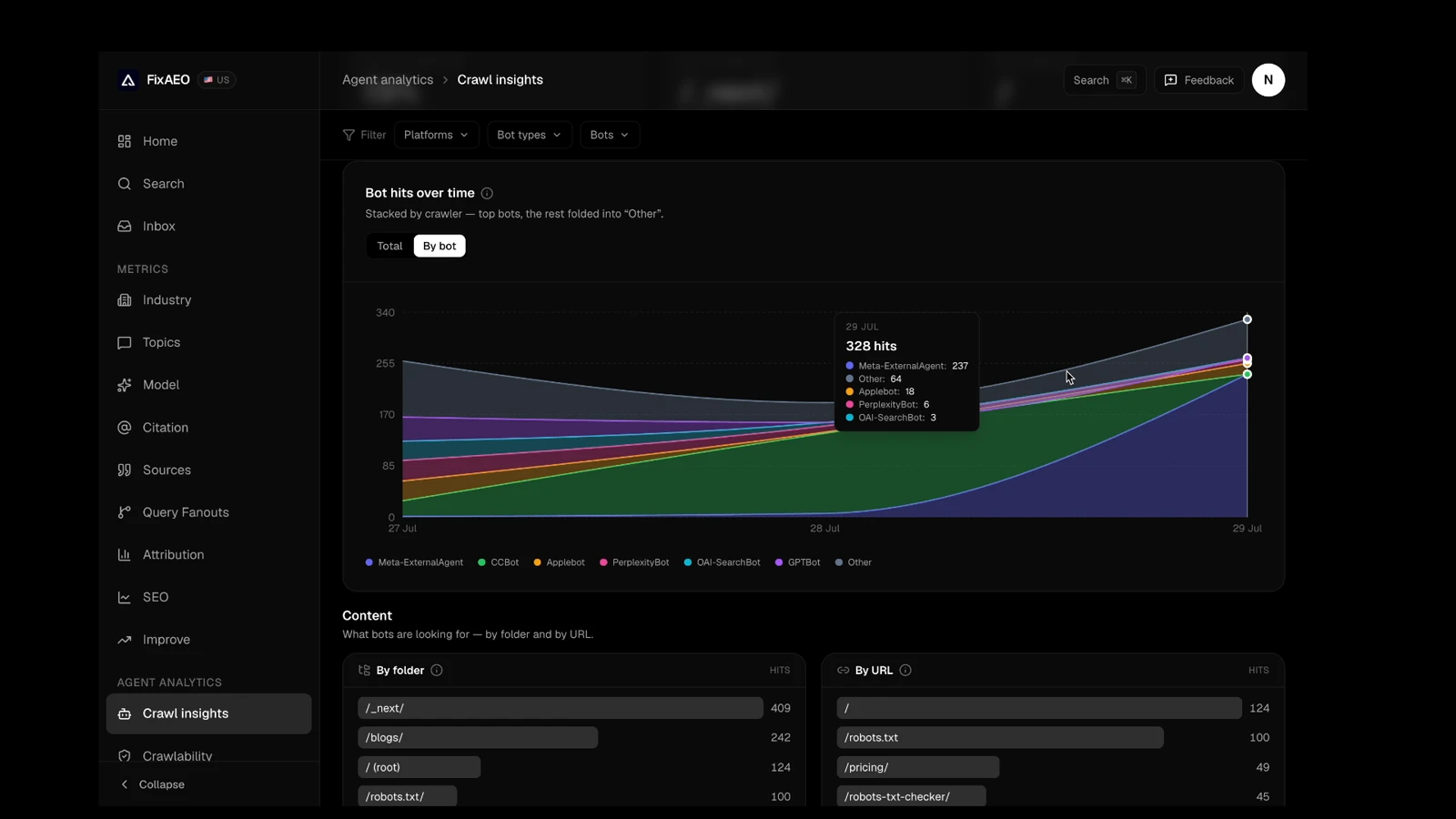
That's a real account's Agent Analytics view, not a mockup. Every band is a named bot, and hovering any day breaks the total down by exactly who showed up.
"Allowed" is not the same as "arriving"
Here's the trap most people fall into. They open their robots.txt, confirm GPTBot and ClaudeBot aren't blocked, and move on. Job done, right?
Not quite. Your robots.txt is a permission slip. It says a crawler is allowed in. It says nothing about whether the crawler ever showed up, which pages it read, or whether those pages returned an error when it did.
Those are two completely different facts:
- Allowed — your rules let the bot in. You control this.
- Arriving — the bot actually came, fetched real pages, and got a clean response. You have to observe this.
You can be perfectly "allowed" and still be invisible — because a bot never bothered with a section of your site, or because the pages it did try quietly returned errors. You'd never know from your robots.txt. You'd only know by watching the crawlers themselves.
Crawl comes before citation
It helps to think of AI search as a funnel:
- Crawl — an AI engine's bot fetches your pages.
- Cite — the engine decides your page is worth quoting.
- Recommend — your brand shows up in the answer a real person reads.
Most AEO tools start at step 2. They tell you whether you're getting cited and how you stack up against competitors. That's useful — but when the answer is "you're not getting cited," it can't tell you why. Is your content weak? Or did the engine simply never read it?
Agent Analytics starts at step 1. It's the difference between guessing and knowing. When you can see that GPTBot fetched twelve of your pages this week but never touched your product pages, you're not staring at a mystery anymore — you have a to-do list.
And this matters more than it used to. Victorious tested 177 brands across 107,011 AI responses and found 89.8% of them had zero AI mentions — and that domain authority barely predicted who got cited (a correlation of 0.017, basically noise). When the usual signals stop explaining your results, the boring, mechanical question — are the engines even reading me? — is often the one that does.
What Agent Analytics actually shows you
Strip away the jargon and it answers a handful of very concrete questions:
- Which AI bots visited? GPTBot, ClaudeBot, PerplexityBot, Googlebot, Bingbot and around fifty more — named, so you know exactly which engines are paying attention.
- Which pages did they read? The full list of what got fetched, so you can spot the important pages that never get touched.
- How often, and is it changing? A visit trend over time, so you can see crawl activity pick up after you publish or fix something — or fall off a cliff.
- Did the visit succeed? A page that returns an error to a crawler is worse than a page that's merely thin. Agent Analytics surfaces the failures so they don't stay hidden.
- Who's even allowed? A clear read on which AI crawlers your site permits, so the ones you want reading you aren't blocked by accident.
None of that requires you to go digging through raw server logs by hand. That's the point — it turns "I hope they're seeing me" into a dashboard you can actually act on.
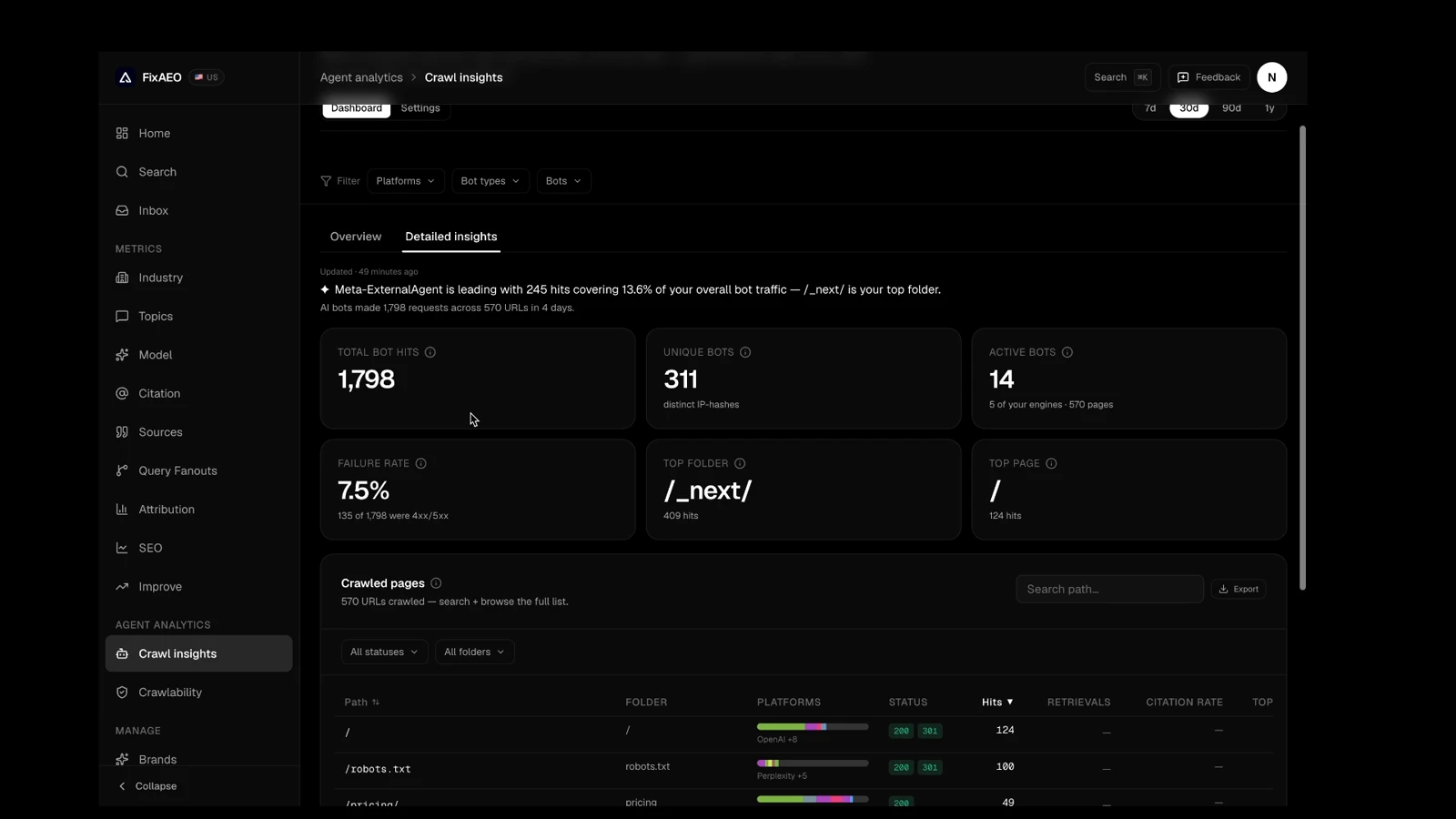
Notice the plain-English line above the numbers — "X is leading with Y hits covering Z% of your overall bot traffic." You don't have to interpret a chart to get the headline; it's handed to you, with the raw numbers sitting right underneath if you want to check the math yourself.
How to read it once you have it
A few patterns are worth watching for:
- A bot that never shows up. If a major AI crawler isn't in your list at all, start with your robots.txt and your sitemap. (Here's a free robots.txt checker to rule out an accidental block.)
- Important pages that never get crawled. If your best content isn't being fetched, that's a discoverability problem — internal links and your sitemap are the usual fixes. A clean llms.txt helps too.
- A rising failure rate. Crawlers hitting errors on real pages is a five-alarm fire for AEO. Fix those before anything else.
- Crawl activity that responds to your work. When you publish and the bots come back within days, that's the feedback loop working. When you publish and nothing changes, that's your signal to look upstream.
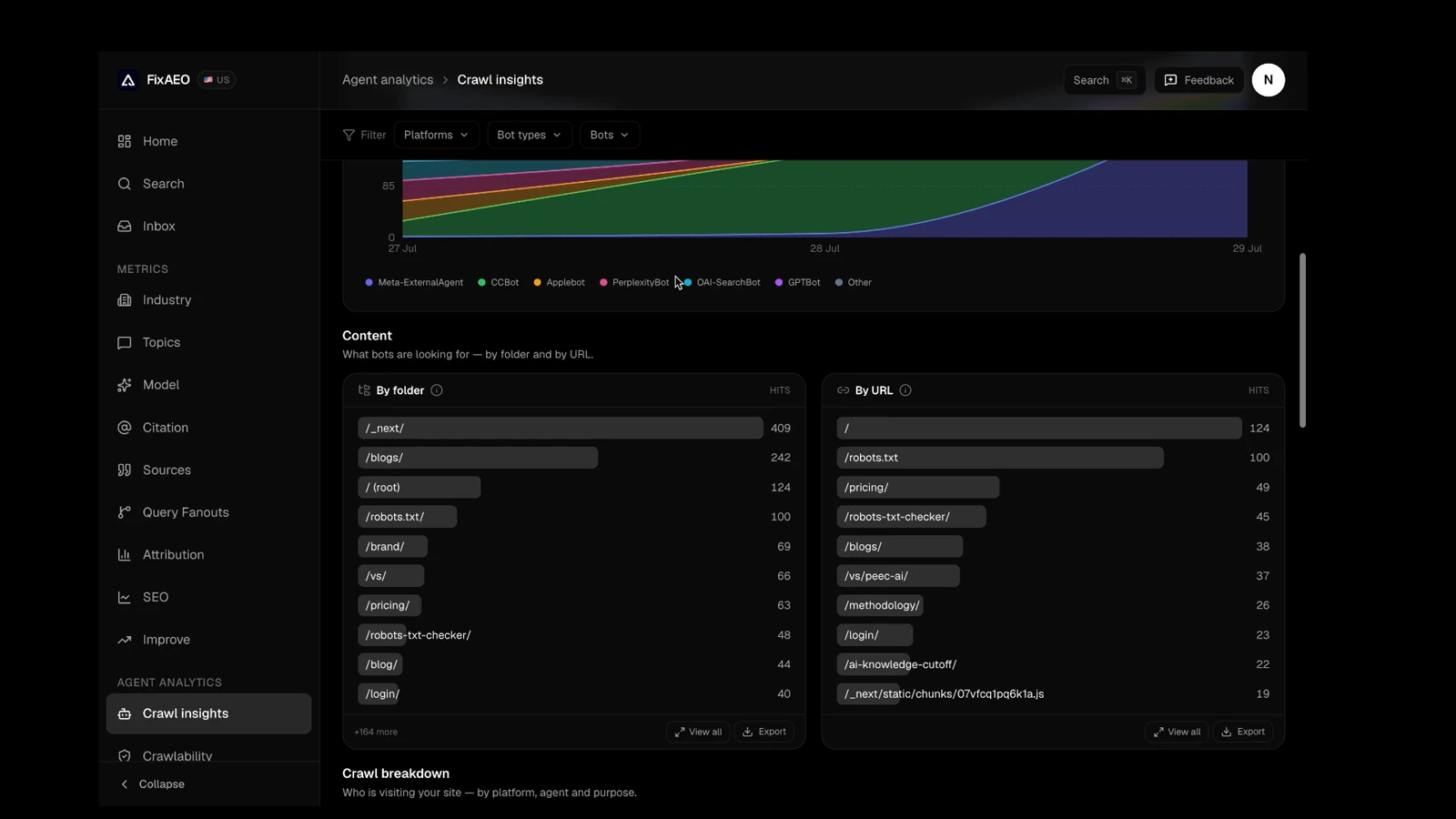
This is the view that turns "I think my blog gets crawled" into "my blog folder got 242 hits and my pricing page got 49" — specific enough to act on, not just feel reassured by.
This pairs naturally with the other end of the story. GA4 can show you the humans arriving from AI answers; Agent Analytics shows the crawlers reading you before anyone arrives. Together they cover both sides: who's reading you, and who's coming to you because of it.
Which plans include it
Agent Analytics is a paid feature, and it comes in two flavors:
- Lite includes it with a lightweight page tag — a zero-setup way to start seeing AI-driven traffic and AI browsing agents on your pages.
- Growth and Enterprise add fuller server-side capture — the most complete view of every AI crawler hitting your site, including the training bots a page tag can't see.
If your main question is "are the big AI crawlers reading my content," the server-side view on Growth and Enterprise is the one that answers it completely. You can see the full breakdown on the Agent Analytics page or in pricing.
Start with the question everyone skips
If you take one thing from this: don't start your AEO work at the citation. Start one step earlier. Confirm the engines are actually reading you, then spend your effort on the pages they're already fetching — or on getting them to fetch the ones they're missing.
New to all this? Our guide to what AEO actually means is a good primer, and why ChatGPT doesn't recommend your brand walks through the most common reasons — the first of which is, unsurprisingly, that the crawlers can't or don't reach you.
FAQ
What is Agent Analytics?
Agent Analytics shows which AI crawlers and bots visit your website — GPTBot, ClaudeBot, PerplexityBot, Googlebot, Bingbot and more — which pages they read, how often they come back, and whether each visit succeeded. It answers the first question in AI search: are the engines even seeing your content?
How is it different from checking my robots.txt?
Your robots.txt controls which crawlers are allowed in. Agent Analytics shows whether they actually show up. Allowing GPTBot in your rules tells you nothing about whether it has ever fetched a page — you need both the door open and a record of who walked through it.
Is this the same as AI referral traffic?
No. AI referral traffic (which you can see in GA4) is the people who arrive on your site from an AI answer. Agent Analytics is the AI crawlers reading your site in the first place, before anyone arrives. They're two halves of the same picture.
Do I need to be on a paid plan?
Yes. Lite includes Agent Analytics with a lightweight page tag; Growth and Enterprise add fuller server-side capture of every AI crawler. The free scan focuses on your AI visibility score rather than crawler tracking.
Why should I care which AI crawlers visit my site?
Because a page an engine never read can't be cited, no matter how good it is. If you're not being named in AI answers, the very first thing to rule out is whether the crawlers are reaching you at all — and that's exactly what Agent Analytics tells you.
Related reading
Why ChatGPT doesn't recommend your brand
ChatGPT SEO fix: six reasons ChatGPT names competitors instead of you, ranked by frequency across 1,000+ FixAEO scans — with a fix for each and a 30/60/90 day plan.
17 min readThe 30-point AEO audit checklist (2026)
AEO audit checklist: 30 signals across 7 categories — from crawler access to per-engine verification. Copy it into Notion and run your audit today.
16 min readHow to add llms.txt to your website in 10 minutes
llms.txt tells AI assistants what your site is about. Get the exact format, a copy-paste template, deployment steps for every major host, and how to prove it's working.
17 min read7 Zero-Click SEO Tips for Better GEO Visibility
Zero-click search now swallows most Google queries. Seven evidence-backed GEO tactics, with sources, to get cited in AI answers instead of chasing clicks.
15 min readWhat is AEO? Answer Engine Optimization explained
Answer Engine Optimization (AEO) means getting AI assistants to recommend your brand. Learn what AEO is, why it matters more than SEO, and how to start.
18 min readGA4 Setup for AI Traffic: Surface ChatGPT Referrals
Default GA4 hides AI referrals in 'Direct' and 'Other'. Here's the 20-minute setup that surfaces them — channel group, dimensions, and dashboard.
13 min read
Free AEO tools
Put this into practice with free FixAEO tools — no signup required.
AI Visibility Checker
Score your brand across 9 AI engines
AEO Audit Tool
Answer-engine readiness scan
Schema Generator
Build valid JSON-LD structured data
llms.txt Generator
Create a spec-compliant llms.txt
Sitemap Validator
Check your XML sitemap for errors
AI Content Grader
Grade content for AI citation readiness