Check If AI Recommends Your Brand (Free Extension)
ChatGPT and Gemini recommend brands to buyers every day. Here's how to check your brand's AI visibility on any website in one click — free, no signup.

On this page
Your customers are asking ChatGPT, Gemini, and Perplexity for recommendations before they ever open Google. When they ask "what's the best tool for X," an AI answers with a short list of names. Your brand is either on that list or it isn't — and most teams have no idea which.
I built the AEO Quick Check extension because I got tired of running the same manual scans over and over. Every founder call would end the same way: "wait, is my brand actually in ChatGPT's answer?" And the only way to know was to open a tab, ask, wait, and read. Multiply that by three engines, five prompts, and a dozen competitors, and you burn an afternoon before you have your first data point.
The good news: you can check it in about ten seconds now, for free, on any website. This guide shows you exactly how, what the number means, how I use it every day at FixAEO, and what to do if your score is low.
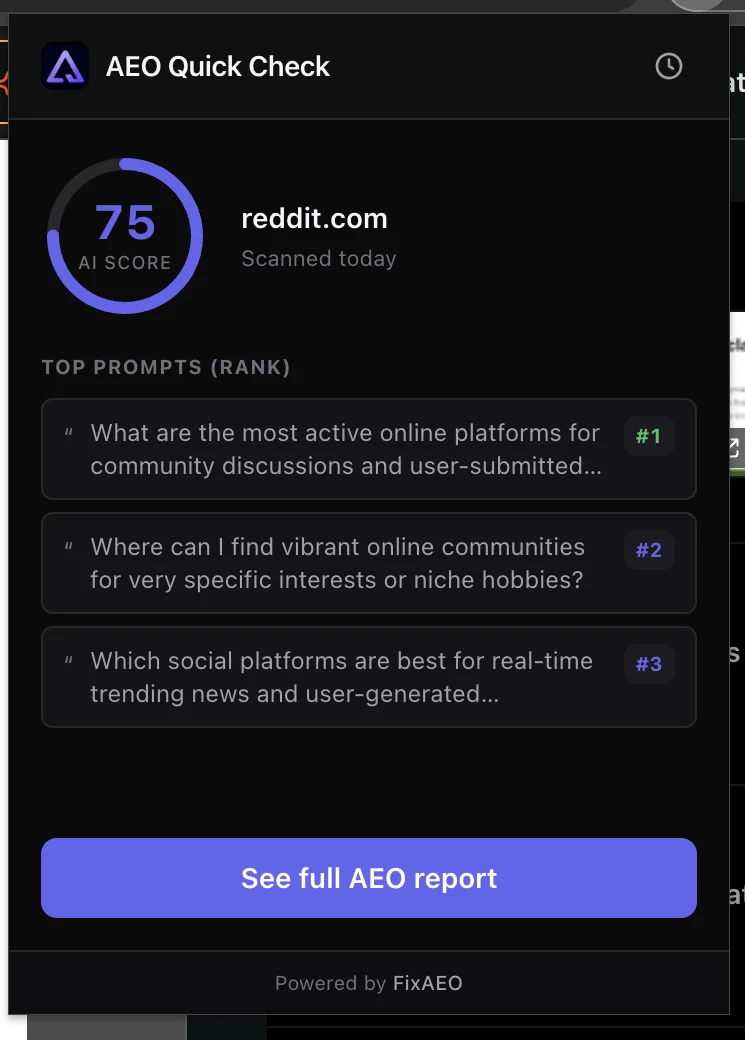
The extension scoring reddit.com 75/100 in one click — AI score plus the top prompts it ranks for, right in the browser.
The short answer
To check whether AI recommends your brand, run your domain through an AI visibility checker. The fastest way is the free AEO Quick Check Chrome extension: click the toolbar icon on any website and you get that brand a 0–100 AI visibility score in one click — no signup, no API key, no credit card.1 The score is powered by Google Gemini, and it shows the top buyer-intent prompts where the brand already appears.
That's the 10-second version. The rest of this post explains what the score measures, how to read it, and how to raise it.
The moment I realized SEO tools couldn't see this
I was preparing for a customer call in early 2025, running the usual pre-call diligence in Ahrefs and Search Console. The customer was a payments SaaS with strong SEO — first-page rankings for every buyer-intent query, a clean backlink profile, decent Domain Rating. Everything a traditional SEO audit would call healthy.
Then I opened ChatGPT and asked "what's the best payment gateway for a new e-commerce business." ChatGPT answered with Stripe, PayPal, Square, and Adyen. Not the customer. I tried Perplexity. Same answer, same absence. Gemini — again, no mention.
Every SEO tool the customer paid for said they were winning. Every AI engine their buyers used said they didn't exist. That gap is the entire reason AEO exists as a category, and it's why a Chrome extension for AI visibility isn't a gimmick — it's the fastest way to close the diagnostic gap between what SEO tools measure and what buyers actually see.
Why you can't see this in Google Analytics
Traditional analytics and rank trackers were built for the click. They tell you where you rank on a search engine results page and how many people clicked through. But AI assistants don't send a ranked list of ten blue links — they synthesise one answer, and whether your brand is named in it is binary.2
So a visitor who asked ChatGPT "best CRM for a small SaaS," saw your competitor recommended, and clicked through never shows up as a missed opportunity in your dashboard. You simply never existed for that buyer. Analytics can only measure sessions that happened; it can't measure sessions you should have had. This is the gap AEO — Answer Engine Optimization exists to close, and it's why SEO and AEO are now two different jobs.
Search Console has the same blind spot. It'll tell you your impressions on Google, your click-through rate, and your average position — all inputs into a system that increasingly doesn't determine what buyers see first. If your buyer never types the query into a Google search box because they asked ChatGPT instead, Search Console reports zero impressions where the truth is "you weren't in the running."
What "AI visibility" actually measures
An AI visibility score answers a simple question: when buyers ask AI about your category, how often does your brand come up?
Here's how the score is built:
- We generate a set of unbranded, buyer-intent prompts for the brand's category — the real questions a customer would ask (e.g. "best payment gateway for a new e-commerce business"), not "tell me about [Brand]." The unbranded part matters. Anyone gets a great score for "tell me about [my own brand]." That's not the game.
- We ask the AI engine those prompts and check whether it naturally recommends the brand.
- The AI Presence score is the share of prompts where the brand surfaces, on a 0–100 scale.3
A score of 80+ means AI reliably puts you in the consideration set. A score under 40 means you're mostly invisible at the exact moment buyers are choosing. Between 40 and 70 is the messy middle — you show up sometimes, but not consistently, and small changes in how the buyer phrases their question can push you out.
How to check your brand's AI visibility in one click
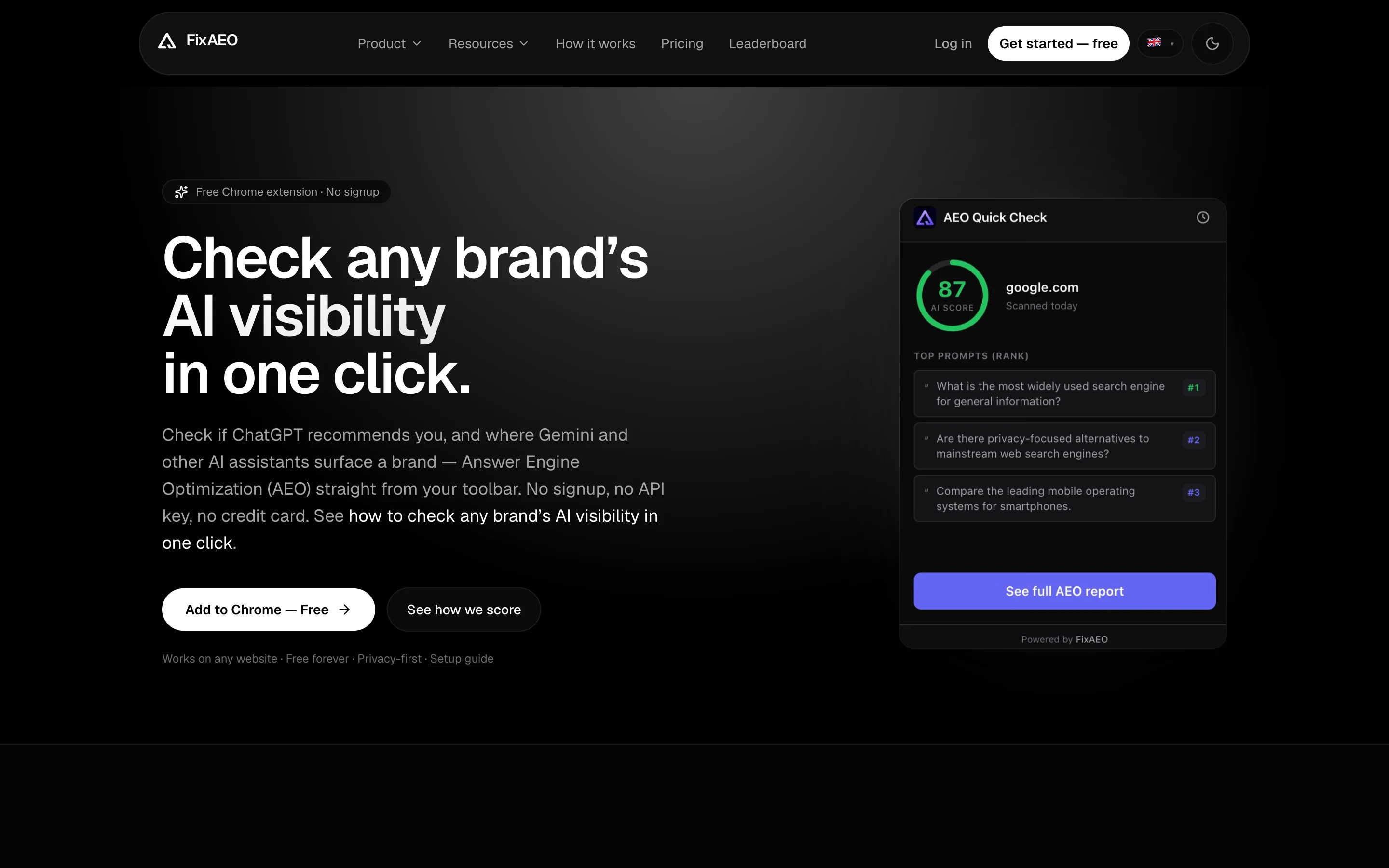
The AEO Quick Check landing page. Install, pin to toolbar, click on any site — done.
Step 1 — Install the extension
Add AEO Quick Check from the Chrome Web Store and pin it to your toolbar (the puzzle-piece menu → pin). It's free and asks only for activeTab + storage permissions — it reads the domain of your current tab only when you click it, and never touches your other tabs.
The extension works in Chrome, Edge, Brave, Arc, and any Chromium browser. Not Firefox or Safari yet — those are on the roadmap but not this quarter.
Step 2 — Open any website
Your own domain, a competitor, a prospect, or a client site. It works on any public site. The popup identifies the brand by root domain, so stripe.com and stripe.com/pricing both resolve to Stripe.
Step 3 — Click the icon and read the score
You get an instant 0–100 AI visibility score for that brand, plus the top buyer-intent prompts where it shows up and how it ranks on each. If the site hasn't been scanned before, one click runs a free scan (the same free Gemini-powered scan the FixAEO homepage uses).
Step 4 — Check your competitors
This is where it gets useful. Run the same check on the two or three rivals AI keeps recommending instead of you. The gap between your score and theirs is usually the wake-up call — and it tells you exactly which prompts to go win.
Five ways I use the extension every week
The install is trivial. The compounding value comes from having AI visibility one click away, all the time. Here's how it fits into my actual workflow.
1. Before every customer call. Ninety seconds of pre-call diligence: check the prospect's domain, check their top two competitors, note the gap. Walking into a call knowing "your competitor scores 78 and you score 34 on the exact same buyer prompts" changes the shape of every conversation.
2. When a blog post gets referenced anywhere. Someone linked to our AEO audit checklist? I check their AI visibility. If they're 40 and we're 82, that's a good signal our content is reaching the right teams. If they're 90 and rising, they're a case study candidate.
3. Reading industry news. I read newsletters like anyone else — Lenny's, First Round, SaaStr. Any brand that shows up gets a one-click check. Over a year, this is how I've built a mental map of "which categories AI has already picked winners in" versus "which categories are still up for grabs."
4. Diligencing an acquisition or partnership. A brand that's about to be acquired at $500M revenue but scores 22 on AI visibility is a different investment than one that scores 88. It's not the whole story, but it's a fast tell about whether they've adapted to AI search or not.
5. Sanity-checking our own content strategy. After we publish a new blog post, I wait 30 days and check whether we moved the needle on our own AI visibility. Sometimes we did. Sometimes we didn't, and the difference tells us which formats compound and which ones don't.
Common misreads of the score
Not every low score is a real problem, and not every high score is safe. Three misreads I see all the time.
Misread 1: "My score is 20, I'm invisible." Sometimes yes. But if your brand name is a common word or overlaps with another entity ("Bright" the recruiting tool vs "Bright" the electricity retailer), the extension might be finding you but the AI is picking the other entity for unbranded prompts. Fix: check whether the AI is naming you by name for branded prompts. If yes for branded but no for category, the problem is category positioning, not existence.
Misread 2: "My score is 90, I'm safe." A 90 today doesn't guarantee a 90 in three months. Models get retrained, competitor content lands, and the query landscape shifts. High scorers are the most complacent, in my experience. Check monthly at minimum.
Misread 3: "My score is higher than the category leader, we're winning." This one bites. Sometimes the extension surfaces a brand for niche prompts where the category leader isn't even ranked. That looks like a win on the score, but the leader is winning the high-volume prompts and you're winning the long tail. The AI visibility score doesn't weight prompts by volume — for that, you need the FixAEO dashboard's demand-ranked view.
How agencies use the extension in client work
I get emails from agencies weekly asking how their peers use it. The pattern that keeps coming up:
Pre-pitch diligence. Every new business meeting starts with a domain check on the prospect and their top three competitors. The score gap becomes a slide. Prospects who see "your competitor scores 78 and you score 34 in the exact AI queries your buyers ask" tend to become clients faster than any generic AEO pitch could produce.
Monthly reporting. Agencies embed a screenshot of the extension score in their monthly client deck. Even without upgrading to a paid dashboard, this shows movement over time and gives the client something concrete to react to.
Competitive audits. Running the extension across a client's competitor list produces a fast "who's winning AI search" ranking. Agencies pair it with our free AEO audit checklist to produce a shippable deliverable in an afternoon.
Onboarding new team members. New hires spend a week clicking the extension across the client roster to build intuition for what "good" and "bad" AI visibility look like in that industry. Faster than any training deck.
If you run an agency and want more than the extension can do — multi-client dashboards, bulk exports, white-labeling — the FixAEO Growth or Enterprise tier is priced for exactly this.
What the free check shows vs the full picture
Be clear about scope so you read the number correctly. The free extension gives you one overall score, powered by Google Gemini — enough to find out whether you have a problem. Seeing how each AI engine treats you, and tracking it over time, is the paid FixAEO dashboard.
| Free Chrome extension | FixAEO dashboard | |
|---|---|---|
| Score | One overall AI visibility score (Google Gemini) | Per-engine scores across all 9 AI engines |
| Engines | — | ChatGPT, Claude, Gemini, Perplexity, DeepSeek, Grok, Copilot, AI Overviews, AI Mode |
| Tracking | On-demand, one click | Daily, with trend charts |
| Extras | Top prompts where you appear | Competitor leaderboards, the sources AI cites, alerts, exports |
| Cost | Free, no signup | Paid |
The extension is the free way to answer "do I have a problem?" The dashboard answers "where, on which engine, and what's changing?"
What to do when your competitor scores higher than you
This is the situation I see most often. You check your domain and get a 42. You check your top competitor and get an 87. Uncomfortable, but useful — because now you have a specific gap and a specific benchmark.
Three moves, in order.
First, look at which prompts they win that you don't. The extension shows the top prompts per brand. Line them up side by side. Prompts where they appear and you don't are your priority list — those are queries where AI has already picked a winner and it wasn't you. That's the map.
Second, look at what content they've published for those prompts. Go to their site, search for keywords in the prompt, read the pages. Nine times out of ten, the winning brand has a comprehensive page structured as a direct answer to the prompt — heavy use of headings, FAQPage schema, a clear noun-first opening.
Third, publish better answers. Not "the same answer with your logo" — a better answer. Structured content, better proof, real numbers, clearer positioning. AI engines don't reward pages that regurgitate the same claims; they reward pages that resolve ambiguity. Give them a page that resolves ambiguity in your favor.
I've watched brands close a 40-point gap in 90 days with this playbook. It's not fast, but it's reliable. The compound benefit of shipping better content is that once you win a prompt, you tend to keep it.
Chrome extension permissions — what we actually see
Founders ask me about this every time. Here's the honest answer.
The extension requests two permissions:
activeTab— the extension can read the URL of the current tab, and only at the moment you click the toolbar icon. It cannot see your other tabs, your browsing history, your bookmarks, your form data, or anything you type. It cannot run in the background.storage— used to cache your last five checks locally on your device. Never transmitted anywhere.
We don't inject content scripts, don't track pages you visit, don't A/B test anything on you, and don't sync anything to a server without your click. The full manifest and the source behavior are exactly what the extension needs to work and nothing more.
The domain of your current tab is sent to FixAEO only when you click the icon, so we can look up the AI visibility score for that brand. That's it. If AI visibility for a brand you've never heard of shows up in our logs, it's because someone clicked our extension on their page — not because we're crawling anything.
What to do if your AI visibility score is low
A low score is fixable. The signals AI engines weight are different from classic SEO — structured data and authoritative citations matter far more than raw backlinks.4 If your number is low, start here:
- Unblock the AI crawlers. Check
robots.txtisn't blockingGPTBot,ClaudeBot,Google-Extended,PerplexityBot, orDeepSeekBot— a leftover from 2023 makes you invisible by default. - Publish an
llms.txtfile. A ten-minute Markdown manifest that tells AI engines what your business is and where the key pages are. Follow the step-by-step llms.txt guide. - Write answer-shaped content. Turn product-marketing headlines into the actual questions buyers ask, and add
FAQPageschema so assistants can lift the answers verbatim. - Earn authoritative citations. A single mention on Wikipedia or a respected industry publication can outweigh a thousand backlinks for AI recommendation.
- Fix your positioning statement. If your homepage doesn't say what you are in a noun-first sentence, models can't slot you into a category. Rewrite the hero.
- Add
OrganizationandProductJSON-LD. These give AI engines a machine-readable identity to attach to the content on your site. - Publish comparison pages. Pages titled "X vs Y" and "alternatives to Z" are heavily consulted by AI when it's picking between named entities.
- Re-check weekly. AI answers shift constantly, so measure AI visibility on a cadence, not once. For the deeper reasons your brand might be missing, see why ChatGPT doesn't recommend your brand.
FAQ
Is the AI visibility checker free?
Yes. The AEO Quick Check extension is free with no signup and no credit card. Looking up a brand that's already been scanned is instant and unlimited; if a site hasn't been scanned yet, you can run a free scan (one anonymous scan per day per IP, the same flow the FixAEO homepage uses).
Which AI engines does the extension check?
The free one-click check is powered by Google Gemini and shows a single overall score — it does not break the score down by engine. The full view across all 9 engines (ChatGPT, Claude, Gemini, Perplexity, DeepSeek, Grok, Copilot, Google AI Overviews, and Google AI Mode) lives in the paid FixAEO dashboard.
How is the AI visibility score calculated?
We generate unbranded, buyer-intent prompts for the brand's category and check whether the AI naturally recommends it. The score is the share of those prompts where the brand surfaces, on a 0–100 scale. Full details are on the methodology page.
What data does the extension collect?
Only the root domain of your current tab, and only at the moment you click the icon. That domain is sent to FixAEO to look up the score. Your last five checks are stored locally on your device and never transmitted — no tracking, no content scripts, no background activity.
Can I check my competitors' AI visibility?
Yes. It works on any public website, with no per-seat license. Agencies use it to spot-check a client's or prospect's AI visibility on the spot, right before a call.
Does AI visibility actually affect sales?
Increasingly, yes. As buyers shift from scrolling search results to asking an assistant for a recommendation, being named in that answer becomes a direct acquisition channel — one that classic SEO tools can't measure. You can translate a score change into expected pipeline with the AEO ROI calculator.
Does the extension work on internal or authenticated pages?
Only if the domain is publicly reachable. The lookup is by root domain, so an internal wiki or a customer dashboard won't return meaningful results — the extension can only score what AI engines can see too.
Can I use the extension for client work in an agency?
Yes — no per-seat license and no attribution requirement. Many of our agency customers use it before client meetings to demo the gap live. If you want branded reports or bulk checks across a client list, that's what the FixAEO dashboard is for.
Will my score change over time?
Yes. AI models get retrained, indexes get refreshed, and competitor content gets published. Expect to see 5–15 point swings without doing anything. If you do invest in AEO, expect swings of 20–40 points over a quarter. Track weekly, not daily.
What browsers does it support?
Chrome, Edge, Brave, Arc, and any Chromium-based browser. Firefox and Safari builds are on the roadmap.
In one paragraph
AI assistants recommend brands to buyers every day, and most teams can't see whether they're in those answers. An AI visibility score fixes that: it measures how often your brand surfaces when people ask AI about your category. The fastest way to check is the free AEO Quick Check Chrome extension — one click on any site gives you a 0–100 score powered by Gemini, plus the prompts where you show up. Check your own site, then your competitors, and the gap will tell you exactly where to focus. Want the full picture across all nine AI engines, tracked daily? Run a free FixAEO scan to get started — no signup, about 30 seconds.
Footnotes
-
AEO Quick Check on the Chrome Web Store. View the listing. ↩
-
OpenAI: Introducing ChatGPT search. Read the announcement. ↩
-
FixAEO: How we score AI visibility. Read the methodology. ↩
-
Google Search Central: AI features and your website. Read the AI features guidance. ↩
Related reading
Why ChatGPT doesn't recommend your brand
ChatGPT SEO fix: six reasons ChatGPT names competitors instead of you, ranked by frequency across 1,000+ FixAEO scans — with a fix for each and a 30/60/90 day plan.
17 min readAEO vs SEO: what changed and what to do about it
AEO vs SEO in 2026: AI answers and search engines reward different signals. The data, a plain comparison, and a 30-day migration plan your SEO team can run.
17 min readWhat is AEO? Answer Engine Optimization explained
Answer Engine Optimization (AEO) means getting AI assistants to recommend your brand. Learn what AEO is, why it matters more than SEO, and how to start.
18 min read12 Best Answer Engine Optimization Tools (2026)
12 answer engine optimization tools compared — engines covered, entry price, free tier — with honest takes on which to pick by stage and budget.
19 min readAI Visibility: 11 Brands Gemini Names Every Time
33 brands tested on Google Gemini: 11 hit perfect AI visibility, but share of voice reveals the real gaps. See the data — then scan your own brand free.
17 min readHow to measure AEO ROI: a copy-paste spreadsheet
Measure AEO ROI with attributable visits, conversion rate, gross profit, and cost. Includes a transparent worked example, spreadsheet layout, and limitations.
13 min read
Free AEO tools
Put this into practice with free FixAEO tools — no signup required.
AI Visibility Checker
Score your brand across 9 AI engines
AEO Audit Tool
Answer-engine readiness scan
Schema Generator
Build valid JSON-LD structured data
llms.txt Generator
Create a spec-compliant llms.txt
Sitemap Validator
Check your XML sitemap for errors
AI Content Grader
Grade content for AI citation readiness